Which Digital Workspace Solutions Provide Real-Time Team Visibility and Analytics
The SoWork Team
Published:
Updated on:
Introduction
SoWork, Microsoft Viva, Slack Analytics, and Zoom Workplace Analytics are the leading digital workspace solutions providing real-time team visibility and analytics for modern organizations. These platforms enable remote and hybrid teams to monitor presence, track productivity patterns, and gain actionable insights into collaboration effectiveness without manual reporting overhead. Digital transformation is accelerating the adoption of these solutions, reshaping company culture and enhancing digital experiences by leveraging AI and analytics to create more personalized and efficient digital environments.
It is important to distinguish between digital workspaces and digital workplaces: digital workspaces power the user experience by providing the interface and access to digital tools, while digital workplaces define the overall strategy and infrastructure that support enterprise processes, technology, and policies. This distinction is critical for IT decision-makers evaluating solutions that impact both operational efficiency and company culture.
Digital workspace solutions encompass various tools and digital tools that support real-time visibility and analytics. These include features for communication, collaboration, and workflow automation, all of which contribute to a flexible and effective company culture by enabling seamless digital experiences and supporting the needs of a modern digital workforce.
Direct answer: For comprehensive team visibility, SoWork provides the most unified approach as a virtual office foundation that sits above productivity suites like Microsoft 365 and Google Workspace. It aggregates presence, meetings, and analytics across all the tools your team already uses, reducing context switching and tool fragmentation that plague distributed teams.
By the end of this article, you will:
Identify which platforms best match your team visibility requirements
Understand the layered integration approach for digital workplace solutions
Learn implementation strategies that minimize disruption
Discover ROI measurement methods for analytics investments
Establish a practical framework for evaluating solution fit
Understanding Real-Time Team Visibility and Analytics
Real-time team visibility refers to live awareness of who is active, where they are in their work context, what meetings are in progress, and how communication flows across your organization. One of the primary goals of real-time team visibility is to improve communication within organizations, ensuring that teams can collaborate more effectively and respond quickly to changes.
Unlike delayed reporting that arrives hours or days later, real-time visibility operates in seconds to minutes enabling immediate data driven decisions rather than reactive management.
Digital workspace tools that provide real-time team visibility and analytics are typically categorized by focus areas such as project orchestration, communication, or workforce analytics. Understanding these categories helps organizations select the right solutions to match their specific needs.

Core Visibility Features
Live presence indicators show team member availability status across the organization, eliminating the coordination overhead of checking multiple communication tools. Active collaboration sessions reveal current project focus areas and who is working together, providing context that helps employees access the right people at the right time.
Real-time communication flows track response times and interaction patterns, helping managers identify bottlenecks before they cascade into delivery delays. These features enhance collaboration by making team coordination visible rather than assumed.
Essential Analytics Capabilities
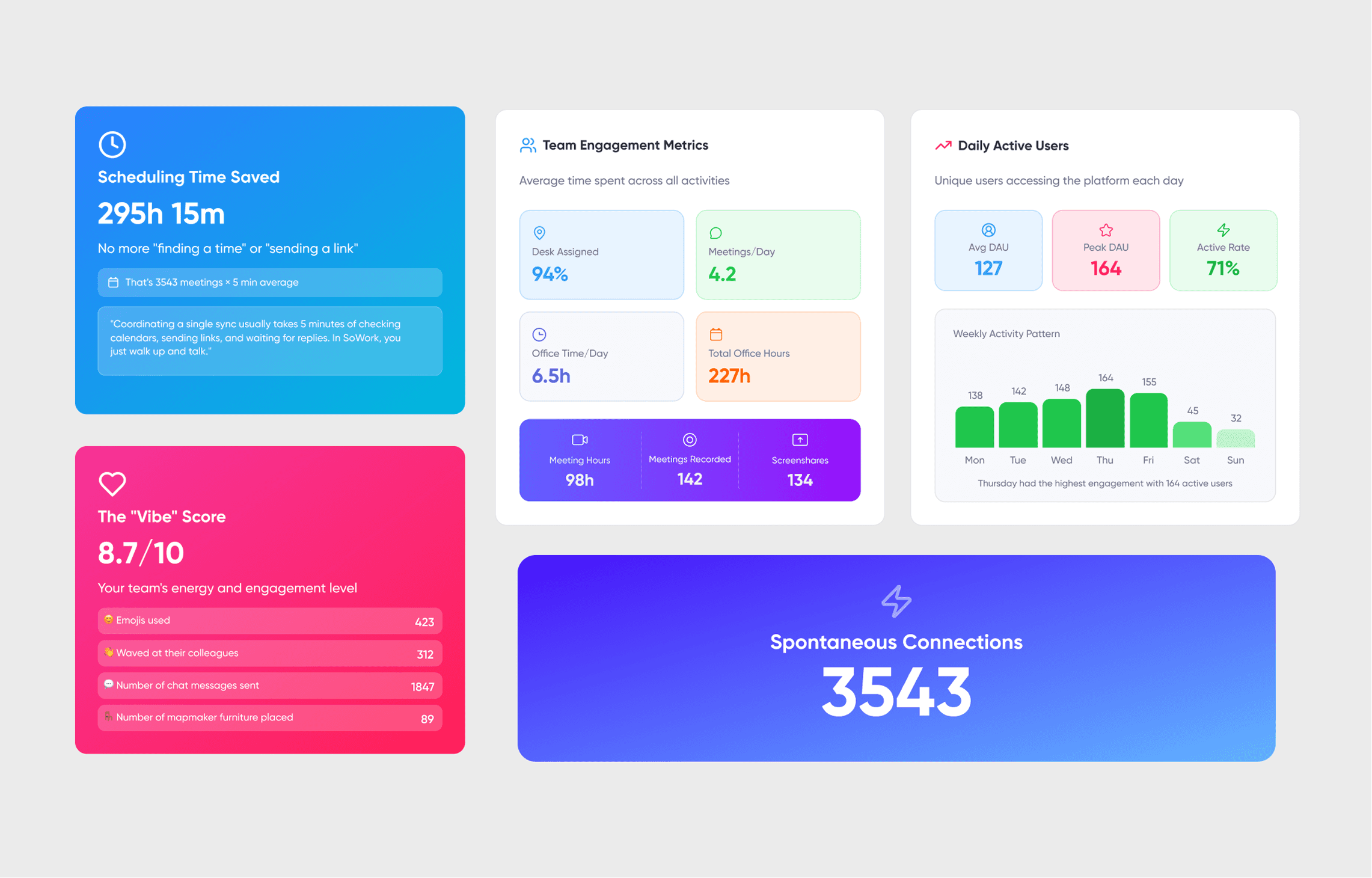
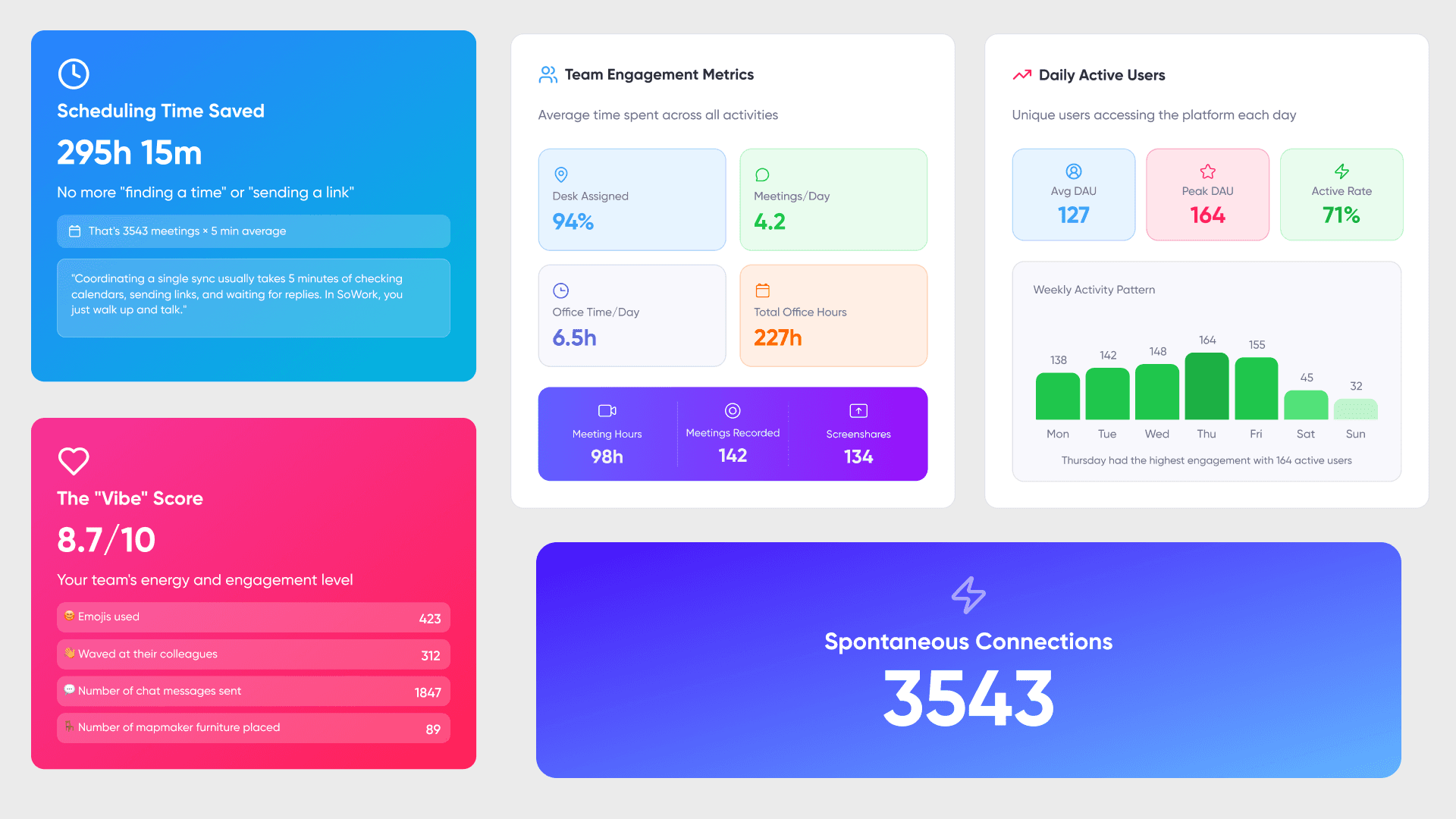
Team productivity trends aggregate patterns over time, showing meeting frequency, duration, and effectiveness scores alongside tool usage analytics. These metrics help identify bottlenecks in workflows and reveal context switching frequency that erodes focus time. Specialized software also measures how time is spent and identifies efficiency gaps.
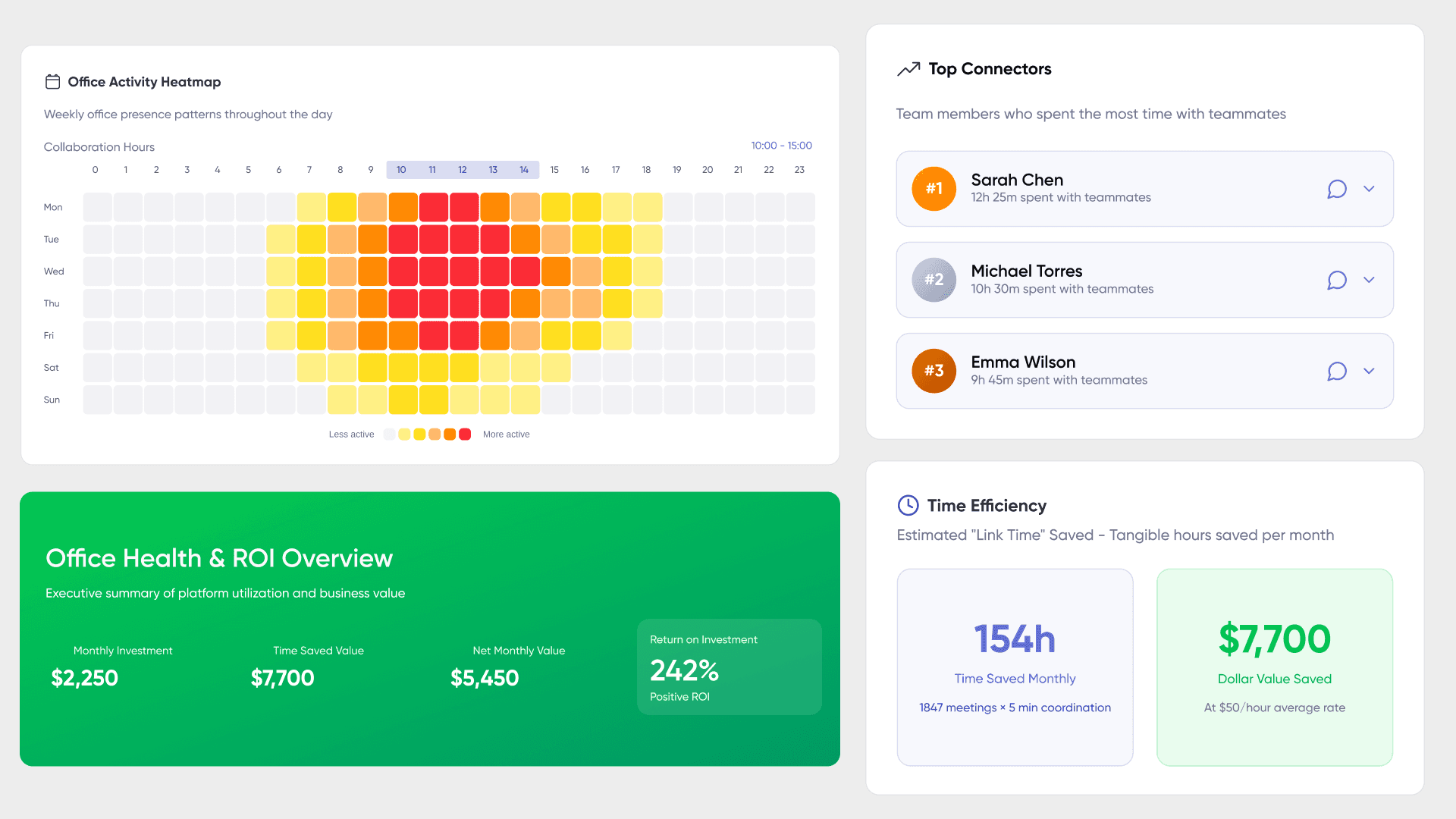
Communication pattern analysis examines cross-team interactions, response latencies, and collaboration network density. Meeting effectiveness scoring evaluates whether synchronous time generates decisions and action items or drifts into unproductive sessions. Real-time dashboards provide visibility into project progress, KPIs, and team activity. Together, these capabilities empower teams to optimize their work environment based on evidence rather than intuition.
Understanding these capabilities prepares you to evaluate how different solution categories deliver them some through native features, others through integrations with your existing it infrastructure. Effective digital workspace tools enhance team visibility and offer real-time analytics to improve efficiency.
Digital Workplace Solutions Categories
Digital workspace solutions have evolved into comprehensive 'work operating systems' that centralize workflows, making it easier for teams to manage tasks, communication, and collaboration in one place. These solutions fall into three main categories: virtual office platforms that provide unified visibility, productivity suite analytics built into existing tools, and specialized monitoring platforms for specific communication channels. File sharing is a common feature across these categories, playing a crucial role in facilitating communication and collaboration among team members.
Virtual Office Platforms
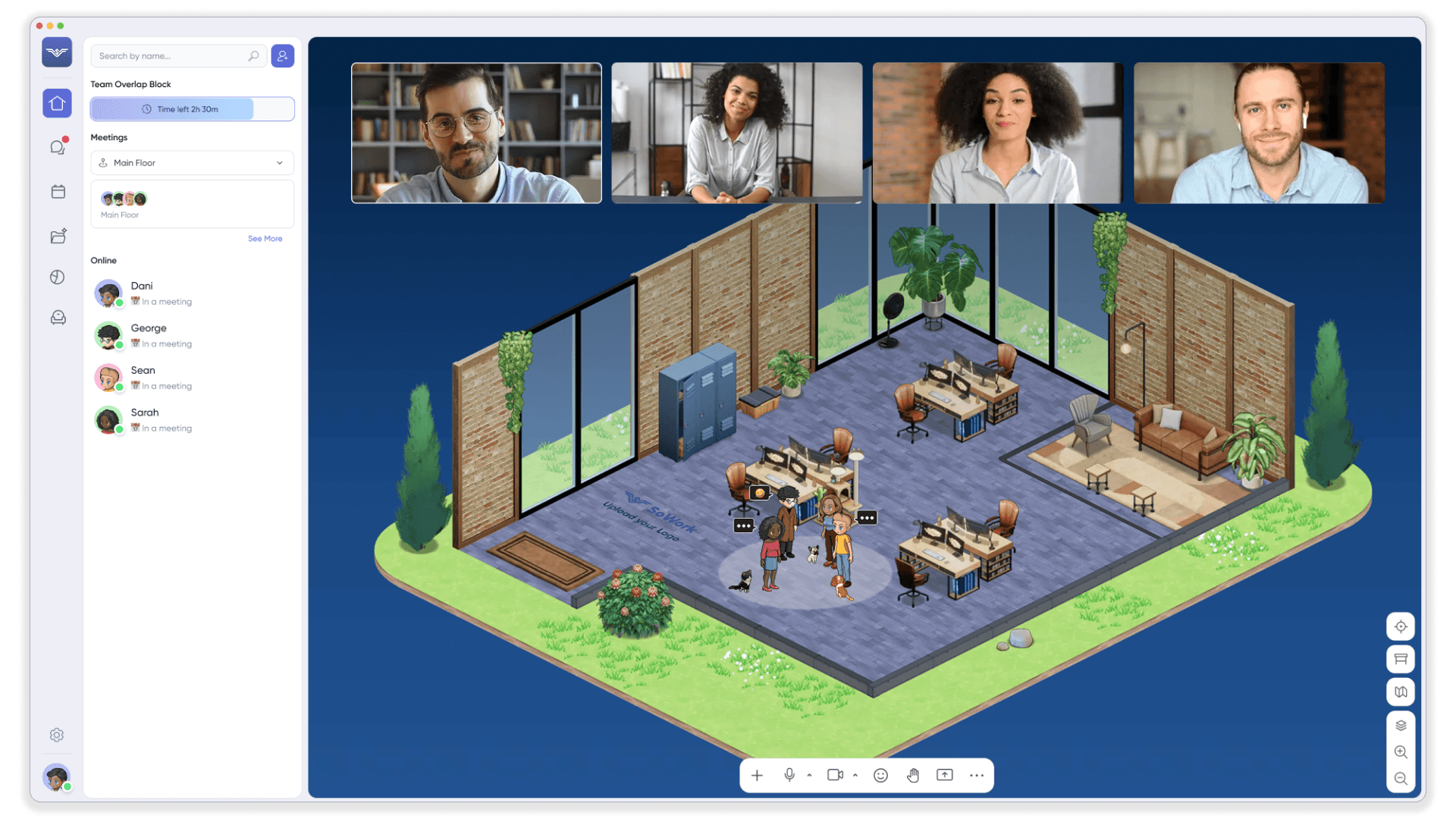
SoWork operates as an AI-powered central hub providing unified team visibility across all work activities. Rather than replacing document suites or productivity tools, SoWork sits above them as the operational layer where teams coordinate work, communicate in real time, and maintain shared context.
The platform delivers comprehensive presence awareness through spatial collaboration tracking team members see who is available, who is in meetings, and who is in focused work zones via a visual office map. Video conferencing, screen sharing, and spontaneous collaboration happen naturally within this unified space. SoWork supports a range of deployment models, including mobile endpoints, enabling flexible access for remote teams and facilitating BYOD (Bring Your Own Device) policies.
SoWork’s analytics pull data from connected applications through native integrations with Slack, Google Calendar, Outlook, and Zapier. This integration-based approach means visibility extends across your entire tool stack rather than remaining siloed within individual applications. AI-assisted meeting summaries and action item extraction reduce follow-up coordination overhead while creating searchable records of decisions. High-performance digital workspaces like SoWork are designed with built-in security features such as multi-factor authentication, session monitoring, and centralized access control to protect sensitive data.
Productivity Suite Analytics
Microsoft Viva Insights delivers workplace analytics within the Microsoft 365 ecosystem, aggregating data from email, calendar, and Teams to surface collaboration patterns, meeting load, and after-hours work trends. These insights help enterprise organizations with significant Microsoft investments understand productivity patterns without adding new tools.
Google Workspace provides activity dashboards showing document collaboration, email patterns, and calendar utilization. Both suites offer valuable analytics, but visibility remains limited to activities occurring within that specific ecosystem leaving gaps when teams use collaboration tools outside the core suite.
Communication Platform Analytics
Slack Analytics tracks message patterns and channel engagement, showing workspace activity levels, active users, and communication volume trends. These metrics help organizations understand how their digital employee experience functions across messaging channels.
Zoom Workplace Analytics focuses on meeting participation, collaboration scoring, and video conferencing quality metrics. Recent additions include AI Companion analytics showing adoption of meeting summaries and chat summarization features.
Both platforms provide valuable domain-specific insights, but their visibility boundaries align with platform usage rather than comprehensive team activity. This creates the need for either a unifying layer above these tools or acceptance of fragmented visibility.
Employee Experience in Digital Workspaces
STRATEGIC TRUTH: The "Digital Employee Experience" is the make-or-break factor for any workspace transformation initiative. In today's hybrid battlefield, organizations cannot afford fragmented tool stacks that create "Context Switching" nightmares for their workforce. Fact: A unified digital workspace strategy drives 3x higher productivity rates compared to disconnected app ecosystems. The digital employee experience isn't just about satisfaction metrics it's about creating "Operational Continuity" where employees can execute seamlessly whether they're stationed in-office or operating remotely. This strategic foundation directly impacts talent retention and competitive advantage in the war for top performers.
The solution requires investment in "Unified Collaboration Ecosystems" not just random video conferencing tools and chat applications. These integrated digital workspace solutions eliminate the productivity drain caused by app-hopping and create "Real-time Problem-solving Capabilities" that transcend geographical boundaries. Strategy: Deploy platforms that enable instantaneous knowledge transfer and idea synthesis across distributed teams. The competitive advantage lies in fostering "Innovation Velocity" through seamless connectivity, making it easier to capture market opportunities and outmaneuver competitors in talent acquisition battles.
Critical Implementation Factor: Continuous feedback loops are non-negotiable for digital workspace optimization. This "Voice of Employee" data stream identifies friction points and transformation opportunities before they become productivity killers. The feedback mechanism ensures your digital infrastructure evolves with workforce demands and technological shifts. Bottom line: A strategically executed digital workspace creates an "Employee Empowerment Engine" where your workforce operates at peak performance capacity, driving measurable business outcomes and sustainable competitive positioning.
Cost Efficiency of Digital Workspace Solutions
Adopting digital workspace solutions delivers "Substantial Cost Efficiency" for organizations across all operational scales. By transitioning to a digital workplace, companies can achieve dramatic reductions in operational overhead tied to physical office maintenance - eliminating rent burdens, utility expenses, and supply chain costs. Digital workplace solutions create "Workflow Optimization," systematically removing manual processes and destroying paper-based documentation inefficiencies.
Remote working capabilities unlock "Enhanced Cost Performance" by slashing employee travel expenditures, on-site training investments, and recruitment overhead. Cloud-based digital workspace solutions provide "Scalable On-Demand Access" to critical tools and resources, completely eliminating massive upfront IT infrastructure investments. This operational flexibility enables organizations to implement "Pay-Per-Use" models, optimizing resource allocation and driving productivity performance to new levels.
Digital workspace solutions deliver "Consolidated Integration," merging collaboration tools and business applications while reducing IT management complexity and support overhead. By leveraging these unified solutions, organizations unlock productivity acceleration, operational streamlining, and "Greater Cost Efficiency" achievements while maintaining peak employee engagement and performance standards.
Digital Workspaces and Security Considerations
As organizations embrace digital workspaces, security becomes THE top priority to protect sensitive data and maintain the integrity of company operations. Fact: 68% of data breaches target remote work environments specifically because of weak "Access Control" protocols. A robust digital workspace strategy MUST include comprehensive security measures, such as multi-factor authentication and strict access controls, to prevent unauthorized access to company data and critical business applications (the alternative is catastrophic data loss that costs companies an average of $4.45 million per incident).
Modern digital workspace solutions are designed with security as the CORE foundation, incorporating features like end-to-end encryption, firewalls, and intrusion detection systems to safeguard information. These aren't just "nice-to-have" features they're essential barriers against the 4,000+ cyberattacks that happen every day globally. Regular security audits, vulnerability assessments, and penetration testing are non-negotiable practices to identify and address potential risks, ensuring that the digital workspace remains resilient against evolving cyber threats (because hackers evolve their methods every 14 days on average).
By proactively managing security, organizations can minimize their "Attack Surface" and maintain full control over access to sensitive data. This isn't just about protection it's about business survival. Prioritizing security not only protects company assets but also builds unshakeable trust with employees and clients, reinforcing the value of a secure and reliable digital workspace that becomes the competitive advantage in an increasingly dangerous digital landscape.
Infrastructure Flexibility and Scalability
CORE INFRASTRUCTURE TRUTH: THE "SCALE-UP" PRINCIPLE
Infrastructure flexibility and scalability are not optional features. They are the FOUNDATION of any winning digital workspace strategy.
Fact: Organizations that deploy cloud-based solutions see 40% faster tool deployment rates.
Fact: Companies with scalable infrastructure handle 3x more user growth without performance degradation.
Strategy: We must build for "Elastic Demand" - the ability to expand resources instantly as business needs explode.
TECHNOLOGY REALITY: VDI IS THE "UNIVERSAL ACCESS ENGINE," NOT JUST REMOTE DESKTOP
Virtual desktop infrastructure (VDI) is a persistent workspace delivery system, not a temporary remote access band-aid like traditional VPN solutions.
The Secure Access Gateway:
This is the central nervous system of business operations.
Applications and data are delivered ON-DEMAND from any device or location.
Access is "context-aware" (e.g., marketing data stays protected within marketing user profiles).
Benefit: It eliminates "Device Dependency." Teams can work productively from laptops, tablets, or smartphones without compatibility issues.
Hybrid Work Enablement:
VDI supports distributed teams across 100+ device types natively.
Uniqueness: The system maintains "Session Persistence" - work continues seamlessly when switching between home office and corporate locations.
Result: Productivity flows uninterrupted regardless of physical workspace.
The Problem with Legacy Infrastructure:
Using Fixed Servers + Limited Licenses + Device-Specific Apps creates "Scalability Bottlenecks."
IT teams suffer from "Capacity Guessing" (predicting growth requirements 6 months ahead with 60% accuracy rates).
Inflexible systems create a "performance cliff" where adding users destroys the experience for everyone.
INFRASTRUCTURE ASSESSMENT REQUIREMENTS:
Network bandwidth evaluation, storage capacity planning, and device management protocols are CRUCIAL for handling "Growth Surge Events" - those moments when user demand spikes 300% overnight.
"Elastic Scaling": The ability to automatically expand infrastructure resources during peak demand periods.
"Performance Consistency": Maintaining user experience quality regardless of simultaneous user count.
"Future-Proof Architecture": Building systems that adapt to emerging technologies without complete replacement.
MANDATORY INFRASTRUCTURE PRINCIPLE:
Organizations must prioritize "Infrastructure Agility" over static deployment models. Digital workspace success requires systems that respond instantly to market changes and support explosive workforce distribution growth.
Leading Solutions Detailed Comparison
Evaluating digital workplace solutions requires comparing capabilities across real-time monitoring depth, analytics granularity, integration breadth, and implementation complexity. In 2026, digital workspace solutions combine real-time team visibility, project tracking, and performance analytics, offering a comprehensive approach to team management. These solutions also provide IT leaders with more control over complex, fragmented environments, ensuring a consistent and secure experience that enhances productivity and oversight. This framework helps match solutions to specific organizational needs rather than defaulting to familiar vendors.
Solution Evaluation Framework
The criteria below reflect what matters most for remote working teams seeking to boost productivity through visibility rather than surveillance. Real-time monitoring depth indicates how quickly presence and activity data updates. Analytics granularity measures the sophistication of insights beyond simple usage counts. Integration scope determines whether visibility extends across your tool stack or remains siloed.
Solution | Real-Time Visibility | Analytics Depth | Integration Scope | Best For |
SoWork | Comprehensive spatial presence with avatar-based office map | Cross-platform AI insights, meeting summaries, social connection graphs | Universal connectivity via Slack, Calendar, Zapier | Remote team coordination requiring unified visibility |
Microsoft Viva | 365 ecosystem activity with some latency | Deep productivity patterns, wellbeing metrics, sentiment analysis | Microsoft tools focus with limited external reach | Enterprise 365 users with single-vendor strategy |
Slack Analytics | Message and channel activity in historical view | Communication metrics and engagement trends | App-specific data with some API extensions | Communication pattern analysis |
Zoom Workplace | Meeting participation and quality metrics live | Collaboration scoring and AI adoption tracking | Video-centric insights with conference focus | Meeting optimization and quality monitoring |
Worklytics | Near real-time calendar analytics | Collaboration heatmaps and pattern detection | Google Workspace and 25+ tool integrations | Hybrid teams on Google stack |
Abloomify | Output-focused metrics from work systems | Collaboration health without content monitoring | Jira, GitHub, Slack, Teams, Google Workspace | Engineering and deliverable-focused teams |
SoWork provides the most comprehensive approach by unifying visibility across all tools rather than delivering silo-specific insights. Teams report an huge boost in productivity and ~40% reduction in meetings after implementing the platform as their virtual office foundation.
Implementation Approaches
Layered approach: Start with a virtual office foundation like SoWork to establish unified visibility, then add specialized analytics where deeper domain insights are needed. This approach creates a central command layer for team coordination while preserving existing tool investments.
Ecosystem approach: Choose analytics within your existing productivity suite if your organization operates almost entirely within Microsoft 365 or Google Workspace. This minimizes integration complexity but accepts visibility boundaries aligned with suite usage.
Hybrid approach: Combine multiple solutions for comprehensive coverage—virtual office for presence and coordination, suite analytics for document collaboration patterns, communication platform analytics for messaging insights. This approach maximizes visibility but increases it admin complexity.
Trial strategy: SoWork offers a free plan supporting up to 10 members, allowing teams to evaluate virtual office benefits before committing to premium tiers at approximately $6-15 per user monthly. Microsoft Viva core insights start at $4 per user monthly with the full suite reaching $12 per user monthly.
Best Practices for Maximizing Visibility and Analytics
STRATEGIC IMPERATIVE: MAXIMIZE "DIGITAL VISIBILITY" FOR COMPETITIVE ADVANTAGE
Organizations must deploy advanced monitoring and analytics tools to achieve real-time "User Activity Intelligence" and eliminate "Performance Blind Spots." FACT: Companies with comprehensive workspace analytics see 40% faster bottleneck resolution. STRATEGY: Establish clear metrics and benchmarks that enable IT teams to make data-driven decisions and drive "Productivity Acceleration." This systematic approach transforms raw data into actionable insights that directly enhance operational performance.
OPERATIONAL TRUTH: "CONTINUOUS OPTIMIZATION" REQUIRES HUMAN INVESTMENT
Regular training and dedicated support for IT teams creates the foundation for effective digital workspace management and ongoing optimization capabilities. CRITICAL POINT: Employee feedback loops are essential for refining the user experience and preventing "Adoption Friction." Organizations must foster a culture of "Continuous Improvement" where analytics directly inform digital workspace strategy and drive measurable operational excellence across all departments.
BOTTOM LINE: PROACTIVE IMPLEMENTATION DELIVERS SUSTAINED SUCCESS
Companies that focus on these strategic practices create digital workspaces that support both "Productivity Maximization" and superior user experiences for all employees. RESULT: This proactive approach empowers teams, streamlines workflows, and positions the organization for sustained success in the competitive digital landscape. The difference between reactive and strategic digital workspace management determines long-term market positioning and operational efficiency.
Common Challenges and Solutions
Implementation obstacles can derail digital workplace strategy investments. Addressing these challenges proactively increases adoption success and accelerates time to value.
Data Fragmentation Across Tools
When visibility data lives in separate platforms calendar analytics in one dashboard, meeting metrics in another, communication patterns elsewhere leaders struggle to form coherent pictures of team effectiveness.
Solution: Use SoWork as a central hub to aggregate analytics from connected applications. The platform’s integration architecture pulls presence, meeting, and communication data into unified views, eliminating the need to correlate insights across multiple dashboards. For teams requiring deeper custom analysis, API-based data consolidation into business intelligence platforms provides additional flexibility.
Privacy and Monitoring Concerns
Employees understandably resist tools that feel like surveillance technology. Security concerns about sensitive data collection can undermine adoption even when visibility features offer genuine productivity benefits.
Solution: Establish transparent policies that focus on team-level metrics rather than individual surveillance. SoWork emphasizes aggregated insights and allows users to set “Unavailable” status for privacy boundaries. Position visibility tools as productivity support for employee experience improvement rather than performance monitoring mechanisms. Most enterprise grade security implementations require minimum participant thresholds before surfacing certain analytics, preventing individual identification.
Analytics Overload and Action Paralysis
Having too many metrics leads to confusion rather than clarity. Leaders receive dashboards full of data but struggle to identify which numbers actually matter for business outcomes.
Solution: Start with 3-5 core metrics aligned to specific business objectives for example, meeting time versus focus time ratio, cross-team response latency, and context switching frequency. Use AI-powered insights to surface actionable recommendations automatically rather than requiring manual interpretation of raw data. SoWork’s analytics dashboards highlight patterns requiring attention rather than simply displaying all available metrics.
Integration Complexity
Complex it operations environments resist adding tools that require extensive initial setup or custom development work. User sessions with configuration interfaces can consume significant it teams resources.
Solution: Prioritize solutions with native integrations to your existing tool stack. SoWork connects directly with major calendar and communication platforms without custom development. Virtual office platforms that sit above rather than replace current productivity tools reduce integration burden while preserving existing workflows and company data investments.
Conclusion and Next Steps
SoWork leads in comprehensive team visibility by serving as a virtual office foundation that unifies presence, meetings, and analytics across your entire tool stack. Specialized solutions like Microsoft Viva excel within their ecosystems, while communication platform analytics provide valuable domain-specific insights. The most effective digital workspace strategy typically layers these solutions starting with a virtual office hub that reduces tool fragmentation, then adding specialized analytics where deeper visibility justifies the additional complexity.
Immediate next steps:
Audit your current tool stack to identify which applications hold critical team activity data
Trial SoWork’s free plan for 30 days to evaluate unified visibility benefits against your current fragmented approach
Identify your top 3 visibility gaps the questions about team effectiveness you currently cannot answer
Establish baseline metrics for meeting time, response latency, and focus time to measure improvement
Additional Resources
SoWork free trial — Start with up to 10 team members at no cost, premium analytics available at $6-15 per user monthly
Team visibility assessment checklist:
[ ] Which tools currently hold presence and availability data?
[ ] Where do meeting recordings and summaries live?
[ ] What percentage of team communication occurs outside primary platforms?
[ ] Which metrics would most improve coordination decisions?
[ ] What privacy policies govern employee activity monitoring?
ROI calculation factors: Time saved through reduced context switching (estimated 3.5 hours weekly with AI tools), meeting reduction impact on focus time (teams report 40% meeting load reduction), and coordination overhead eliminated through unified presence awareness.
FAQ
1. What makes SoWork different from typical remote tools?
2. How does SoWork improve team productivity?
3. Do I need to replace my current tools to use SoWork?
4. Is SoWork suitable for remote and hybrid teams?
5. How does SoWork handle analytics and insights?
6. Will my team feel monitored or controlled?
7. How fast can we get started with SoWork?
8. What kind of ROI can we expect from SoWork?
Blogs
Read Similar Articles

Remote Team Analytics: Complete Guide to Data-Driven Remote Work Management in 2026

Complete Guide to Gaining Visibility Into Remote Team Performance and Collaboration
