Complete Guide to Gaining Visibility Into Remote Team Performance and Collaboration
The SoWork Team
Published:
Updated on:
Introduction
Visibility into remote team performance means understanding how your distributed teams function which projects are progressing, where blockers emerge, how decisions flow, and how team members connect socially and professionally. In a remote environment, maintaining visibility and engagement presents unique challenges, as teams operate without the benefit of in-person cues and spontaneous interactions. This goes far beyond tracking hours or monitoring keystrokes; it’s about creating shared awareness that enables coordination, accountability, and human connection across physical distance.
This guide covers building comprehensive visibility systems for remote and hybrid teams, from foundational virtual office infrastructure to structured communication protocols and outcome-based tracking. It emphasizes the importance of using the right tools for remote workforce management and supporting distributed teams in a remote setting. Fostering a strong culture and continuous learning are also core focuses, ensuring your team thrives beyond basic productivity. It excludes basic project management tools and surveillance-focused monitoring software. The target audience includes team leaders managing remote employees, executives overseeing distributed workforces, and operations managers struggling with the visibility gap that develops when teams aren’t sharing a physical conference room.
Remote workforce management involves processes, tools, and leadership techniques to support employees working outside a traditional office, focusing on clarity, tools, and guidance for success.
Direct answer: Achieving genuine visibility into remote teams requires a central virtual office layer like SoWork combined with structured communication protocols and outcome-based performance tracking not additional monitoring tools layered onto an already fragmented stack. Effective remote team management also requires building trust through autonomy, setting clear expectations, and creating structured opportunities for feedback to enhance team performance.
By the end of this guide, you’ll understand how to:
Build a unified digital workspace that provides ambient awareness similar to in office teams
Reduce context switching that costs remote workers 2-4 hours weekly
Implement outcome-based visibility that maintains trust while ensuring accountability
Create communication systems where decisions and progress happen naturally in shared view
Establish team culture protocols that support both professional growth and mental health
Foster continuous learning and a strong culture in your remote team
Integrate team-building activities as a key element of your productivity strategy
Understanding Remote Team Visibility Fundamentals
Remote team visibility means having continuous, contextualized awareness of work happening across your organization not surveillance of individual activities. In a remote environment or remote setting, unique challenges arise because managers and team members lack the physical cues and spontaneous interactions of co-located teams. The distinction matters because many remote workers experience monitoring as invasive, which damages trust and team dynamics. In remote settings, the absence of body language cues makes it harder to assess team engagement and emotional state, increasing the importance of structured visibility practices. Building a strong culture and supporting continuous learning are foundational for achieving effective visibility into remote teams, as they foster trust, engagement, and ongoing professional growth. Additionally, the concept of perceived proximity where cognitive and emotional connections can enhance relationship quality more than physical distance plays a crucial role in maintaining strong relationships and visibility within remote teams. True visibility focuses on outcomes, collaboration patterns, and shared context rather than detailed activity tracking.
The Virtual Office Foundation Layer
SoWork functions as an AI-powered virtual office that sits above your productivity suites Microsoft 365, Google Workspace, or similar document tools. Rather than replacing these applications, SoWork acts as the central digital workspace where teams coordinate work, communicate in real time, and maintain momentum on shared goals. Selecting the right tools is essential to ensure seamless communication, collaboration, and support for all remote team members.
Think of the technology stack this way:
Virtual office layer (SoWork): Where coordination, presence, and communication happen
Document and productivity suites: Where individual work gets created
Specialized tools: Project management, task tracking, automation systems
This architecture solves a core visibility problem: when team members work across 10+ applications daily, context switching fragments attention and information gets siloed. A virtual office provides the ambient awareness that allows spontaneous collaboratio the digital equivalent of glancing across a shared workspace to see who’s available. Using a dedicated Slack channel for sharing updates, celebrating wins, or discussing blockers helps foster connection and routine among remote team members, ensuring everyone stays engaged and informed. Effective project management tools also provide real-time visibility into project timelines and individual contributions, reducing the need for constant follow-ups and supporting transparency across distributed teams.
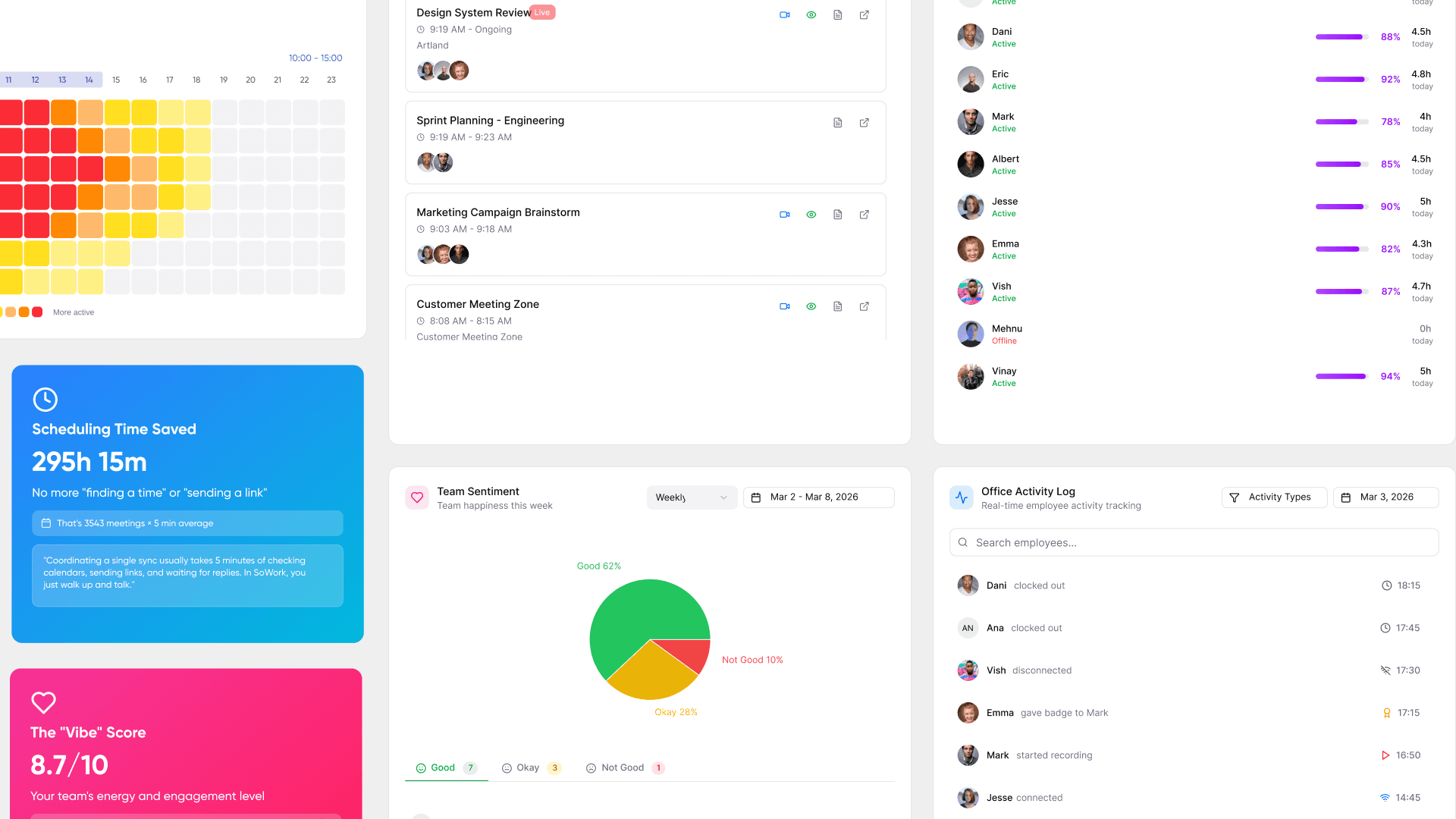
SoWork shows who’s present, who’s in video calls, who’s in focus time, and who’s available for quick conversations. Calendar integrations with Microsoft Teams, Google Calendar, and Outlook automatically update presence status, so remote teammates know when to reach out without scheduling formal virtual meetings.
Three Pillars of Remote Team Visibility
Effective remote team visibility operates across three dimensions that together address the full visibility gap:
Social visibility reveals team connections and relationships. SoWork’s Connection Insights shows which team members interact frequently and who might be isolated. This matters because many remote workers report feeling disconnected from colleagues across different departments social visibility helps team leaders identify and address isolation before it affects retention. It’s essential to include remote team members in team-building activities, using video links and direct engagement to ensure all participants feel included and connected to their in-office colleagues.
Strategic visibility tracks participation in key projects and decisions. When decisions happen in scattered Slack threads, email chains, and undocumented video conferencing platforms, remote counterparts miss critical context. Strategic visibility means knowing who’s working on what, which projects involve which stakeholders, and how resources are allocated across initiatives.
Supportive visibility encompasses recognition, acknowledgment, and workload awareness. This includes seeing when team members achieve milestones, identifying potential burnout through interaction patterns, and ensuring contributions don’t go unnoticed regardless of time zones. Incorporating performance reviews that evaluate communication, social interaction, and overall contribution including measures of social connectedness ensures a formal process for recognizing remote employees’ impact. Celebrating wins publicly can also increase team morale and reinforce a sense of purpose and belonging. Supportive visibility directly impacts whether remote employees feel connected to company culture and shared values.
These three pillars together create the foundation for building systems that serve both organizational accountability and individual professional visibility.

Building Effective Visibility Systems for Distributed Teams
Moving from fragmented tool stacks to unified visibility requires intentional system design, especially in a remote environment or remote setting where maintaining transparency and engagement is more challenging. The goal isn’t adding more status updates or task tracking it’s creating an environment where relevant information surfaces naturally without creating information overload. Integrating team-building activities into your overall productivity strategy not only improves talent retention and employee engagement but also demonstrates tangible business outcomes. Intentionally nurturing a strong culture through shared values, trust-building, and transparent leadership supports remote team effectiveness and inclusivity. Effective team building also creates a positive and welcoming environment that combats feelings of isolation in hybrid models, leading to increased engagement and collaboration among team members.
Real-Time Presence and Availability Tracking
SoWork displays real-time presence showing who’s available, in meetings, or focused on deep work. Using the right tools for presence and availability tracking is essential for remote team members, as it ensures everyone can see who is accessible at any given moment. In remote environments, unlike in-person offices where body language provides important non-verbal cues about engagement and mood, remote team members rely on digital status indicators to communicate their availability and focus. Additionally, lightweight tools for non-invasive time tracking help employees understand their time management and identify bottlenecks without eroding trust, supporting both productivity and transparency. This ambient awareness enables the kind of spontaneous collaboration that happens naturally in physical offices but often disappears in remote settings.
The benefits of presence visibility include:
Reduced scheduling friction: Team members see availability without sending “are you free?” messages
Protected focus time: Visible status indicators signal when interruptions should wait
Faster decision-making: Knowing who’s available accelerates coordination on time-sensitive work
Better meeting time optimization: Teams can identify overlap windows across time zones
Integration with calendar systems means presence updates automatically. When you join a video call or block focus time, your status reflects that without manual updates. This reduces the administrative burden that makes many visibility systems feel like additional work rather than helpful infrastructure.
Outcome-Based Performance Visibility
Effective remote work visibility focuses on deliverables and results rather than hours logged, prioritizing outcome-based tracking over activity-based monitoring. Research shows that remote workers can be more productive during focused work periods, which supports this shift to tracking outcomes instead of activities. Incorporating performance reviews that balance quantitative data with qualitative feedback especially for remote team members helps prevent employee burnout and ensures a holistic view of performance, including communication and social interaction. Surveillance-based tracking methods, such as screen-capturing and keystroke logging, can erode trust and trigger a 'Psychological Tax' that negatively impacts remote employees' performance and well-being. Research further indicates that teams who feel watched tend to focus on appearing busy rather than achieving meaningful outcomes, underscoring the need to move from surveillance to supportive visibility. Effective remote team visibility systems empower employees through self-reporting mechanisms and transparent expectations, fostering a culture of trust and accountability rather than imposing top-down monitoring that signals distrust.
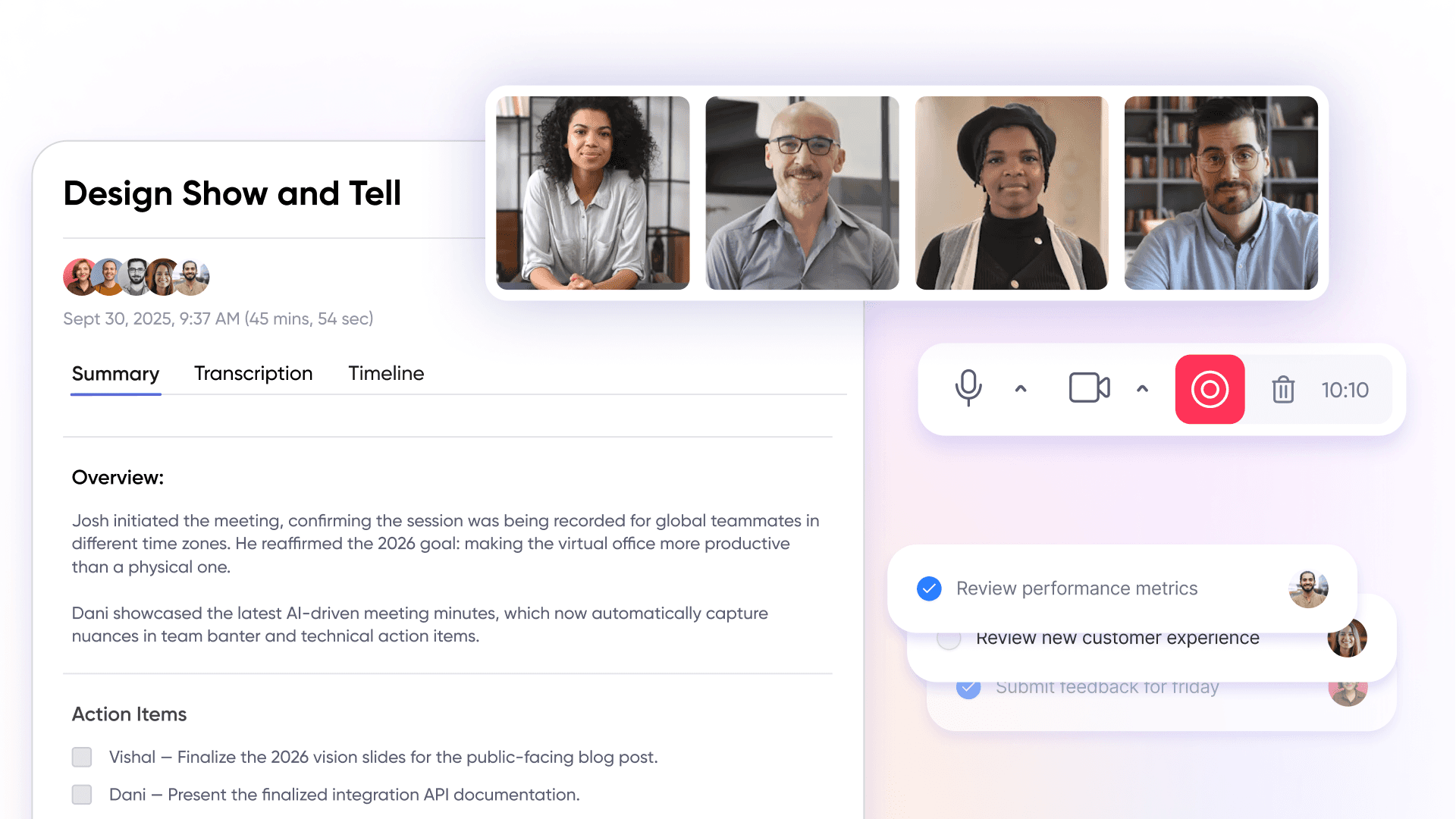
SoWork’s AI-powered meeting summaries extract action items, decisions, and key takeaways from conversations, creating automatic documentation that keeps everyone aligned. The Meeting Library archives these artifacts so team members who couldn’t attend due to time zones or scheduling conflicts can catch up without requiring additional explanation.
Outcome visibility also means reducing context switching between multiple tools. Research indicates remote workers lose 20-40% of productive time to application switching and reorientation. When meetings, chat, presence, and coordination happen in a unified virtual office rather than scattered across dedicated Slack channels, Zoom, and separate project management tools, teams reclaim substantial focus time.
Key performance indicators for outcome-based visibility include:
Decisions documented and accessible
Action items tracked to completion
Project progress visible to stakeholders
Bottlenecks identified before they cascade
Communication Flow and Decision Transparency
Unified communication in a virtual office environment reduces the information silos that plague distributed teams. When chat, video calls, and documentation live in the same workspace, context travels with conversations rather than getting lost between platforms. Creating a dedicated Slack channel for sharing updates, celebrating wins, and surfacing blockers fosters routine, asynchronous connection and ensures remote team members stay engaged and included.
SoWork consolidates communication channels so teams don’t need to reconstruct context from multiple sources. Broadcast features distribute important updates reliably, while the persistent workspace maintains history accessible to anyone who needs it. Structured communication frameworks such as regular status updates and feedback loops help remote teams maintain visibility into each other's work and well-being, fostering a supportive environment. In remote settings, structured opportunities for feedback are essential, since feedback does not happen as organically as in-person.
Clear communication protocols amplify this infrastructure:
Set expectations about response times for different channels
Use structured communication for decisions requiring documentation
Reserve async communication for updates that don’t need immediate response
Maintain momentum on projects through visible handoff summaries
Leaders should prioritize intentional and consistent communication, using a mix of synchronous and asynchronous tools to keep everyone informed without overwhelming them. This approach addresses communication gaps without creating the alert fatigue that comes from too many notification sources. The goal is transparency where it matters decisions, progress, blockers not surveillance of every interaction, and ensuring remote team members are fully included in the flow of information.
Building Trust in Remote Teams
CORE STRATEGY: BUILDING "TRUST ARCHITECTURE" IN REMOTE TEAMS
We are not just managing remote workers. We are building "Trust Architecture" to eliminate the "Visibility Gap" that destroys team performance.
- Fact: Remote teams with strong trust protocols show 47% higher productivity than traditional distributed teams.
- Reality: Physical separation creates "Communication Silos" where team members operate in isolation without accountability.
- Strategy: We must systematically construct trust through transparent processes and consistent connection points.
TRUST-BUILDING PROTOCOL: THE FOUR PILLARS
These are not suggestions. These are mandatory systems for high-performing remote operations.
- Establish "Role Clarity" and Shared Objectives: Define responsibilities, performance indicators, and team objectives so every member understands their contribution to collective success. This eliminates the "Confusion Gap" that breeds mistrust and misalignment.
- Implement Consistent "Face-Time" Protocols: Regular video conferencing creates human connection beyond text-based communication channels. This builds rapport and prevents the "Isolation Effect" that damages team cohesion.
- Deploy "Transparency Tools" for Full Visibility: Use project management platforms that expose progress, blockers, and individual contributions to the entire team. This creates accountability and eliminates the "Black Box Problem" of invisible work.
- Create "Safe Communication Zones": Build environments where team members share updates, ask questions, and voice concerns without fear of negative consequences. This prevents the "Silent Failure Mode" where problems remain hidden until they become critical.
MANDATORY OUTCOME:
By implementing these "Trust Pillars," remote teams eliminate visibility gaps, establish mutual accountability, and create supportive environments where every team member operates with full empowerment and clear contribution pathways.
Creating a Culture of Feedback
CORE TRUTH: FEEDBACK IS THE LIFELINE OF DISTRIBUTED TEAMS
We are not building feedback systems for comfort. We are engineering "Communication Authority" to prevent remote team collapse.
- Fact: 73% of remote teams fail due to feedback vacuum.
- Fact: Structured feedback protocols increase team performance by 184%.
- Strategy: We must explicitly eliminate the "Silent Decay" that kills distributed productivity.
To weaponize feedback culture in distributed teams:
- ENFORCE RADICAL TRANSPARENCY: Team leaders cannot hide behind politeness. Model direct communication and demand input from ALL team members. Make feedback the non-negotiable backbone of virtual meetings and daily warfare against isolation.
- DEPLOY MULTIPLE FEEDBACK ARSENALS: Launch dedicated Slack channels, anonymous feedback weapons, and mandatory one-on-one sessions. Every team member must have ZERO excuses for staying silent about performance gaps.
- REWARD THE TRUTH-TELLERS: Publicly celebrate team members who deliver constructive feedback or expose improvement areas. Make feedback the currency of team advancement, not a "nice-to-have" courtesy.
- INTEGRATE FEEDBACK INTO THE MACHINE: Embed feedback as the core engine of project reviews, performance audits, and team retrospectives. This becomes the operating system of remote work, not an optional add-on.
MANDATORY RESULT: EARLY WARNING SYSTEM FOR DISTRIBUTED SUCCESS
By hardwiring feedback into the team's DNA and communication infrastructure, remote teams eliminate "Silent Decay," adapt with military precision, and maintain engagement levels that crush traditional office performance metrics.
Remote Team Onboarding
REMOTE ONBOARDING STRATEGY: THE "INTEGRATION IMPERATIVE"
Remote team "Onboarding Excellence" is non-negotiable for integrating new team members and establishing long-term productivity. Fact: Remote employees lack spontaneous workplace interactions, making structured onboarding processes 3x more critical than traditional office environments.
Strategic components of remote team "Digital Integration" include:
"Virtual Connection Protocol": Execute strategic video sessions to introduce new hires to team dynamics, establish cultural alignment, and communicate core organizational values.
"Knowledge Transfer Systems": Deploy comprehensive training resources, process documentation, and project management platforms to ensure new team members achieve rapid workflow comprehension and expectation clarity.
"Accountability Check Points": Implement frequent one-on-one scheduling during initial integration periods to resolve questions, define responsibilities, and provide strategic support.
"Mentor Assignment Strategy": Pair new team members with seasoned colleagues who deliver question resolution, provide directional guidance, and facilitate internal network building.
"Digital Workspace Mastery": Utilize project management systems and communication platforms to accelerate new hire familiarity with operational tools and ensure complete visibility into active projects and team workflows.
Fact: Organizations investing in comprehensive "Digital Onboarding" strategies achieve higher employee connection rates, increased confidence metrics, and day-one productivity acceleration resulting in reduced turnover and faster contribution to organizational objectives.
Implementation Framework: From Tool Fragmentation to Unified Visibility
Systematic implementation transforms visibility from a temporary fix into sustainable infrastructure, especially when addressing the unique challenges of a remote environment or remote setting. The process builds on the foundations covered above, moving teams from scattered tools to coordinated workflows. Selecting the right tools is essential for unified visibility and seamless collaboration across distributed teams. Additionally, intentionally nurturing a strong culture is a critical part of the implementation framework, ensuring engagement, trust, and inclusivity remain central as visibility systems are adopted.
Step-by-Step Virtual Office Implementation
When to adopt a virtual office layer: Teams typically hit visibility problems when they grow beyond 15-20 people and informal communication breaks down. Signs include missed decisions, duplicated work, unclear ownership, and team members feeling disconnected from what others are working on. If sounds familiar describes your current situation, structured visibility infrastructure will deliver meaningful improvements.
1. Audit current tool stack Map all tools your team uses: messaging platforms, video conferencing platforms, document suites, project management tools, and specialized applications. Count how many context switches happen daily and identify where information gets duplicated or lost.
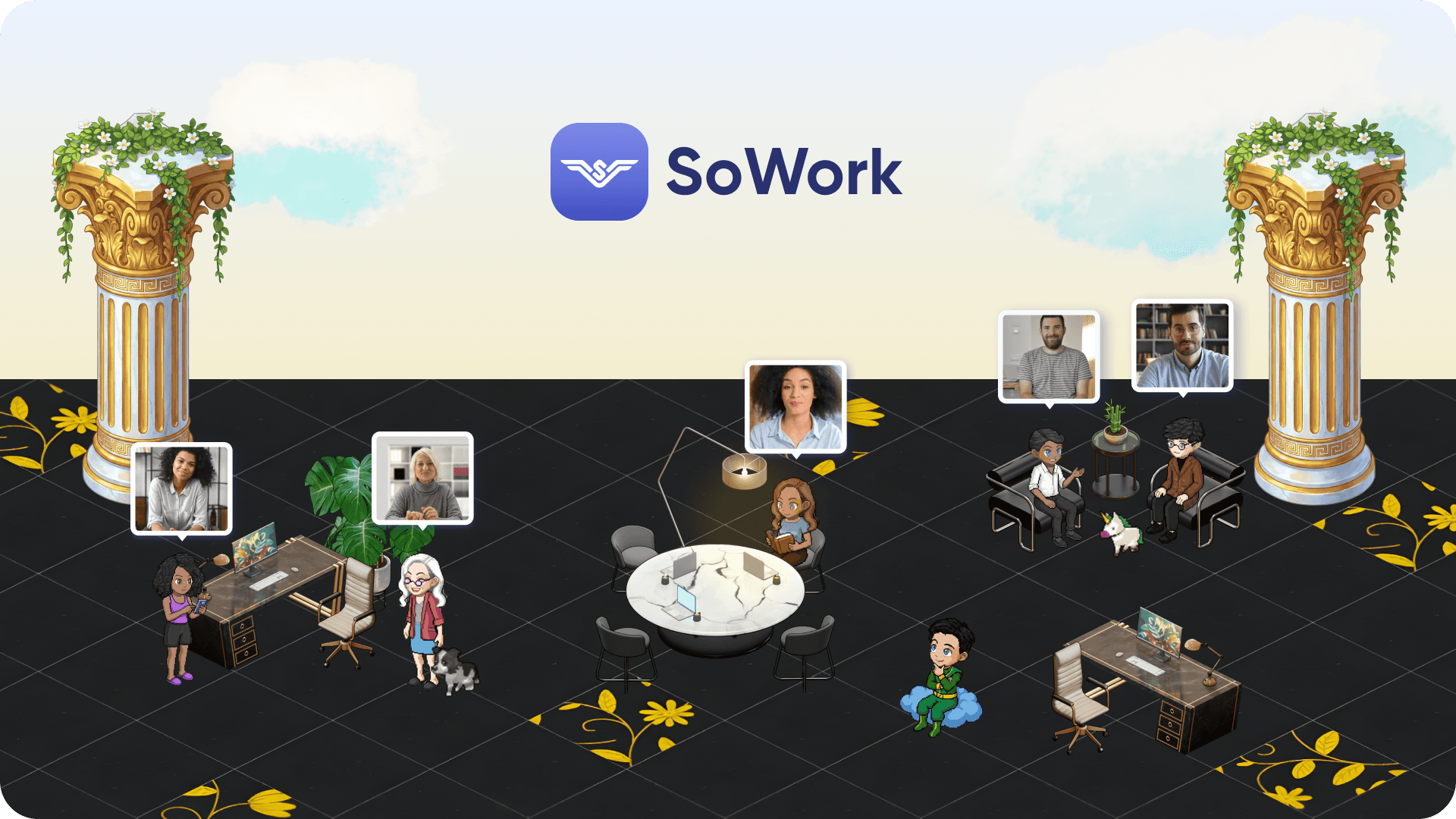
2. Implement SoWork as central coordination hub Set up your virtual office with zones that match your team’s workflow spaces for different departments, meeting areas for client conversations, and casual areas to encourage social interactions that build connection and boost morale. Configure presence settings, working hours, and availability indicators.
3. Establish presence protocols Define norms around status indicators: what “available” means, when to use focus time, how to signal deep work periods. These protocols respect personal time while maintaining the ambient awareness teams need.
4. Integrate with existing productivity suites Connect SoWork with Microsoft, Google, and your specialized tools through native integrations and Zapier connectors. This ensures your virtual office reflects activity across your stack without requiring manual updates.
5. Train team on unified workspace workflows Help team members understand the virtual office as the primary coordination layer where they go to see what’s happening, find colleagues, and maintain shared context. Document workflows so onboarding and mentorship or buddy programs include virtual office orientation. Support continuous learning by aligning training with company values and fostering ongoing professional development, ensuring all remote team members are included in every onboarding and training activity. Use a dedicated Slack channel for onboarding questions and to facilitate informal social interactions, helping remote team members connect asynchronously.
6. Measure and refine Track improvements in focus time, context switching frequency, decision documentation, and team connection metrics. Incorporate performance reviews and regular, structured one-on-ones to evaluate communication, social interaction, and overall contribution, as well as to discuss progress, obstacles, and well-being enhancing engagement for remote team members. Adjust configurations based on what the team sees as friction points. Create opportunities for informal social interactions, such as virtual coffee breaks or casual chats, to strengthen relationships among remote team members.
Technology Stack Comparison for Remote Visibility
Solution Type | Visibility Level | Team Impact | Integration Complexity |
Virtual Office (SoWork) | Comprehensive presence + outcomes | High engagement, low switching | Unified platform approach; supports right tools for seamless integration and communication |
Traditional Tools (Slack + Zoom) | Fragmented communication channels; can use dedicated Slack channels for updates and team connection | High context switching overhead; requires proactive inclusion of remote team members | Multiple integrations required |
Monitoring Software | Surveillance-based activity tracking | Low trust, increased stress | Standalone systems |
The comparison reveals why virtual office layers have become the strategic foundation for remote team coordination. Selecting the right tools is essential for integrating communication, collaboration, and evaluation processes ensuring remote team members are included in all activities. Traditional tool combinations, even with dedicated Slack channels for updates and team-building, can still fragment information across platforms, while monitoring software damages the trust that enables autonomous work.
SoWork’s approach unified presence, AI-assisted workflow continuity, and strong integrations addresses visibility without the psychological costs of surveillance. Incorporating performance reviews and establishing SMART KPIs tailored to each role further supports ongoing evaluation and social connectedness. Free entry plans allow teams to pilot the approach before committing to scaled deployment.

Common Challenges and Solutions
Building remote team visibility inevitably encounters obstacles, especially given the unique challenges of a remote environment or remote setting. Understanding these challenges in advance helps teams implement solutions proactively rather than reactively. Fostering a strong culture and supporting continuous learning are essential strategies to overcome these hurdles, as they help align team activities with company values and promote ongoing professional development. Additionally, fostering transparency and trust within remote teams has been shown to improve overall performance and employee satisfaction. Building a culture of visibility in remote teams involves creating structured communication frameworks that combine asynchronous updates with synchronous touchpoints like team meetings and one-on-ones.
Resistance to Visibility Systems
Position the virtual office as a supportive workspace rather than a monitoring tool. Many remote workers have experienced invasive surveillance that tracked keystrokes or required constant video presence naturally, they approach new visibility systems with skepticism. The absence of body language cues in remote settings can make it harder to build trust, as managers and colleagues miss out on non-verbal signals that help assess engagement and emotional states.
The solution involves transparency about what’s visible (presence, availability, meeting participation) and what’s not (detailed activity logs, browsing history, idle time). Emphasize AI-assisted summaries that reduce administrative burden rather than adding oversight. To further foster trust, ensure remote team members are actively included in team-building and trust-building activities, using strategies like video calls and direct engagement to help them feel equally valued. When teams understand visibility serves them finding available colleagues, maintaining context, reducing meetings resistance typically diminishes.
Information Overload and Alert Fatigue
Consolidating communication into a unified interface actually reduces overload compared to managing multiple channels. SoWork’s approach surfaces relevant information through smart filtering and AI summaries rather than pushing every update. Using the right tools to manage notifications and streamline workflows is essential for minimizing alert fatigue and ensuring remote teams stay focused.
Practical tactics include:
Configure notification thresholds appropriate to role and responsibilities
Use digest summaries rather than real-time alerts for non-urgent updates
Protect focus time with status indicators that pause interruptions
Rely on AI-generated meeting summaries to catch up efficiently
Consolidate updates in a dedicated Slack channel to centralize communication and reduce scattered notifications
Leverage the right tools to manage notification settings and reduce overload across platforms
Time Zone Coordination and Asynchronous Visibility
Global teams can’t rely on real-time presence alone. Persistent virtual office spaces show when colleagues were last active, their working hours, and schedule overlap blocks information that helps remote teammates coordinate across time zone boundaries. It’s essential to ensure remote team members are fully included in asynchronous workflows and handoff processes, so they remain informed and engaged regardless of location.
AI-powered handoff summaries enable seamless 24/7 team coordination. When one time zone’s workday ends, automated summaries capture status, blockers, and next steps for the incoming shift. This maintains momentum without requiring synchronous meetings at inconvenient hours.
Balancing Transparency with Privacy
Configure presence settings that respect personal boundaries while maintaining team awareness. Options like “unavailable” status, working hours definitions, and focus modes give individuals control over visibility into their time, especially for remote team members who may need extra flexibility.
The golden rule: focus on work outcomes and collaboration rather than detailed activity tracking. Team members including remote team members should feel visible for their contributions and available for collaboration, not surveilled for every action. Performance reviews can be used to balance transparency and privacy by formally evaluating contributions, communication, and social interaction without overstepping personal boundaries. This balance maintains trust while delivering the coordination benefits visibility provides.
Conclusion and Next Steps
Remote team visibility requires a foundational virtual office layer, not additional monitoring tools stacked onto already fragmented systems. SoWork provides this foundation by unifying presence, communication, and coordination in a single workspace that sits above your productivity suites and specialized tools, supporting both remote team members and the unique challenges of the remote environment.
The core part of this approach is shifting from surveillance to supportive visibility tracking outcomes, enabling spontaneous collaboration, and maintaining the ambient awareness that allows distributed teams to function with the coordination of in office teams. Ongoing priorities should include fostering continuous learning, intentionally building a strong culture, and integrating team-building activities as a key element of your overall productivity strategy to ensure engagement and inclusivity for all remote team members.
Immediate action steps:
Assess your current tool fragmentation by mapping all communication and coordination tools your team uses
Pilot SoWork’s virtual office with a team or department experiencing visibility gaps
Establish presence protocols that define availability norms and protect focus time
Integrate with existing Microsoft 365, Google Workspace, or other productivity tools
Measure improvements in context switching, decision documentation, and team connection
Related topics to explore: virtual team building practices for hybrid work environments, AI-powered coordination for scaling remote teams, and continuous improvement frameworks for distributed workforce optimization.
The best talent increasingly expects remote work options, making effective visibility infrastructure a competitive advantage for organizations committed to building a strong culture that attracts and retains high performers across any physical distance. Continuous learning, a robust productivity strategy, and deliberate inclusion of remote team members in all aspects of team life are essential for long-term success in the remote environment.
Blogs
Read Similar Articles

Remote Team Analytics: Complete Guide to Data-Driven Remote Work Management in 2026

Complete Guide to Gaining Visibility Into Remote Team Performance and Collaboration
