Remote Team Monitoring Software: Complete Guide for 2026
The SoWork Team
Published:
Updated on:
Introduction
Remote team monitoring software provides comprehensive visibility into how distributed teams collaborate, coordinate work, and maintain productivity across locations and time zones. These platforms go beyond basic time trackers by integrating team presence indicators, meeting analytics, workflow status tracking, and engagement metrics into unified digital workspaces. Monitoring platforms serve as comprehensive solutions for tracking, analyzing, and optimizing remote workforce productivity in real time.
This guide covers virtual office solutions, productivity analytics platforms, and team coordination tools designed for remote and hybrid employees. Basic time tracking software and invasive employee surveillance systems fall outside this scope. Features like attendance management, activity data collection, and task management are central to effective remote team oversight. The target audience includes remote team leaders, HR managers, and operations directors managing a remote workforce who need to maintain visibility and boost productivity while maintaining trust and work life balance.
The shift to remote work can lead to a significant loss in team cohesion and visibility, making it harder for leaders to manage effectively without real-time data.
Direct answer: Remote team monitoring software centralizes team visibility, communication, and productivity tracking including employee activity tracking through unified digital workspaces, with the most effective monitoring platforms starting from a virtual office layer that coordinates meetings, presence, and collaboration before adding specialized monitoring tools.
By the end of this guide, you will understand:
The distinction between team-focused monitoring and individual surveillance
How virtual office platforms serve as the foundation for remote work management software
Implementation strategies that reduce tool fragmentation and context switching
Selection criteria for choosing the right monitoring approach for your team size and complexity
Legal and ethical considerations for monitoring remote employees in 2026
The global employee monitoring software market is projected to grow from $648.8 million in 2025 to $1.46 billion by 2032, expanding at a 12.1% CAGR, reflecting the increasing demand for robust remote team monitoring solutions.

Understanding Remote Team Monitoring Software
Remote team monitoring software encompasses platforms that track team collaboration, productivity patterns, and coordination across distributed workforces. In addition to these platforms, an employee tracking system and employee software are essential tools designed to track and manage employee time and productivity, providing features that help organizations oversee remote workforces efficiently. The critical distinction lies between team monitoring which focuses on collaboration frequency, workflow status, and group productivity trends and employee surveillance, which emphasizes individual behavior tracking through keystroke logging, screenshot monitoring, and continuous activity tracking on employee computers.
For modern remote and hybrid employees, these systems help measure productivity and manage remote employee time by tracking work hours, monitoring performance, and providing actionable insights. Data-driven performance management allows managers to move away from subjective reviews to evidence-based evaluations. By tracking time and activity, managers can also identify overworked employees, preventing burnout and ensuring tasks are distributed fairly. When team members cannot see who’s available, what colleagues are working on, or when meetings happen spontaneously, productivity suffers and alignment breaks down.
Virtual Office and Collaboration Layer
Virtual office software serves as the foundational layer connecting meetings, communication, and team presence in a single digital workspace. Unlike standalone video conferencing or chat tools, virtual office platforms create persistent shared spaces where remote workers can see team availability, join spontaneous conversations, and maintain the ambient awareness that physical offices provide naturally.
SoWork exemplifies this approach by providing an AI-powered workspace that sits above document suites and specialized tools. Rather than replacing Microsoft 365 or Google Workspace, SoWork acts as the operational hub where teams coordinate work, communicate in real time, and maintain shared context. Features include visual maps showing team presence, dedicated zones for different activities (standups, all-hands, break rooms), and AI-assisted meeting summaries that capture action items automatically. Many virtual office platforms also integrate attendance management and task management, enabling real-time attendance tracking, work status updates, and streamlined task assignment within the same environment.
This virtual office layer connects directly to team monitoring through real-time presence tracking, meeting analytics, and collaboration insights. When teams work from a central workspace, monitoring becomes a natural byproduct of coordination rather than an imposed surveillance system.
Productivity Analytics and Insights
Productivity monitoring in the team context focuses on output metrics, project progress, and workflow efficiency rather than tracking individual keystrokes or app usage minute-by-minute. However, activity data comprehensive, real-time information such as keystrokes, application usage, website visits, and other digital interactions is collected and analyzed to generate actionable insights for management. Effective employee monitoring systems measure what matters: deliverables completed, task progress, bottlenecks identified, and collaboration patterns that indicate healthy team function.
The relationship between productivity analytics and virtual office coordination strengthens when AI assists with workflow continuity. SoWork’s Sophia Bot, for example, generates meeting summaries, extracts action items, and creates searchable archives reducing coordination overhead while providing performance metrics that help teams track productivity without invasive monitoring tools. Employee activity tracking enables the generation of detailed reports on employee behavior, productivity, and task management, supporting management in identifying issues and improving overall efficiency.
This foundation sets the stage for understanding specific monitoring capabilities and how different tool categories serve different team needs. Effective remote team monitoring software should also provide customizable dashboards, allowing teams to focus on the most relevant metrics for their unique workflows.
Benefits of Remote Team Monitoring
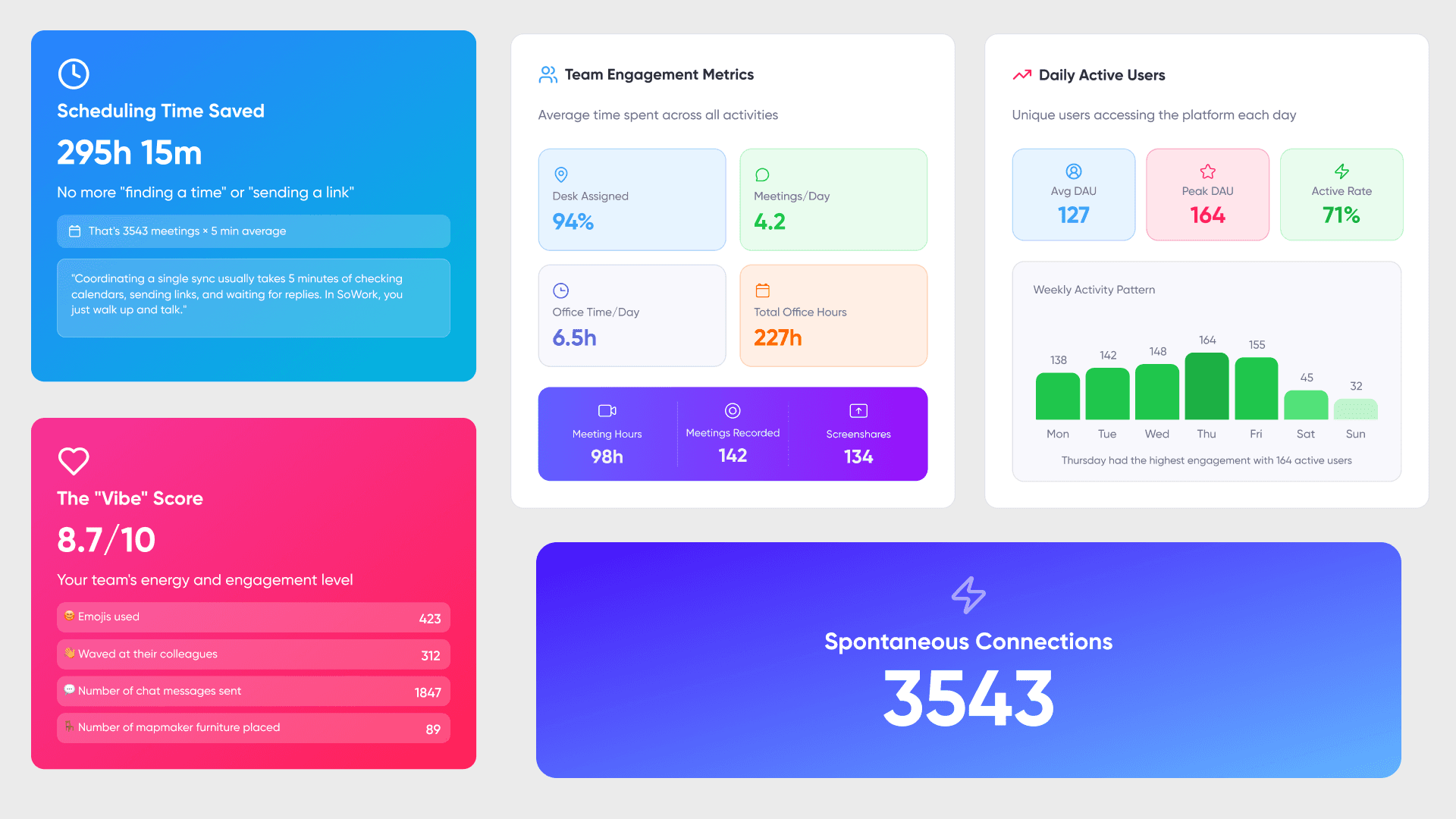
Remote team monitoring delivers game-changing competitive advantages for organizations commanding distributed workforces. Fact: Companies leveraging employee monitoring software unlock actionable intelligence that drives measurable productivity gains of up to 30% within the first quarter. This isn't just visibility it's strategic workforce optimization. Monitoring software empowers managers to eliminate performance bottlenecks, execute precision resource allocation, and deploy targeted improvements that directly translate to bottom-line results. The data doesn't lie: organizations without monitoring operate blind, hemorrhaging productivity through invisible inefficiencies.
Strategic employee monitoring creates an impenetrable security fortress by delivering real-time visibility into user behavior patterns and sensitive data access protocols. Advanced monitoring platforms detect anomalous activities that signal insider threats or imminent data breaches enabling instant intervention before damage occurs. This is risk mitigation at the enterprise level. Additionally, these platforms serve as compliance engines, automatically generating audit logs and ensuring data collection protocols align with regulatory standards. The result: bulletproof compliance posture that eliminates regulatory exposure while maintaining operational excellence.
Types of Remote Team Monitoring Capabilities
Building on the foundational concepts, remote employee monitoring software offers several categories of capabilities. Modern monitoring platforms serve as comprehensive solutions for tracking, analyzing, and optimizing remote teams’ productivity and workflow in real time. The key is selecting capabilities that match your team’s actual coordination challenges rather than implementing monitoring for its own sake. Organizations often seek the best employee monitoring software to ensure the solution aligns with their specific needs, workflow, tech stack, and company values while also respecting employee privacy and providing the necessary visibility.
Communication and Meeting Analytics
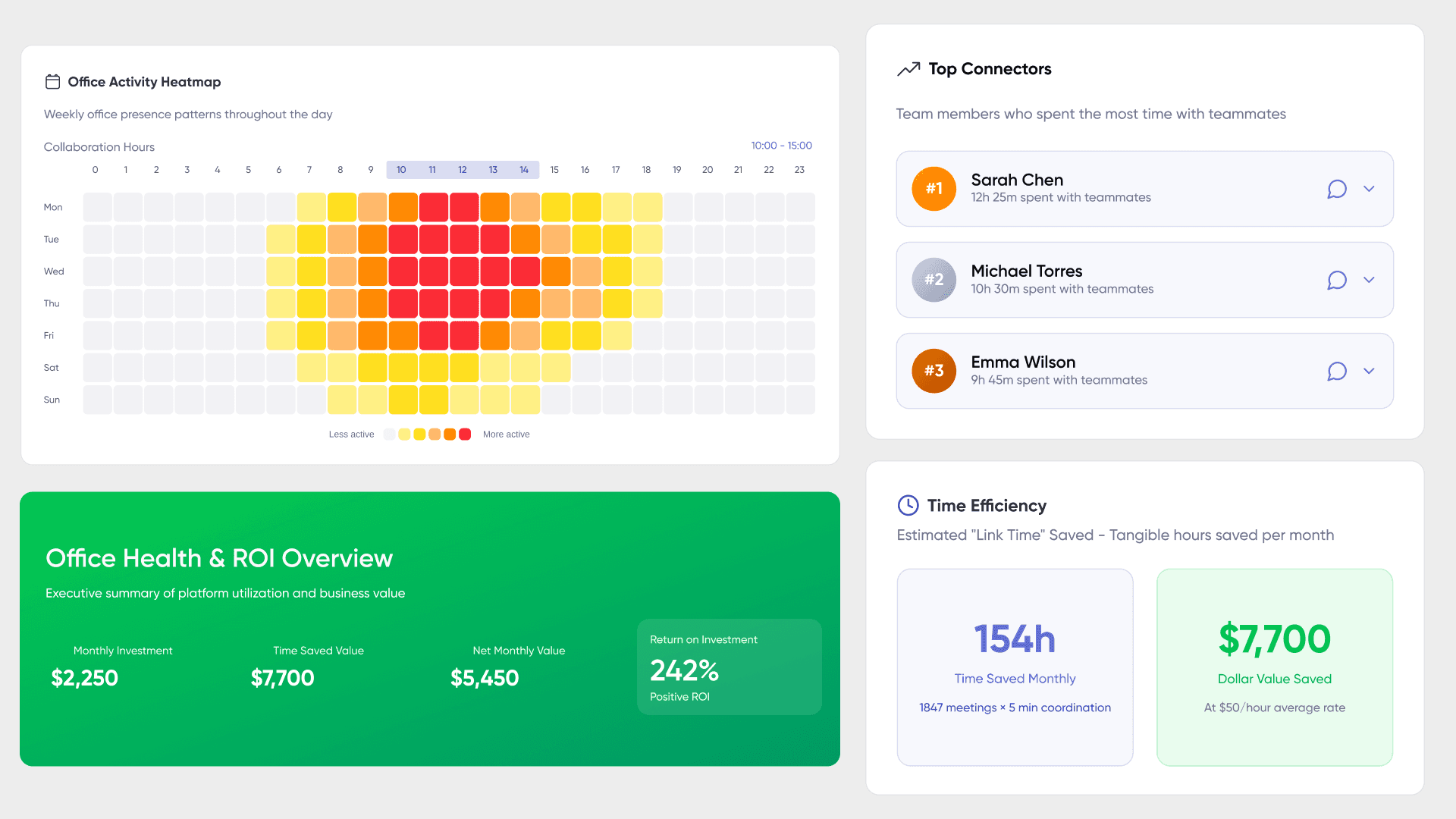
Real-time team presence tracking shows who’s available, who’s in meetings, and who’s focused on deep work. For distributed teams spanning multiple time zones, this visibility eliminates the constant “are you there?” messages that fragment attention and waste time spent on coordination overhead.
Meeting effectiveness metrics reveal patterns in attendance, duration, and follow-through on action items. Productivity analytics at the meeting level help identify whether team members spend time in productive collaboration or suffer from excessive meeting load. Integration with chat platforms within virtual office environments creates unified communication that reduces context switching between separate tools.
Research indicates companies investing in integrated collaboration technology see approximately 20% higher performance compared to those relying on video conferencing alone. This productivity gain stems from reduced coordination friction rather than from monitoring employee activity more closely.
Project and Workflow Coordination
Task progress visibility across remote teams ensures everyone understands project status without constant status meetings. Effective remote employee tracking software shows deadline tracking and cross-team dependencies, making workflow bottlenecks visible before they become project delays. Task management features further support project tracking and workflow coordination by enabling real-time assignment of tasks, monitoring work status, and automating workflow steps.
Resource allocation optimization becomes possible when teams can see where work clusters and where capacity exists.
Integration capabilities with project management and document collaboration tools matter significantly. The most effective approach layers specialized tools beneath a virtual office coordination hub rather than expecting employees to constantly switch between disconnected applications. Tracking project progress, time, and application usage also creates a culture of transparency where employees feel recognized for their work.
Team Productivity and Engagement
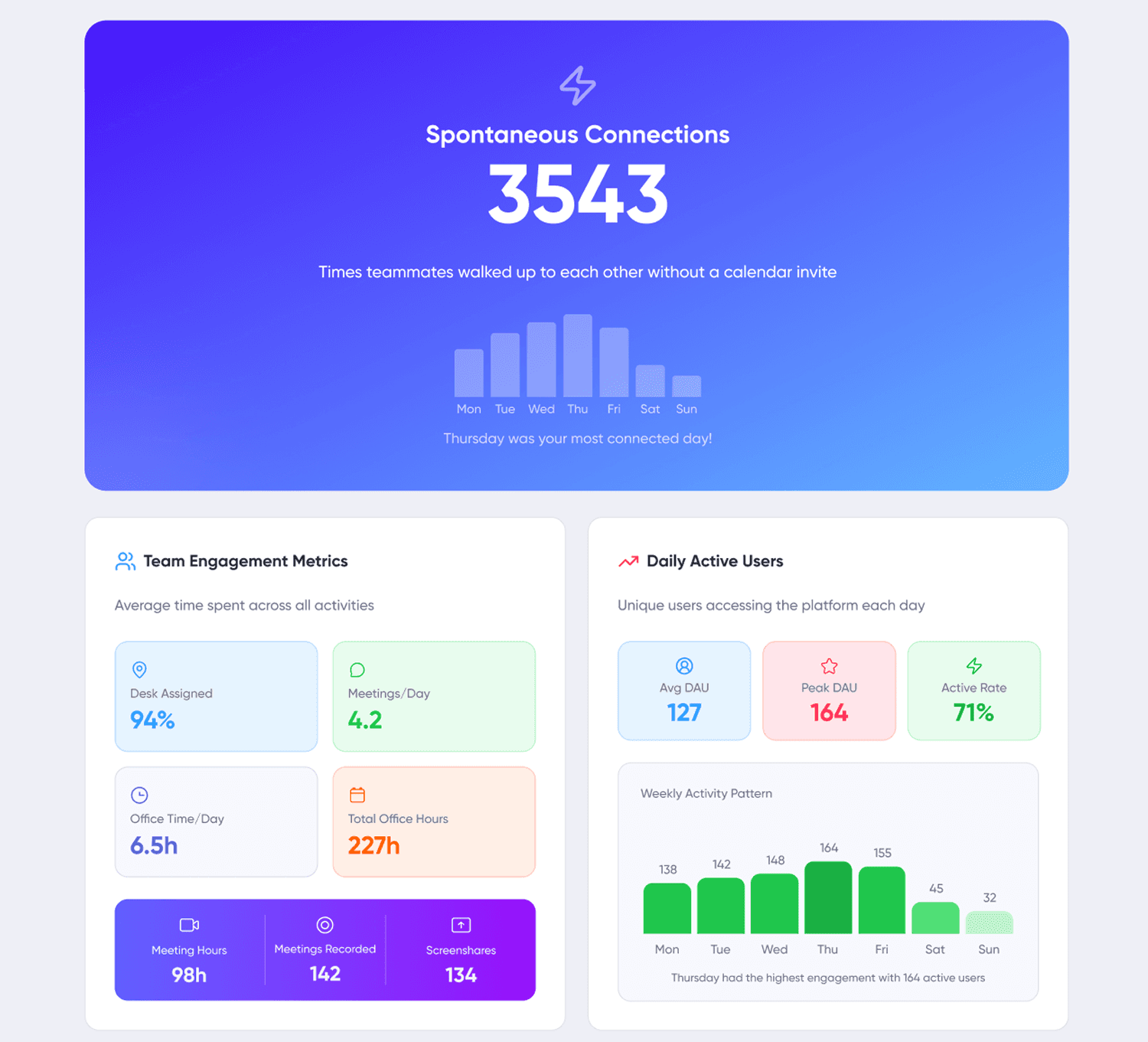
Measuring team productivity rather than individual surveillance protects employee privacy while still providing actionable data collection. For a remote workforce, team-level metrics show collaboration patterns, cross-functional interaction frequency, and engagement indicators, enabling organizations to monitor distributed teams and maintain visibility without the trust-eroding effects of screenshot monitoring or keystroke logging.
Employee engagement indicators emerge naturally from virtual office participation: who joins optional discussions, who contributes to collaborative sessions, who maintains consistent presence versus who disappears for extended periods. This approach to effectively monitor teams respects work life balance while still surfacing productivity trends that require attention.
The collected data from team-level monitoring supports better resource allocation, identifies coordination gaps, and helps managers effectively track progress without creating surveillance anxiety among remote workers. Companies with highly engaged workforces are 23% more profitable and 18% more productive than those with disengaged staff, underscoring the value of engagement in remote team monitoring.
Time Tracking and Management
PRODUCTIVITY COMMAND CENTER: TIME TRACKING AS STRATEGIC INTELLIGENCE
- Fact: Employee monitoring software delivers PRECISE, automated productivity intelligence that transforms how remote teams operate.
- Fact: Detailed tracking reports reveal productivity patterns that manual oversight cannot detect.
- Strategic Reality: Managers who leverage automated time tracking gain unprecedented visibility into resource allocation, identifying productivity hemorrhaging and optimizing project costs with surgical precision. These insights don't just measure work they WEAPONIZE data to make informed decisions that eliminate inefficiencies across teams and individuals. Without this intelligence, remote management operates blind.
THE EMPLOYEE ADVANTAGE: ELIMINATING PRODUCTIVITY DECAY
For remote workers, time tracking tools become the BACKBONE of sustainable productivity and work-life optimization.
- Benefit: Automated tracking eliminates the administrative waste of manual timesheets, liberating high-performers to focus on revenue-generating activities.
- Result: Workers gain transparent visibility into their own productivity patterns, enabling strategic task prioritization and preventing burnout before it destroys performance.
- Strategic Truth: Detailed monitoring reports facilitate data-driven conversations about deliverables and expectations, replacing subjective performance discussions with objective productivity metrics.
Without integrated time tracking, remote teams suffer from "Productivity Decay" the gradual erosion of output that occurs when work patterns remain invisible and unoptimized.
Implementation Approaches and Platform Selection
Selecting between virtual office platforms, specialized employee monitoring tools, employee tracking systems, or broader employee software depends on team size, existing tech stack complexity, and specific coordination challenges. Context matters: a 10-person remote team has different needs than a 200-person distributed workforce. Most remote team monitoring software platforms use a per-user/month pricing model, with costs ranging from about $4 to over $15 per user per month for advanced features.
Virtual Office-Centered Approach
Starting with a virtual office layer as the central coordination hub offers several advantages for remote work monitoring. SoWork provides a unified workspace that reduces context switching and tool fragmentation the primary productivity killers for remote and hybrid employees.
The implementation strategy integrates with existing document suites rather than replacing them. SoWork connects to Slack, Google Calendar, Outlook, and Zapier, allowing teams to maintain their preferred productivity tools while adding a coordination layer on top. This reduces the “one more tool” resistance that derails many monitoring software implementations.
Scalability from free entry point to enterprise-level team monitoring makes virtual office adoption practical for organizations testing remote team coordination approaches. SoWork offers free access for up to 10 users, with paid plans ranging from approximately $6 to $15 per user monthly competitive with specialized monitoring tools while providing broader coordination capabilities.
The virtual office approach also addresses employee monitoring software pros that matter most: reducing idle time through better coordination, improving employee performance through clearer communication, and providing detailed reports on team productivity without invasive basic tracking of individual behavior.
Platform Comparison Framework
Approach | Virtual Office (SoWork) | Specialized Monitoring | All-in-One Suites (Monitoring Platforms) |
Team Coordination | Central unified workspace | Limited integration | Comprehensive features for workflow, analytics, and coordination |
Context Switching | Minimal - single platform | High - multiple tools | Moderate - heavy interface |
Implementation Speed | Fast - free start | Slow - tool selection | Slow - training required |
AI Assistance | Built-in summaries | Usually separate | Variable quality |
Employee Privacy | Team-level analytics | Often individual surveillance | Depends on configuration |
Cost Scaling | Predictable per-user | Variable license models | Higher base cost |
Monitoring platforms, as all-in-one suites, offer a comprehensive set of features such as real-time analytics, video recording, keystroke logging, and automated alerts, providing deep visibility and forensic insights to optimize productivity and ensure compliance.
Teams should choose based on their primary challenge. If coordination and visibility are the main issues, virtual office platforms provide the fastest path to improvement. If deep monitoring capabilities for compliance or security are required, specialized monitoring tools or all-in-one monitoring platforms may be necessary but should be implemented transparently with clear policies.
For organizations seeking basic time tracking, limited free plans exist for some software, such as Clockify and Hubstaff, which can be a cost-effective entry point before scaling to more advanced monitoring platforms.
Organizations with existing heavy investment in Microsoft 365 or Google Workspace may find virtual office layers integrate more smoothly than attempting to add monitoring on top of multiple disconnected tools.
Common Challenges and Solutions
Remote team monitoring implementations frequently encounter predictable obstacles, especially when it comes to accurately tracking employee time and remote employee time. Without the right systems, it can be difficult to measure, manage, and optimize how employee time is spent, leading to inefficiencies and gaps in accountability. Addressing these proactively improves adoption and prevents the monitoring from becoming counterproductive.
Tool Fragmentation and Context Switching
Solution: Implement a virtual office layer first to centralize team coordination before adding specialized tools.
Tool fragmentation is the leading productivity drain for remote workers. Each additional tool requires mental context switching, separate notifications, and independent learning curves. SoWork’s integration capabilities connect existing document suites and project management platforms into a single coordination point, reducing time spent navigating between applications and eliminating the information silos that create alignment gaps.
Team Resistance to Monitoring
Solution: Frame monitoring as team coordination and productivity support rather than surveillance. Start with collaborative features.
Employee resistance to monitoring tools stems primarily from surveillance anxiety the fear that every action is watched and judged. Research shows employees accept monitoring when it is transparent, focused on team outcomes rather than individual surveillance, and provides visible benefit to their work experience.
Virtual office environments build trust through collaborative value before any monitoring function activates. When teams experience improved coordination and reduced meeting overhead, they view the platform as helpful rather than threatening. Approximately 60-80% of companies with remote staff use some form of monitoring tools, but employee acceptance varies dramatically based on implementation approach.
Data Overload and Analysis Paralysis
Solution: Begin with AI-assisted summaries and key coordination metrics rather than comprehensive tracking. Focus on actionable insights.
Too many performance metrics create decision fatigue rather than clarity. Effective remote work management software provides real time data filtered through AI that surfaces what matters: meetings that need action items, team members who haven’t connected in too long, projects approaching deadlines with incomplete dependencies. While these platforms can collect a wide range of activity data such as keystrokes, application usage, website visits, and even other sensitive data like confidential documents or credit card numbers the key is to analyze and present only the most relevant insights to avoid overwhelming users and to ensure compliance and security.
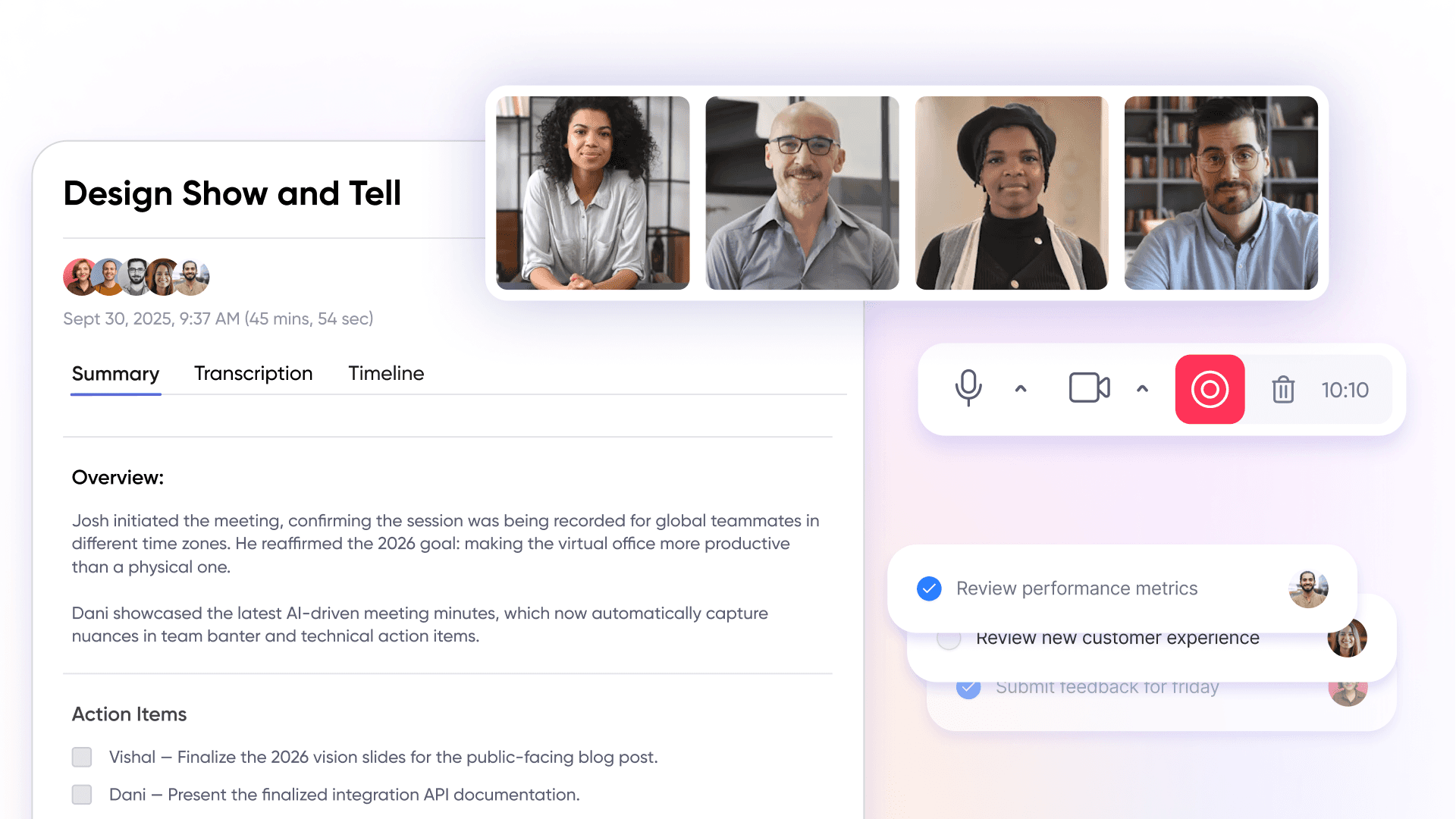
SoWork’s AI-powered meeting summaries and action item extraction exemplify this approach providing collected data that reduces coordination overhead rather than adding to the analysis burden.
Insider Threats and Security Risks
CORE SECURITY CHALLENGE: THE "INSIDER THREAT" REALITY
Insider threats and security risks are the silent killers for organizations running remote and hybrid workforces. Employee monitoring software isn't just nice-to-have tech it's your frontline defense against "Internal Bad Actors."
Fact: 60% of data breaches come from inside the organization.
Fact: Remote employees create 3x more security vulnerabilities than on-site workers.
Strategy: Continuous behavioral tracking becomes mandatory, not optional.
Employee monitoring software delivers the tactical advantage by tracking employee behavior patterns, monitoring data access in real-time, and flagging suspicious activity that screams "Insider Threat Alert."
TACTICAL IMPLEMENTATION: THE "ZERO-TRUST" MONITORING FRAMEWORK
Monitoring software enables organizations to deploy granular access controls meaning only authorized personnel get the keys to sensitive data kingdoms. Real-time alerts and instant notifications allow managers to jump on unusual user activity before it becomes a full-blown "Data Breach Disaster."
The Access Control Engine:
Granular permissions stop "Data Tourism" (employees browsing files they shouldn't see).
Real-time monitoring catches "Anomalous Behavior" before damage occurs.
The Audit Trail System:
Comprehensive audit logs create an unbreakable "Digital Paper Trail."
Regulatory compliance becomes automatic, not a scramble.
Post-incident investigations get solid evidence, not guesswork.
The old security approach hoping employees "do the right thing" creates massive blind spots. Organizations need "Continuous Visibility" into employee digital behavior to prevent internal threats from becoming external headlines.
Legal and Ethical Considerations
Remote employee monitoring operates within an increasingly complex regulatory environment. Organizations implementing employee monitoring systems must understand both legal requirements and ethical best practices that affect employee engagement and retention.
Regulatory Compliance in 2026
The legal landscape for monitoring software has intensified significantly. In the United States, the Electronic Communications Privacy Act provides federal baseline, but state laws add substantial requirements:
New York, Connecticut, Delaware: Require written notification and policy documentation for employee monitoring
Illinois (BIPA): Continues generating significant fines for biometric data breaches and misuse
Colorado: AI governance framework covering employee monitoring and automated decisions takes effect
California: Expanded privacy requirements affecting monitoring of remote employees
The EU AI Act, with requirements effective August 2026, classifies employee monitoring tools that generate performance scores as high-risk AI systems. These require risk mitigation, transparency obligations, and human oversight affecting any organization with European remote workers or EU-based employees.
Ethical Best Practices
Beyond legal compliance, ethical monitoring practices correlate with higher employee engagement and lower turnover:
Transparency: Publish clear policies explaining what data collection occurs and how data is used
Employee Participation: Involve teams in selecting monitoring approaches and reviewing policies
Data Minimization: Collect only what serves legitimate coordination needs; avoid surveillance of personal life
Employee Data Access: Give employees visibility into their own data and how it’s interpreted
Focus on Team Outcomes: Use aggregate team productivity analytics to measure productivity for evidence-based evaluations, rather than individual activity tracking where possible
Research indicates transparent monitoring implementation yields approximately 19% higher engagement compared to opaque surveillance approaches. Protecting employee privacy while maintaining necessary visibility isn’t just legally prudent—it directly affects employee performance and retention.
Sensitive Data and Security
Employee monitoring systems often access sensitive data including communication content, location tracking information, behavior analytics, and other sensitive data such as credit card numbers or confidential documents. Organizations must implement appropriate access controls to prevent data leaks and protect against insider threats.
Audit log requirements, data retention limits, and breach notification obligations vary by jurisdiction. Any monitoring platform should provide configurable data collection limits and demonstrate compliance with relevant privacy frameworks.
Conclusion and Next Steps
Effective remote team monitoring starts with a virtual office foundation that coordinates team presence, meetings, and communication before layering specialized tools. This approach reduces context switching, builds trust through collaborative value, and provides productivity tracking that focuses on team outcomes rather than individual surveillance.
Immediate actionable steps:
Assess current tool fragmentation count how many separate applications team members use for coordination
Trial a virtual office platform with a small team to establish centralized workspace coordination
Define 3-5 key coordination metrics aligned with actual business outcomes (delivery speed, project completion, collaboration frequency)
Document transparent monitoring policies before expanding implementation
Related topics worth exploring:
Hybrid work optimization strategies for teams with varying in-office and remote schedules
AI-assisted workflow management and how meeting summaries reduce coordination overhead
Team productivity scaling approaches as organizations grow from startup to enterprise
Additional Resources
Getting Started:
SoWork free trial setup provides immediate virtual office implementation for teams up to 10 users
Integration guides for connecting existing document suites and project management tools
Implementation Support:
Remote team coordination frameworks for establishing presence norms and meeting protocols
Workflow optimization strategies using AI-assisted summaries and action item tracking
Policy Templates:
Team monitoring frameworks scaled for different organization sizes (10, 50, 200+ employees)
Hybrid work policies balancing visibility with employee privacy
Compliance checklists for state and international monitoring requirements
Blogs
Read Similar Articles

Remote Team Analytics: Complete Guide to Data-Driven Remote Work Management in 2026

Complete Guide to Gaining Visibility Into Remote Team Performance and Collaboration
