Which Digital Office Tools are Recommended for Scaling Remote Teams: Complete 2026 Guide
The SoWork Team

Published:
Updated on:
Introduction
The most recommended digital office tools for scaling remote teams follow a three-layer architecture: a virtual office like SoWork as the central coordination hub, productivity suites such as Microsoft 365 or Google Workspace for document collaboration, and specialized tools for project management and workflow automation. A cloud-based platform serves as the foundation for scalable, secure, and integrated communication for remote and hybrid teams. This strategic stack eliminates the fragmentation that costs remote teams up to 23% of their productivity through constant context switching between disconnected apps. Keeping teams aligned is crucial as organizations scale, ensuring everyone stays on the same page and projects move forward efficiently. Clear communication is essential for remote teams, especially in work-from-home environments.
This guide covers essential tool categories, integration strategies, and implementation approaches for remote and hybrid teams growing from 10 to 100+ employees. Essential tools play a critical role in collaboration, communication, and workflow management, serving as the backbone of an effective digital workspace. The focus is on building a cohesive digital workplace rather than collecting individual tools that compete for attention. Business leaders managing distributed teams, HR teams establishing remote work infrastructure, and operations managers optimizing team productivity will find actionable frameworks here. Knowledge sharing is a fundamental component of a digital workspace, enabling teams to access and exchange information seamlessly. Effective scaling for remote teams relies on selecting tools that facilitate asynchronous communication, structured project management, and centralized documentation.
Direct answer: Start with SoWork as your AI-powered virtual office foundation, integrate your preferred productivity suite (Microsoft 365 or Google Workspace), then layer specialized project management tools like Asana or ClickUp. This order prevents tool fragmentation and reduces coordination overhead by up to 40% compared to ad-hoc tool adoption.
By the end of this guide, you will gain:
A strategic three-layer framework for building your remote team’s tool stack
Specific tool recommendations across virtual office, productivity, and project management categories
A phased implementation roadmap from 10 to 100+ team members
Integration best practices for seamless collaboration across tools
Internal communication tools are vital for employee engagement and information sharing, helping teams stay connected and productive.
ROI measurement approaches to quantify productivity improvements
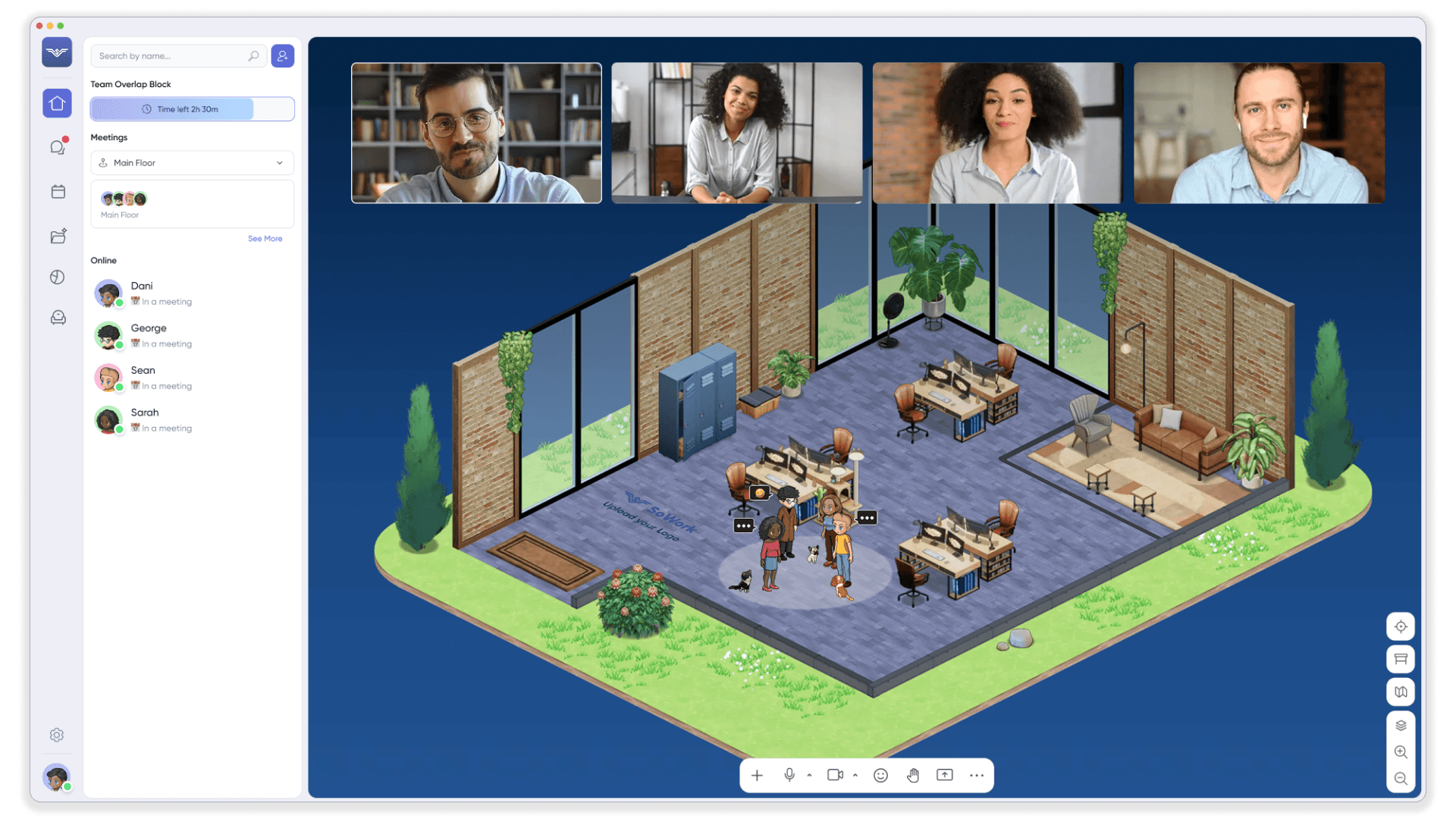
Understanding the Strategic Digital Office Tool Stack
The difference between high-performing remote teams and struggling ones rarely comes down to individual tool features. It comes down to tool architecture how your digital tools relate to each other and support your workflows as a unified system. In a remote setting, a well-architected stack is especially important, as digital tools must simulate physical office interactions and facilitate communication, presence, and spontaneous collaboration in a virtual workspace. When teams scale from 10 to 50 to 100+ members, coordination overhead becomes the primary productivity bottleneck, not individual task execution.
A strategic digital office tool stack follows three distinct layers working in harmony: a virtual office coordination layer where teams gather and align, productivity suites where content gets created, and specialized applications where specific work happens. This architecture matters because it establishes clear boundaries for when to use which tool, eliminating the confusion that leads to context switching and duplicated effort. Context switching costs can drain productivity through interruption and reorientation time. Remote teams often handle several projects at the same time, making task management crucial.
Layer 1: Virtual Office and Coordination Hub
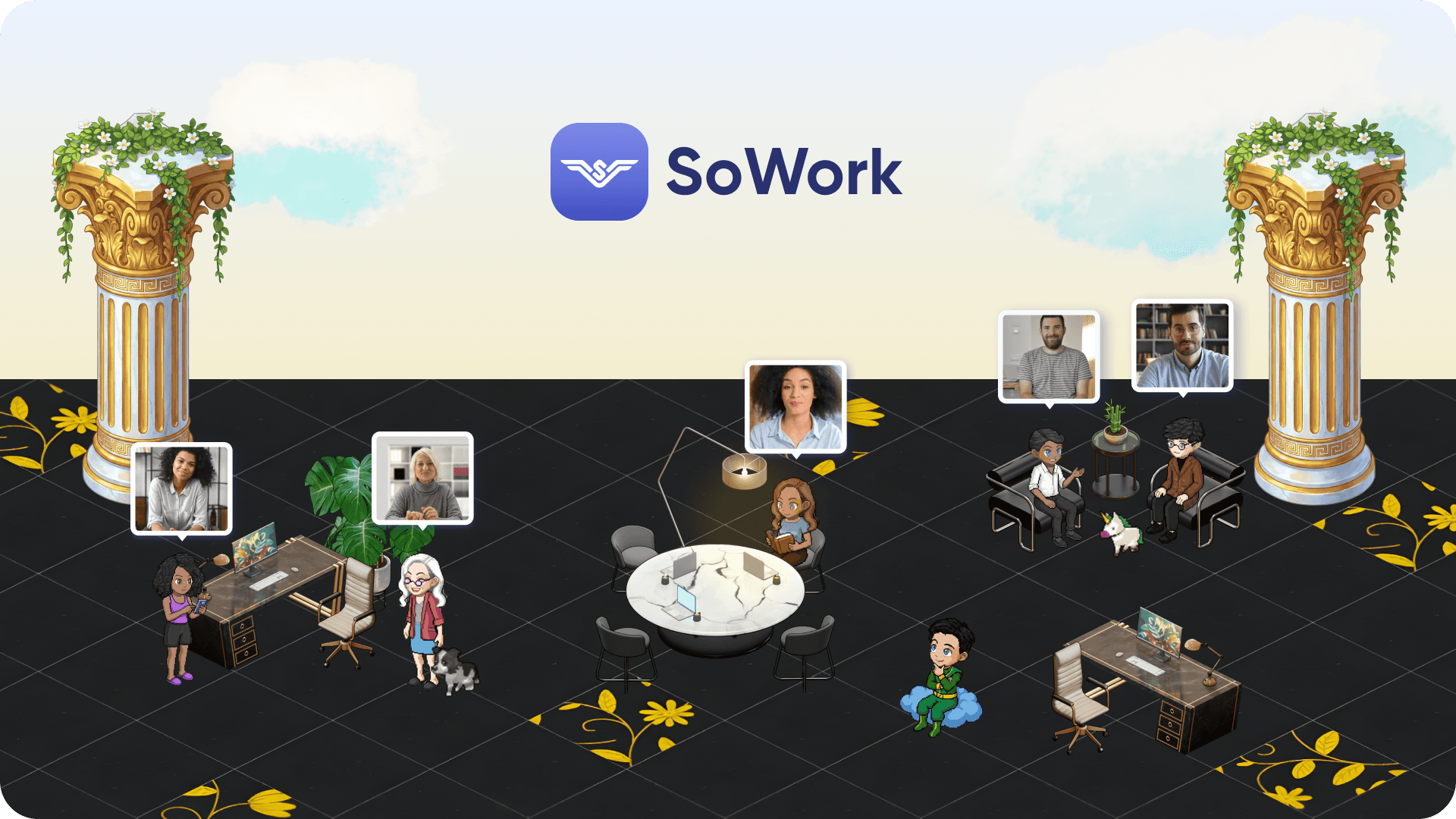
SoWork represents the first layer of a modern remote work setup, an AI-powered virtual office that serves as the central hub connecting meetings, team communication, presence visibility, and daily collaboration. In addition to these features, virtual office platforms provide virtual meeting spaces that replicate in-person office dynamics for remote teams, offering immersive environments with spatial audio and natural interactions. Unlike standalone video conferencing or team chat tools, a virtual office provides spatial presence indicators showing who is available, busy, or in meetings, enabling the spontaneous collaboration that remote workers often miss from physical offices. This visibility is crucial, as remote teams need to know who's available, focused, or in meetings without sending 'are you free?' messages.
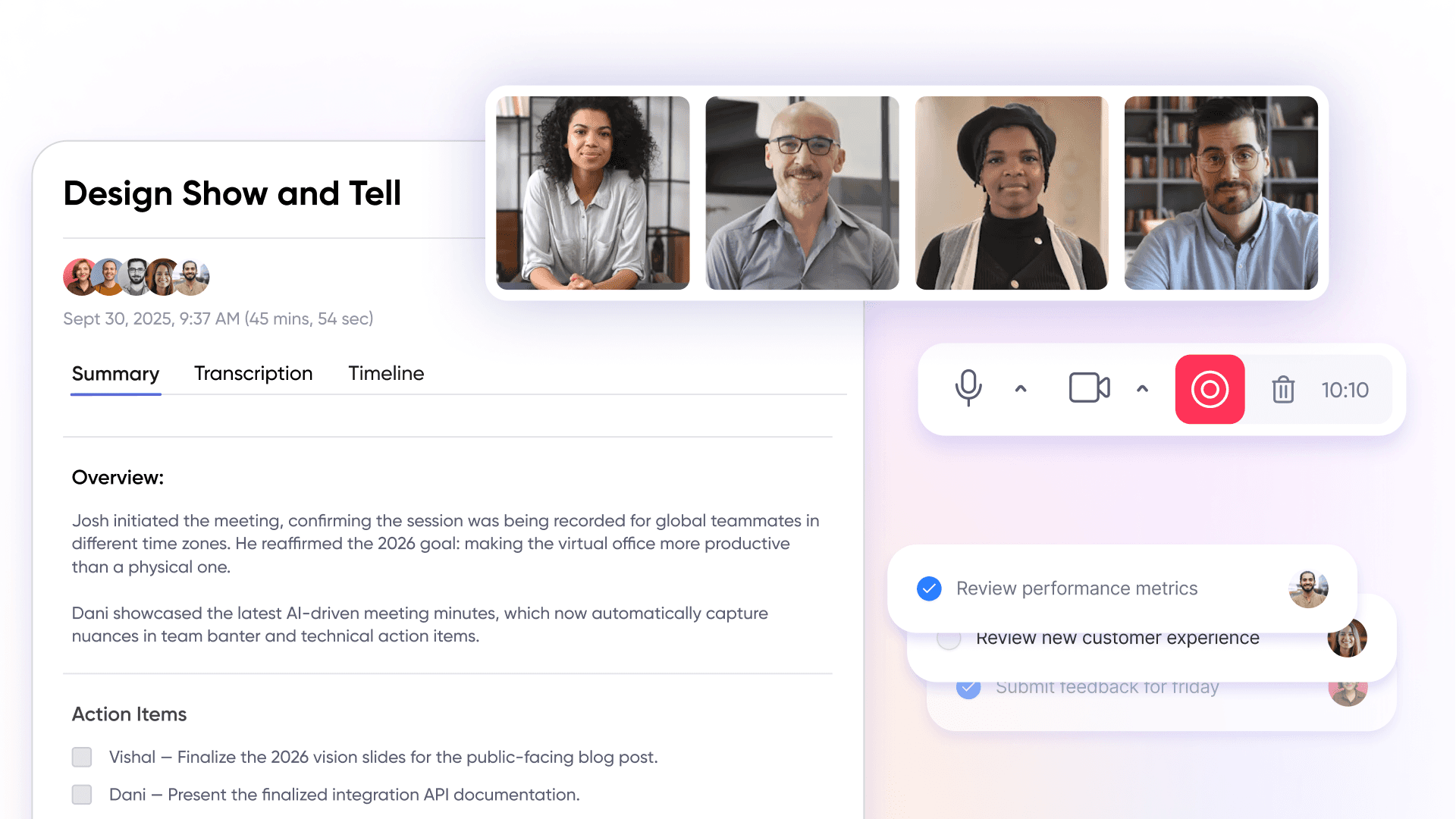
This layer reduces context switching by providing a single digital workspace where team members can see each other’s availability, jump into video calls without scheduling, access AI-generated meeting summaries, and maintain shared context across conversations. SoWork’s meeting library stores transcripts, decisions, and action items in a searchable format, eliminating the information loss that typically occurs between meetings.
For growing teams, this coordination layer becomes critical once you exceed 15-20 people. At that size, the informal coordination that worked with a smaller group breaks down. Without a central hub for real-time communication and presence management, teams resort to excessive scheduled meetings, lengthy email chains, and constant Slack interruptions all of which drain productivity. Virtual office platforms serve as central digital workspaces that help remote teams maintain presence and communicate in real time.
Layer 2: Core Productivity and Document Suites
Microsoft 365 and Google Workspace form the productivity foundation where actual content creation happens documents, spreadsheets, presentations, and file sharing. These suites include comprehensive office apps, such as word processors, spreadsheets, and presentation tools, enabling seamless remote teamwork and real-time editing within an all-in-one platform. These suites provide real-time collaboration, version control, and cloud-based storage that remote teams require for document collaboration.
The key distinction is that these productivity suites integrate with rather than replace the virtual office layer. Document creation happens in Word or Google Docs, but the coordination around that document reviewing it together, discussing changes, making decisions happens in the virtual workspace. SoWork integrates with both Microsoft 365 and Google Workspace, allowing teams to open documents within the virtual office environment without switching contexts.
As organizations scale, licensing models, admin complexity, and cross-team collaboration features become significant considerations. Microsoft 365 offers all-in-one functionality for office apps, cloud storage, and collaboration tools. Microsoft 365 offers robust device management and security controls suited to larger enterprises, while Google Workspace provides simpler administration and stronger browser-based collaboration for teams that prefer lightweight infrastructure.
A digital workspace allows employees to access applications, data, and desktops from anywhere.
Layer 3: Specialized Tools and Automation
Project management platforms like Asana, Monday.com, and ClickUp handle task tracking, workflow management, and project coordination. Task management tools are essential for project planning and workflow tracking, helping remote teams stay organized and efficient. CRM systems manage customer relationships, development tools support engineering teams, and workflow automation connects everything through tools like Zapier. Zapier connects disparate apps and automates repetitive manual tasks, enhancing productivity.
These specialized tools layer on top of the virtual office and productivity suites, not alongside them. The integration requirements are critical: meeting action items from SoWork should flow automatically into your project management tool, document updates should trigger notifications in relevant channels, and status changes should be visible across the stack without manual updates. These tools help organize tasks and track tasks for remote teams, ensuring nothing falls through the cracks. Automation removes a lot of manual work from daily routines, allowing teams to focus on higher value work.
Choosing tools in this order virtual office first, productivity suite second, specialized tools third prevents the fragmentation that plagues most remote teams. When specialized tools get selected first without a coordination layer in place, each tool becomes its own silo, requiring team members to constantly switch between disconnected systems. These integrations support remote team collaboration by centralizing workflows and reducing tool fragmentation.

Essential Tool Categories for Remote Teams Growth
Building on the three-layer foundation, selecting the right collaboration tools within each category determines how effectively your team can collaborate and scale. The following recommendations prioritize tools that specifically address remote team challenges: visibility, alignment, coordination, and efficient collaboration across time zones. Effective online workspace platforms bring everything under one roof, including communication, file storage, project tracking, and meeting tools.
Visual collaboration tools, such as digital whiteboards, enable remote teams to brainstorm, plan, and ideate together in real time using shared, interactive canvases. These platforms support multi-user interaction and enhance teamwork with visual elements and integration capabilities.
Central Virtual Office and Communication
SoWork serves as the primary recommendation for a virtual office platform, combining AI-powered meeting summaries, spatial presence indicators, unified communication tools, and seamless collaboration in a single digital workspace. Teams report formal meetings dropping by approximately 60% after adoption because spontaneous communication replaces unnecessary scheduled calls.
Key features for scaling teams include:
Presence management showing who is available, in meetings, or focused on deep work
Instant messaging and topic-segmented channels for team chat
Slack is a popular messaging platform that centralizes team communication and integrates with many other tools.
Video meetings (scheduled and spontaneous) with screen sharing and annotations
Zoom is widely considered the top video conferencing app due to its ease of use and reliability.
Support for virtual backgrounds in video meetings to enhance remote meeting experiences
AI-generated summaries and transcripts stored in a searchable meeting library
Guest access for external partners and client meetings
Integration with Google Calendar, Outlook, and productivity suites
Alternative platforms serve specific use cases. Gather provides a playful virtual environment suited to creative teams prioritizing culture. Tandem offers lightweight presence and quick calls for smaller teams. WorkAdventure provides customizable virtual spaces for events and team building. However, SoWork’s combination of AI capabilities, professional client meeting support, and tight integration with productivity tools makes it the strongest choice for growth-focused remote teams.
Document and Content Collaboration Systems
Microsoft 365 offers the most comprehensive productivity suite for teams requiring desktop application strength, advanced security controls, and enterprise-grade administration. The base tier provides 1TB of OneDrive storage per user significantly more than Google Workspace Starter’s 30GB. For teams with existing Windows infrastructure, Microsoft Teams integration, Intune device management, and Defender security tools provide seamless collaboration across the entire stack.
Google Workspace excels in browser-based real-time collaboration with a simpler learning curve and lighter administration overhead. Google’s 2025 pricing restructure bundled Gemini AI capabilities across plans without separate charges, making it attractive for teams wanting AI-assisted document creation without premium licensing. Document collaboration happens directly in the browser with minimal software installation.
LibreOffice and WPS Office provide cost-effective alternatives for budget-conscious teams. Collabora Online offers self-hosted web-based editing with OpenDocument format support, relevant for organizations prioritizing data sovereignty or avoiding vendor lock-in. These alternatives work best when document formatting requirements are flexible and tight integration with cloud services is less critical.
Integration with the virtual office layer matters more than individual suite features. Both Microsoft 365 and Google Workspace connect to SoWork, allowing document review sessions, whiteboard brainstorming, and collaborative editing within the virtual workspace rather than requiring separate application switching.
Project Management and Task Coordination
Asana provides structured project plans with strong portfolio and goal tracking at higher tiers. Teams appreciate clear hierarchies for managing projects and task dependencies. Business tier pricing runs approximately $10.99 per user monthly, scaling to approximately $55 monthly for a 5-user team.
ClickUp offers the highest flexibility with built-in time tracking, Gantt charts, docs, and robust workflow automation. Pricing is more competitive at approximately $7 per user monthly at Business tier. The tradeoff is complexity ClickUp’s feature density creates a steeper learning curve that may slow onboarding for less technical teams.
Monday.com excels in visual boards and user-friendly interfaces, making it accessible for teams new to project management tools. However, minimum seat requirements and higher per-user costs (approximately $12 per user at Standard tier) can inflate expenses as teams scale, particularly when automation features require premium tiers.
All three platforms integrate with SoWork, enabling meeting action items to flow directly into project task lists. When evaluating project management platforms, prioritize native integrations with your virtual office and productivity suite over standalone feature comparisons.
Leveraging AI-Powered Tools for Remote Teams
CORE REALITY: AI-powered tools are not just improving remote teams they are fundamentally redefining "Operational Excellence" in distributed workforces. By automating routine tasks and delivering actionable insights, these solutions eliminate "Manual Overhead" and force teams to focus on high-value work that drives actual business outcomes.
Fact: AI-powered project management tools automatically prioritize tasks, assign responsibilities based on real-time workload analysis, and track progress without human intervention. This creates "Perfect Alignment" remote teams operate without bottlenecks because the system prevents them. AI-driven communication tools solve the "Language Barrier Problem": real-time translation, personalized feedback loops, and communication optimization that actually improves team interactions instead of just facilitating them.
STRATEGIC FEATURES: The tools that matter include "Workflow Automation," advanced analytics that predict bottlenecks, and seamless integration that eliminates "Tool Fragmentation." Platforms like ClickUp and Asana now deploy AI assistants that summarize meetings, generate next steps automatically, and create tasks from conversations without human input. These capabilities don't just streamline project management they eliminate "Decision Lag" and enable data-driven choices that happen at the speed of business.
COMPETITIVE MANDATE: Remote teams that adopt AI-powered tools achieve "Productivity Multiplication," superior task tracking, and maintain "Universal Alignment" regardless of geographic distribution. As AI continues to evolve, integrating these solutions into your digital office stack isn't optional it's the baseline requirement for maintaining "Digital Age Competitiveness."
Unified Presence and Communication in Distributed Workforces
Fact: Distributed teams using fragmented communication tools lose 23% productivity to "Context Switching" between apps. Unified presence and communication platforms eliminate this "Digital Friction" they are the operational backbone that separates thriving remote teams from those drowning in communication chaos. Microsoft Teams and Google Workspace don't just offer integrated platforms they create unified command centers that merge instant messaging, video calls, and file sharing into a single productivity engine for real-time collaboration.
Strategy: End the app-juggling nightmare. Unified communication platforms obliterate the need to context-switch between disconnected tools that create "Communication Silos." With team chat, video meetings, and document sharing consolidated in one interface, teams execute seamless transitions between conversations, brainstorming sessions, and project updates without productivity hemorrhaging. Real-time presence indicators become your team's "Digital Radar" showing who is available, busy, or offline nabling remote workers to coordinate meetings and spontaneous discussions with zero friction delays.
Product Truth: Microsoft Teams functions as your team's "Digital Command Center," supporting instant messaging, video calls, and file sharing within a unified interface architecture. Google Workspace delivers parallel capabilities, enabling remote teams to collaborate on documents, schedule video meetings, and share files without tool fragmentation. These communication platforms integrate with other collaboration ecosystems, ensuring information flows seamlessly across your digital workspace without creating the "Tool Graveyard" that kills institutional knowledge.
Implementation Result: Unified presence and communication tools eliminate the "Collaboration Chaos" that plagues distributed workforces. They reduce misunderstandings, minimize delays, and forge a culture of seamless collaboration the critical differentiators for successfully scaling remote and hybrid teams beyond traditional productivity limits.
Digital Transformation for Distributed Teams
"Digital Transformation" is no longer optional for distributed teams aiming to dominate today's hyper-competitive business landscape. Fact: Teams that embrace comprehensive digital tools and platforms outperform traditional setups by 40% in task management efficiency and cross-location collaboration metrics.
"Digital Workplace" solutions like Wimi, Jamespot, and Asana create a unified command center where remote teams orchestrate projects, centralize file access, and monitor real-time progress. These platforms eliminate the "Context Switching" problem distributed teams manage tasks collaboratively within a single ecosystem, ensuring universal access to critical information while driving collective goal achievement. Automation features systematically eliminate repetitive workflows, redirecting human capital toward strategic innovation and high-value deliverables.
Beyond pure productivity metrics, "Digital Transformation" empowers remote teams to engineer personalized customer experiences and execute data-driven strategic decisions. By integrating digital tools into every operational layer, distributed teams achieve measurable performance improvements, slash operational overhead by 30%, and respond to market volatility with unprecedented agility.
For remote teams, "Digital Transformation" transcends software adoption—it's about architecting a unified digital ecosystem that champions collaboration, operational transparency, and continuous optimization. Strategic investment in the right digital infrastructure and workflows positions your team for sustainable competitive advantage in the digital-first economy.
Security and Compliance Considerations for Remote Collaboration
SoWork prioritizes security at every layer, leveraging industry-leading cloud infrastructures to safeguard your remote collaboration environment. Hosted on Amazon Web Services (AWS) and Google Cloud Platform (GCP), SoWork benefits from both platforms' ISO 27001 and SOC 2 certifications, ensuring rigorous adherence to global security standards.
Our video infrastructure is distributed across multiple AWS regional media servers in the United States, Europe, and Asia-Pacific. This setup not only optimizes performance by automatically routing sessions through the region with the lowest latency but also ensures that meeting recordings are securely stored in the US-East region with encrypted backups and multi-region redundancy for maximum data resilience.
Application and database services run on Google Cloud’s NAM5 multi-region (U.S. Central) infrastructure, where all data is encrypted both at rest and in transit using TLS 1.2+ protocols. Access to sensitive information is tightly controlled and continuously logged to prevent unauthorized use.
In full compliance with GDPR principles, SoWork enforces lawful, secure, and minimal data processing practices, including data minimization and strict retention policies, to protect personal information. This comprehensive security framework provides remote teams with the confidence to collaborate effectively, knowing their data integrity and privacy are uncompromised.
By embedding these enterprise-grade security measures, SoWork not only protects your business assets but also fosters the trust essential for scalable, secure remote collaboration.
Implementation Strategy for Growing Remote Teams
Successful tool adoption follows a phased approach that avoids overwhelming teams during growth periods. Each phase builds on the previous, ensuring the coordination layer is established before adding complexity.
Phase 1: Establish Virtual Office Foundation
Timeline: Days 1-30
Begin by implementing SoWork as your central hub for team communication and coordination. This foundation sets the pattern for how all other tools will integrate.
Connect calendar systems (Google Calendar or Outlook) to enable scheduling and presence synchronization
Define communication boundaries specify which conversations happen in the virtual office versus email versus other channels
Train team on workflow benefits rather than features demonstrate how presence visibility reduces scheduling friction and how AI summaries eliminate note-taking
Migrate recurring meetings into the virtual office environment, starting with internal team syncs before client-facing meetings
Success metrics to track:
Reduction in scheduled meeting count and total meeting duration
Time from question to answer for cross-team queries
Team visibility satisfaction scores
Adoption rate measured by daily active presence
SoWork offers a free 7-day trial, allowing teams to validate the workflow improvements before committing. This low-risk entry point makes Phase 1 accessible for teams uncertain about virtual office adoption.
Phase 2: Optimize Productivity Suite Integration
Timeline: Days 30-60
With the coordination layer established, optimize how document collaboration flows through the virtual workspace.
Set up and connecting your cloude suite (OneDrive or Google Drive)
Configure document sharing defaults ensuring files are accessible to appropriate team members without manual permission management
Establish document review workflows using the virtual office for synchronous review sessions rather than asynchronous comment threads
Position this phase as workflow simplification rather than tool addition. Teams should experience fewer context switches as document work becomes integrated with communication rather than separate from it.
Advanced features to implement:
Automated task extraction from meeting transcripts into project management tools with Zapier
Document version notifications in relevant virtual office channels
Template libraries accessible from within the virtual workspace
Phase 3: Layer Specialized Tools Strategically
Timeline: Days 60-90 and ongoing
With coordination and productivity layers operational, specialized tools can integrate cleanly rather than creating new silos.
Connect project management tools (Asana or ClickUp – coming soon as integration) via native integrations or Zapier automations
Configure data synchronization ensuring meeting action items, document updates, and task status changes flow between systems without manual entry
Build reporting dashboards that pull data from across the tool stack into unified views
Document integration patterns so new team members understand how tools connect
Ongoing optimization includes:
Regular audits of tool utilization and unused features
Quarterly reviews of automation efficiency and failure rates
Training sessions for advanced features as teams mature
Adjustment of tier levels based on actual usage patterns rather than anticipated needs
Tool Selection Criteria and Comparison Framework
Evaluating tools for scaling remote teams requires criteria specific to growth challenges rather than generic feature comparisons. The following frameworks focus on factors that matter as team size increases, including the availability of enterprise plans that cater to larger organizations with additional features, higher team capacities, and integration capabilities to meet complex business needs.
Additionally, digital workspace platforms provide a secure environment for employees to access applications and data from anywhere.
Comparison Table: Virtual Office Platforms for Scaling Teams
Platform | Team Size Range | Key Features | Integration Depth | Monthly Cost (per user) |
SoWork | 5-200+ | AI summaries, spatial presence, client guest access, meeting library | Deep (Google/Microsoft suites, Slack, Asana, GitHub, Zapier) | Free tier available; paid plans scale with features |
Gather | 5-100 | Virtual space, avatars, spatial audio | Moderate (Google Calendar, Slack) | $15/user |
Tandem | 5-100 | Lightweight presence, quick calls | Light (calendar, Slack) | Free for small teams |
WorkAdventure | Event-based | Customizable spaces, events | Limited | Self-hosted options available |
Synthesis: SoWork provides the strongest combination of enterprise features, AI capabilities, and integration depth for growth-focused teams. Gather suits creative teams prioritizing playful culture over productivity features. Tandem works for smaller teams wanting minimal overhead. WorkAdventure serves event-specific use cases rather than daily operations.
Productivity Suite Evaluation Matrix
Criteria | Microsoft 365 | Google Workspace | LibreOffice/Collabora |
Admin Complexity | Higher (robust controls) | Lower (simpler management) | Variable (depends on hosting) |
Collaboration Features | Strong (desktop + web) | Excellent (browser-native) | Moderate |
Virtual Office Integration | Native SoWork support | Native SoWork support | Possible via API |
Cost (Business tier, per user) | ~$12.50/month | ~$12/month | Free or hosting costs |
Storage | 1TB base | 30GB-2TB (tier dependent) | Self-managed |
AI Capabilities | Copilot (premium/add-on) | Gemini (included) | Limited |
Security/Compliance | Enterprise-grade | Strong | Self-managed |
Recommendations by team size:
10-25 employees: Google Workspace Business Starter or Standard for simplicity; Microsoft 365 Business Basic if Windows-centric
25-50 employees: Google Workspace Business Plus or Microsoft 365 Business Premium for enhanced security and storage
50-100+ employees: Enterprise tiers with advanced compliance, unlimited storage, and dedicated support
Measuring Success and ROI of Digital Office Tools
FACT: Your investment in digital office tools demands measurable "Value Extraction," not wishful thinking about transformation outcomes. Tracking the right performance indicators task completion rates, project delivery timelines, employee engagement, and customer satisfaction creates the "Success Blueprint" that separates winning digital strategies from expensive failures.
Project management platforms like Asana and Trello aren't just productivity tools they're your "Performance Intelligence Centers." Built-in analytics and reporting features become the command center for monitoring team productivity, exposing workflow bottlenecks, and crushing process inefficiencies. These insights fuel data-driven decisions that identify which tools deliver results and which drain resources from your remote teams.
ROI calculation transcends basic cost savings—it captures productivity acceleration, collaboration breakthroughs, and customer experience elevation. Reducing project delivery times or boosting employee engagement creates direct bottom-line impact that compounds over time. Regular metric reviews become your "Optimization Engine," eliminating underperforming tools and channeling investment toward solutions that generate measurable business outcomes.
The digital workplace evolution demands relentless measurement and optimization—this is your competitive weapon. Continuous performance tracking ensures your digital office tools become growth accelerators, not productivity graveyards that burn budget without delivering long-term business objectives.
Common Implementation Challenges and Solutions
Even with strategic planning, remote team tool implementations encounter predictable obstacles. Addressing these proactively prevents adoption failures and wasted investment.
Tool Fragmentation and Context Switching
The problem: Teams adopt tools reactively a chat app here, a video tool there, a project management platform somewhere else. Each tool becomes a silo requiring separate logins, separate notifications, and separate mental models. Remote workers report spending up to 23% of their time switching between disconnected tools.
Solution: Implement SoWork as the coordination hub before adding specialized tools. Establish clear use case boundaries: presence and spontaneous communication happen in the virtual office; deep work happens in productivity suites; task tracking happens in project management tools. Create a one-page reference document showing which tool handles which type of work.
Specific tactics:
Map existing workflows before adding new tools
Conduct training sessions focused on “when to use what” rather than individual tool features
Roll out new tools gradually (one team at a time) to catch workflow gaps before organization-wide adoption
Integration Complexity During Rapid Growth
The problem: As teams grow rapidly, integration configurations built for 15 people break at 50. API rate limits get exceeded, custom automations fail silently, and data synchronization lags create conflicting information across systems.
Solution: Prioritize native integrations over custom development. When evaluating new tools, verify integration maturity with your existing stack before committing. Plan dedicated technical resources for integration maintenance during growth phases.
Specific approaches:
Select tools with published API documentation and active developer communities
Schedule integration audit sprints every quarter during rapid growth periods
Maintain technical documentation of all integration configurations
Build monitoring for critical data flows to catch synchronization failures early
Change Management and User Adoption
The problem: Team members resist new tools, especially when they perceive additions as complexity rather than simplification. Adoption rates plateau below useful thresholds, and shadow IT emerges as people revert to familiar tools.
Solution: Position the virtual office as productivity enhancement rather than additional tool overhead. Demonstrate time savings and workflow improvements with concrete examples before requiring adoption. Identify champions within each team who will advocate for new workflows.
Tactics for successful adoption:
Champion programs pairing early adopters with skeptical team members
Phased rollouts starting with receptive teams before expanding
Productivity metrics tracking showing before/after comparisons
Regular sharing of success stories and time savings examples
Free plan availability (like SoWork’s trial) to reduce commitment barriers
Cost Management During Scaling
The problem: Tool costs that seemed reasonable at 10 users become significant at 50 or 100. Per-seat pricing multiplies, tier upgrades become necessary for features that only some users need, and hidden costs (storage overages, automation limits, guest access fees) appear unexpectedly.
Solution: Focus on total cost of ownership including productivity gains rather than per-tool pricing alone. A $15/user tool that reduces meeting overhead by 60% delivers more value than a $5/user tool that fragments workflows. Plan for volume discounts early and monitor utilization metrics to avoid paying for unused seats.
Specific strategies:
Negotiate multi-year contracts during growth phases to lock in pricing before vendor increases
Conduct regular usage audits to identify and eliminate unused licenses
Build ROI measurement frameworks connecting tool costs to productivity metrics
Consider tier-based licensing where power users access advanced features while occasional users stay on basic plans
Conclusion and Next Steps
The most effective digital office tool stacks for scaling remote teams follow a strategic three-layer architecture. SoWork serves as the AI-powered virtual office foundation the central hub where remote and hybrid teams coordinate, communicate, and maintain shared context. Microsoft 365 or Google Workspace provides the productivity suite layer for document collaboration and content creation. Specialized project management tools like Asana or ClickUp layer on top, integrated through native connections and workflow automation.
This architecture works because it establishes clear boundaries between tools while maintaining seamless communication across the stack. Teams know where to go for coordination (virtual office), where to create content (productivity suite), and where to manage tasks (project management platform). The virtual office layer specifically addresses the coordination overhead that becomes the primary productivity bottleneck as remote teams scale beyond 15-20 members.
Immediate actionable steps:
Start a SoWork free trial to experience virtual office coordination before committing validate the workflow improvements with your team
Audit current tool fragmentation costs by counting the number of tools requiring daily context switches and estimating time lost
Define scaling milestones (10-25, 25-50, 50-100+ employees) and identify which tool upgrades each milestone will require
Plan phased implementation using the 30-60-90 day framework, starting with virtual office foundation before adding specialized tools
Related topics worth exploring: Remote team culture development within virtual workspaces, AI-enhanced productivity workflows for document creation and meeting management, hybrid work policies balancing office and remote coordination, and revenue operations alignment connecting sales and marketing tools to the coordination layer.
Additional Resources
Digital Office Tool Evaluation Checklist:
Integration capabilities with existing tools (native vs API vs Zapier)
Scalability limits (user caps, storage limits, automation quotas)
Security compliance requirements (SOC 2, ISO 27001, GDPR)
Total cost of ownership including hidden fees and tier upgrades
User adoption complexity and learning curve assessment
Implementation Timeline Template:
Days 1-30: Virtual office foundation SoWork deployment, calendar integration, team training, workflow definition
Days 30-60: Productivity suite optimization SSO setup, document workflow integration, AI feature activation
Days 60-90: Specialized tool integration project management connection, automation configuration, reporting consolidation
ROI Measurement Framework:
Productivity metrics: meeting count reduction, time-to-decision improvements, task throughput
Coordination overhead: hours spent on scheduling, status update meetings, information searching
Tool consolidation savings: subscriptions eliminated, license cost reduction
Employee satisfaction: remote access quality, tool friction scores, collaboration ease ratings
FAQ
1. What makes SoWork a strong choice for scaling remote teams?
2. Why should remote teams start with SoWork before adding other tools?
3. How does SoWork improve day-to-day communication for remote teams?
4. What can SoWork do that regular chat or video tools cannot?
5. Is SoWork a good fit for teams that are growing quickly?
6. How does SoWork work with Microsoft 365 or Google Workspace?
7. Can SoWork also support project management workflows?
8. Why does the guide recommend SoWork so strongly?
Blogs
Read Similar Articles

Remote Team Analytics: Complete Guide to Data-Driven Remote Work Management in 2026

Complete Guide to Gaining Visibility Into Remote Team Performance and Collaboration
