SoWork vs Kumospace: Which Wins in 2026?
Vishal Punwani
Published:
Updated on:
SoWork is the stronger choice for distributed teams who need AI-powered meeting memory, deep presence awareness, and an all-in-one workspace. Kumospace wins on spatial audio polish and virtual events. For daily work collaboration with analytics and fewer tools to juggle, SoWork has the edge. For social presence and event hosting, Kumospace fits better.
What is SoWork and what problem does it solve for distributed teams?
SoWork is an AI-powered virtual office that eliminates the scheduling overhead crushing distributed teams. It replaces the endless cycle of Zoom links and Slack pings with a persistent workspace where teammates can see each other, talk instantly, and stay aligned without booking a meeting.
Remote workers attend 80% more meetings per week than in-office counterparts, averaging 25.6 vs 14.2 meetings [1]. SoWork attacks that problem directly. Its presence layer shows who is free, focused, or in a meeting at a glance. Instant Meetings let you start a conversation in one click. AI Meeting Memory records, transcribes, and summarizes every session automatically. The result: less calendar friction, more spontaneous collaboration, and a team that actually feels connected. Plans start free for up to 10 users, scaling to $6-$15 per user per month [2].
What is Kumospace and what problem does it solve for distributed teams?
Kumospace is a spatial virtual office where teammates navigate as avatars on a customizable map. Its core problem: remote isolation and the loss of serendipitous, in-person interaction.
Founded in 2020 in New York City, Kumospace was built after its founders struggled to replicate a live networking event using existing video tools [3]. The platform's headline feature is spatial audio: you hear teammates louder as you walk closer and fade out as you move away, recreating hallway conversations without scheduling a call [3]. Over 20,000 teams globally use Kumospace for daily work, all-hands meetings, whiteboard sessions, and virtual events [4]. It bundles chat, video, screen sharing, and whiteboards in one browser-based environment.
How does SoWork replicate spontaneous, ambient collaboration from a physical office?
SoWork replicates physical-office spontaneity through real-time presence indicators and one-click Instant Meetings, so you can tap a teammate on the shoulder digitally without sending a calendar invite.
The visual office map shows who is free, in deep focus, or already in a meeting. Automatic Calendar Sync keeps those statuses accurate without anyone manually updating them. When you see a teammate is free, you walk up and talk, just like you would at a desk. Focus Modes (Simple Mode and Mini Mode) let individuals signal deep work time while staying loosely visible to the team. SoWork's spatial video technology cuts scheduled meeting time by 41% for teams that adopt it daily [5], because most quick questions get resolved in seconds, not via a booked call.
How does Kumospace facilitate spontaneous interaction and presence awareness?
Kumospace uses spatial audio and avatar proximity to trigger spontaneous conversations: walk your avatar near a colleague and you'll hear them, just like passing someone in a hallway.
The platform's map shows every teammate's location and status in the virtual office at a glance. You can enter a room and close the virtual door for privacy; anyone wanting in must knock first [6]. Kumospace also integrates with Google Calendar and Outlook to automatically update your status when a meeting starts [7]. The result is a persistent presence layer that keeps teams loosely aware of each other throughout the day. It works best when the whole team keeps the office open, since the ambient awareness only pays off with consistent adoption.
How do SoWork and Kumospace compare on presence awareness and always-on office feel?
Both platforms offer persistent presence, but SoWork adds AI-driven status automation and analytics on top of the visual map, while Kumospace leans harder on spatial audio as the primary presence signal.
Feature | SoWork | Kumospace |
|---|---|---|
Visual availability map | Yes | Yes |
Calendar auto-sync | Yes (Google + Outlook) | Yes (Google + Outlook) |
Focus/DND modes | Yes (Simple + Mini Mode) | Yes (room door close) |
AI status insights | Yes | No |
Spatial audio | Yes | Yes (primary feature) |
Team analytics dashboard | Yes (Premium) | No |
SoWork's analytics layer lets leaders see participation patterns over time. Kumospace's spatial audio is more refined, but presence data stays surface-level without the analytics depth SoWork provides.
How do SoWork and Kumospace compare on video and audio communication?
Both platforms offer built-in video, spatial audio, and screen sharing. SoWork adds AI meeting summaries and action items; Kumospace's spatial audio is its most polished differentiator.
SoWork's Premium plan includes meeting recordings, AI-generated summaries, and action items automatically captured after every call [8]. That matters because 70% of meeting decisions are forgotten within 24 hours without notes [9]. Kumospace bundles channels, direct messages, unlimited chat history on paid tiers, screen sharing, and whiteboards [10]. Its spatial audio is widely praised for feeling natural. One real drawback: Kumospace supports only one concurrent recording session, which limits teams running parallel meetings [11]. SoWork has no such cap on recordings at the Premium tier.
How do SoWork and Kumospace differ in workspace customization and environment design?
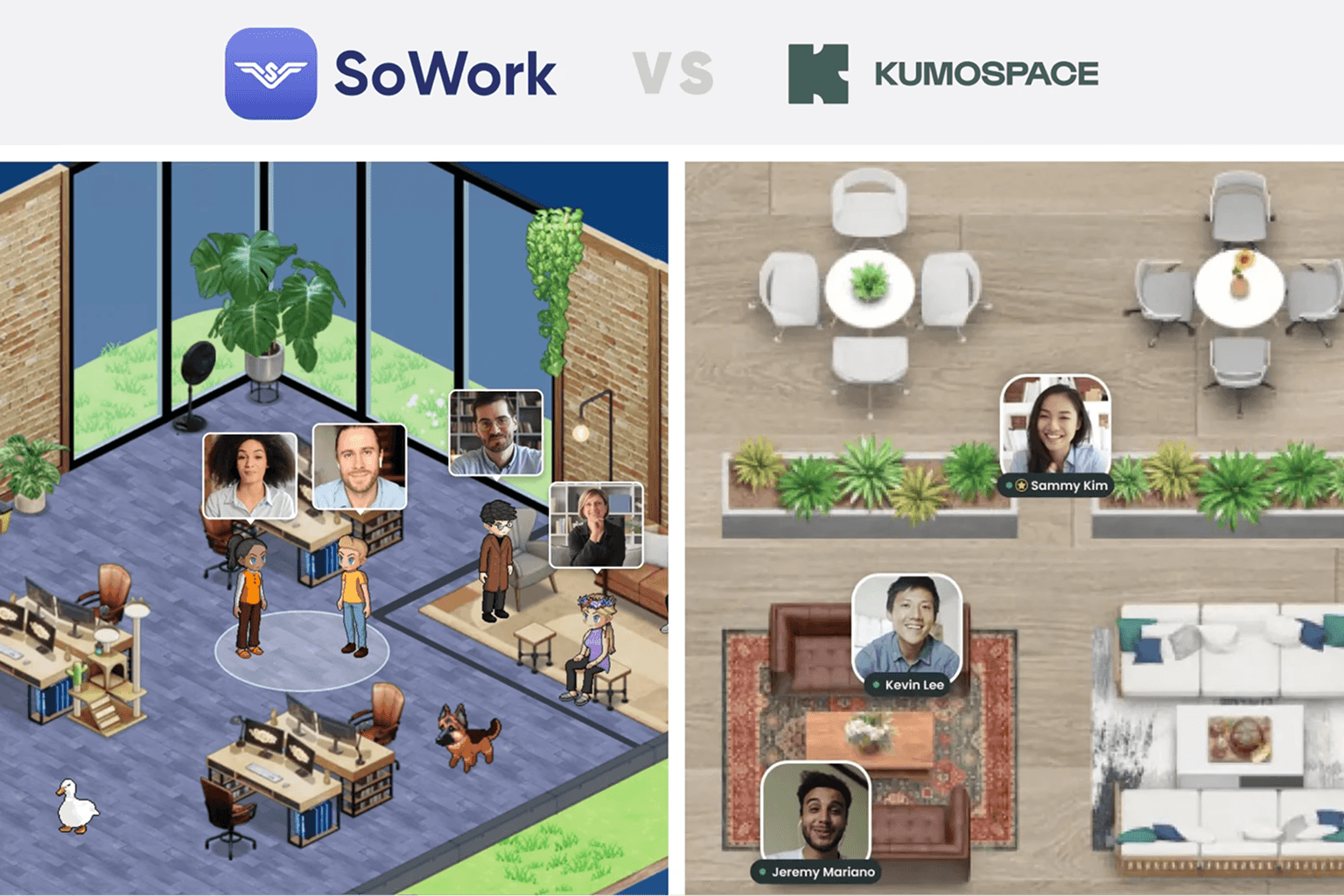
SoWork's customization is inspired by The Sims, with a 2.5D immersive world plus a Simplified Mode for teams who prefer a flat UI. Kumospace uses a top-down floor-plan style with customizable rooms and branded spaces.
SoWork lets teams design office layouts, personalize avatars, and even add company logos to avatar apparel on Premium plans over 30 users [12]. G2 reviewers have called SoWork's offering among the most customization options of any virtual office on the market [13]. Teams can also toggle to Simplified Mode, a non-world interface that looks like a traditional meeting tool, giving every individual a choice [14]. Kumospace's room-based design is clean and browser-native, with customizable spaces suited to both daily work and large events. Both offer pre-built templates to get started fast.
How do SoWork and Kumospace integrate with tools like Slack, Zoom, or project management software?
SoWork integrates with Zapier, Slack, Miro, GitHub, Google Calendar, and Outlook. Kumospace connects with Slack, Microsoft Teams, Google Calendar, Outlook, Google Drive, and Miro, but lacks Zapier support.
SoWork's Zapier integration on the Premium plan is a meaningful advantage: it lets teams push meeting outputs, action items, and status changes into virtually any project management tool without custom code [15]. Kumospace's integration list is narrower. Multiple reviewers flag that Kumospace's lack of Zapier and limited automation hooks can introduce manual data transfer between apps [16]. For teams already running a multi-tool stack, SoWork's broader automation surface reduces friction. Both platforms handle calendar sync well, automatically updating availability when a meeting starts.
How do SoWork and Kumospace compare in scalability for larger distributed teams?
SoWork scales more predictably for teams of 50 to 200+, with volume discounts above 100 users and SSO/SCIM at Enterprise. Kumospace's spatial floor model has documented limitations at larger team sizes.
SoWork's list price for 100 users is $600 per month on Basic or $1,500 per month on Premium billed monthly, with volume discounts available above that threshold [17]. SSO and SCIM are both Enterprise features, enabling automated user provisioning for larger orgs [18]. Kumospace's floor-plan structure has meaningful limitations at scale, with user management becoming harder as team size grows [19]. Kumospace Enterprise removes the 50-guest cap and adds custom onboarding, but pricing requires a sales conversation [20]. For teams planning to grow past 100 people, SoWork's structured scaling path is more transparent.
What are the pricing models for SoWork and Kumospace, and how do they compare in cost?
SoWork is meaningfully cheaper than Kumospace at every comparable tier. SoWork's Basic is $6 per user per month; Kumospace's Business plan starts at $20 per user per month ($16 billed annually).
Plan | SoWork | Kumospace |
|---|---|---|
Free | Up to 10 users | Up to 5 users |
Entry paid (monthly) | $6/user/mo | $20/user/mo |
Entry paid (annual) | $5.40/user/mo | $16/user/mo |
Premium / Business | $15/user/mo | $20/user/mo |
Enterprise | Custom (SSO, SCIM) | Custom (SSO, domain) |
SoWork's free tier is also more generous, covering 10 users vs Kumospace's 5 [21]. At 25 users on annual billing, SoWork Premium runs $300 per month versus Kumospace Business at $400 per month, a 25% cost difference that compounds as teams grow [22].
What criteria should a distributed team use to choose between SoWork and Kumospace?
Choose SoWork if AI meeting outputs, analytics, and a lower per-seat cost matter most. Choose Kumospace if spatial audio polish and virtual event hosting are your primary needs.
Ask these questions before deciding:
Do you need AI meeting summaries and action items automatically? SoWork only.
Is spatial audio the centerpiece of your daily collaboration? Kumospace has the edge.
Do you need Zapier or broad automation? SoWork only.
Are you hosting large virtual events or conferences? Kumospace is purpose-built for this.
Is your team growing past 50 users? SoWork's pricing scales more predictably.
Does your team resist new tools? SoWork's Simplified Mode reduces the learning curve.
Do you need team analytics to monitor engagement? SoWork Premium only.
Which use cases and team types is SoWork best suited for?
SoWork fits best for remote-first startups and scale-ups of 5 to 200 people who want to reduce scheduled meeting overhead while keeping team alignment tight.
It's a strong match for: - Founders and team leads frustrated by Zoom-and-Slack sprawl who want one place for presence, chat, meetings, and AI notes. - Engineering and product teams that need to ship fast and resolve blockers without booking a call. - Companies building remote culture who want a persistent office feel without mandating a return to office. - Teams with analytics needs, where leaders want visibility into participation and meeting patterns. - Organizations migrating from Gather.town who want more AI capability and clearer pricing at scale.
Which use cases and team types is Kumospace best suited for?
Kumospace is best suited for teams that prioritize social presence, virtual events, and a polished spatial audio experience over AI-driven productivity tooling.
It works well for: - Community-driven or culture-first teams that want the office to feel like a social space, not just a productivity tool. - Event organizers running virtual happy hours, conferences, or all-hands for larger audiences. - Hybrid teams wanting a persistent virtual HQ that mirrors a physical floor plan. - Small teams under 30 people where the free or Business plan is cost-effective and the spatial model doesn't hit scale limits. - Teams already using Slack and Google Workspace who want a presence layer that connects to those tools without heavy automation needs.
What are the potential risks or drawbacks of adopting SoWork for a distributed team?
SoWork's immersive 2.5D world uses more GPU and CPU resources than a flat UI, and the value of the platform depends heavily on team-wide daily adoption.
Teams on older hardware may notice performance strain in the full immersive mode; switching to Simplified Mode reduces the load [23]. Like any persistent virtual office, SoWork only delivers its ambient collaboration benefits if the whole team actually keeps it open. Partial adoption kills the presence layer. AI features like meeting summaries and analytics sit behind the Premium plan at $15 per user per month, so smaller teams on Basic miss the most differentiated capabilities. Guest access is free, which helps for client meetings, but SSO and SCIM require Enterprise pricing, which may matter for security-conscious mid-market teams.
What are the potential risks or drawbacks of adopting Kumospace for a distributed team?
Kumospace's main drawbacks are its higher per-seat cost, limited integration ecosystem, a single concurrent recording cap, and spatial model limitations for larger teams.
At $20 per user per month (or $16 annually), Kumospace costs noticeably more than SoWork at every tier [24]. G2 users flag it as expensive as teams grow [25]. The platform supports only one concurrent recording session, which is a real constraint for organizations running parallel meetings [26]. Integration depth is thinner than competitors: no Zapier support means manual data transfer between apps for many workflows [27]. Performance can degrade for participants on older laptops or constrained bandwidth, particularly in densely populated floors [28]. And Kumospace's floor structure has documented limitations for organizations scaling past 100 users [29].
What do real user reviews say about SoWork vs Kumospace collaboration outcomes?
On G2, SoWork scores 4.8 stars from 50 reviews and Kumospace scores 4.7 from 264 reviews. Reviewers rate SoWork higher on meeting business needs, product direction, and quality of support.
G2's head-to-head comparison shows Kumospace is rated slightly easier to use, but SoWork is rated easier to set up and administer [30]. Reviewers preferred doing business with SoWork overall, and rated SoWork higher on feature roadmap direction [31]. G2 users consistently praise Kumospace for creating a fun, engaging virtual office environment and fostering connection [32]. SoWork users highlight ease of use, customization options, and how the platform enhances team communication [33]. Both platforms serve primarily small businesses, with 78-80% of reviews coming from teams under 50 employees [34].
How do SoWork and Kumospace compare to alternatives like Gather, Teamflow, and Sococo?
Gather is the most popular alternative with a 4.8 G2 rating and lower pricing (~$7/user/month annually). SoWork differentiates on AI; Kumospace differentiates on spatial audio and events; Teamflow emphasizes embedded apps.
Platform | Strength | Approx. Price (annual) |
|---|---|---|
SoWork | AI meeting memory, analytics, all-in-one | $5.40-$12/user/mo |
Kumospace | Spatial audio, virtual events | $16/user/mo |
Gather | Largest community, lowest cost | ~$7/user/mo |
Teamflow | Embedded apps, persistence | ~$15/user/mo |
Sococo | Enterprise security, compliance | Custom |
Gather leads on price and community size [35]. SoWork leads on AI-native workflow features. Kumospace leads on event hosting. Sococo targets compliance-heavy enterprises. Teamflow suits teams wanting embedded Google Docs or Notion inside the workspace [36].
Bottom Line: SoWork vs Kumospace for distributed team collaboration
SoWork is the better daily driver for distributed teams who want to reduce meeting overhead, capture decisions automatically, and scale without unpredictable costs. Kumospace is the right pick for teams where spatial audio immersion and virtual event hosting are the primary use cases.
If your team is frustrated by Zoom fatigue, scattered Slack threads, and decisions that get lost after every call, SoWork's AI meeting memory and presence layer directly solve those problems at a lower per-seat cost. Kumospace is a genuinely strong product, especially for social-first teams and event organizers, but its thinner integration ecosystem, higher price, and lack of AI meeting outputs make it a harder sell for teams focused on daily productivity. Start with SoWork's free tier for up to 10 users and see whether your team actually keeps the office open. That adoption test is the real deciding factor for any virtual office platform.
Key Takeaways
SoWork costs $6-$15/user/month; Kumospace costs $16-$20/user/month, making SoWork 25-60% cheaper at comparable tiers.
SoWork's AI Meeting Memory automatically records, transcribes, and summarizes meetings. Kumospace has no equivalent AI meeting feature.
Kumospace's spatial audio is its strongest differentiator and is widely praised for recreating hallway conversations naturally.
SoWork integrates with Zapier, enabling automation into project management tools. Kumospace lacks Zapier support.
Kumospace supports only one concurrent recording session, limiting teams running parallel meetings.
Both platforms offer calendar sync and presence awareness, but SoWork adds a team analytics dashboard on Premium.
Kumospace's floor-plan model has documented scalability limitations for teams above 100 users; SoWork offers volume discounts and clearer enterprise pricing.
On G2, SoWork scores higher on meeting business needs, product direction, and quality of support, while Kumospace scores slightly higher on ease of use.
Sources
Remote workers attend 80% more meetings per week than in-office workers: 25.6 vs 14.2
SoWork plans start free for up to 10 users, scaling to $6-$15 per user per month
Over 20,000 teams globally use Kumospace for daily work, all-hands meetings, and virtual events
Kumospace room door-close feature requires anyone wanting to enter to knock first
SoWork Premium includes meeting recordings, AI-generated summaries, and action items
70% of meeting decisions are forgotten within 24 hours without notes
Kumospace currently supports only one concurrent recording session
SoWork Premium plans over 30 users get a free custom map and company logo on avatar apparel
SoWork's Simplified Mode is a non-world interface that looks like a traditional meeting tool
Kumospace lacks Zapier support and has fewer automation tool integrations compared to competitors
SoWork's list price for 100 users is $600/month on Basic or $1,500/month on Premium billed monthly
Kumospace's floor structure has limitations for larger organizations
SoWork's free tier covers up to 10 users vs Kumospace's 5-user free plan
SoWork Basic is $5.40/user/month annually; Kumospace Business is $16/user/month annually
Kumospace Business plan is $20/user/month or $16/user/month billed annually
Kumospace supports only one concurrent recording session, limiting teams running parallel meetings
Kumospace lacks Zapier support, meaning manual data transfer between apps for many workflows
Kumospace's spatial model has meaningful limitations at scale for teams above 100 users
G2 users consistently praise Kumospace for creating a fun, engaging virtual office environment
G2 users consistently praise SoWork's ease of use, customization, and team communication enhancement
78-80% of both SoWork and Kumospace reviews on G2 come from small businesses under 50 employees
Teamflow pricing lands close to Kumospace at roughly $15 per user per month
FAQ
SoWork vs Kumospace: which is better for distributed team collaboration?
Is Kumospace free to use?
Does SoWork have a free plan?
Which virtual office platform is easier to set up and use?
Does Kumospace work for large teams or enterprise companies?
How does SoWork's AI meeting memory actually work?
Can Kumospace replace Zoom and Slack for a remote team?
Which virtual office is better for virtual events and social gatherings?
Blogs
Read Similar Articles

Remote Team Analytics: Complete Guide to Data-Driven Remote Work Management in 2026

Complete Guide to Gaining Visibility Into Remote Team Performance and Collaboration
