Best Gather Alternatives for Remote Teams in 2026: Complete Platform Comparison
The SoWork Team
Published:
Updated on:
Introduction
Finding the right Gather Town alternatives has become urgent for remote teams facing platform limitations, pricing changes, and evolving collaboration needs. Gather.town has become a popular choice for remote teams seeking virtual collaboration solutions. This comprehensive guide evaluates the leading virtual office platforms in 2026, helping distributed teams select the optimal solution for their specific workflows.
This article covers virtual office software comparisons, integration requirements with existing productivity suites, migration strategies, and detailed cost-benefit analysis. The target audience includes remote team leaders, IT decision makers, and distributed workforce managers who need practical guidance on collaboration platform selection. Teams experiencing tool fragmentation, coordination overhead, limited scalability, team collaboration challenges, or marketing workflow needs in their current Gather setup will find actionable evaluation frameworks here.
Direct answer: SoWork emerges as the most comprehensive Gather alternative for teams seeking an AI-powered virtual office that unifies meetings, chat, presence, and daily collaboration above their existing document suites like Microsoft 365 or Google Workspace.
By the end of this guide, you will:
Understand how virtual office platforms differ from basic video conferencing tools
Evaluate 8 leading Gather Town alternatives against practical team requirements
Build an implementation roadmap for platform migration
Calculate ROI based on reduced context switching and improved coordination
Determine the best-fit platform for your team size and industry by assessing features and limitations
Understanding Virtual Office Platforms
A virtual office platform creates a persistent digital workspace where remote teams maintain presence, communicate spontaneously, and coordinate work without constant meeting scheduling. Unlike standalone video conferencing or chat tools, virtual offices provide spatial context that mimics physical office dynamics enabling the kind of spontaneous conversations and ambient awareness that distributed teams often lose.
These platforms often allow the creation and management of groups, enabling teams to organize users for specific activities or events.
Maintaining a consistent voice in communication is also important for team alignment and brand consistency within virtual office platforms.
What Virtual Offices Replace
Virtual office software addresses specific coordination mechanisms that disappear when teams go remote. Physical offices naturally provide visibility into who’s available, quick tap-on-shoulder questions, and ambient awareness of team activity. Remote teams attempting to recreate these patterns through basic tools face significant friction. For instance, tracking the status of a project phase or monitoring the progress of a specific instance within a workflow can be streamlined within a virtual office environment.
The average remote worker switches between 25 applications daily according to Okta research, creating substantial context switching overhead. Virtual offices consolidate presence indicators, real time collaboration, and communication into a single operational layer, reducing this fragmentation by 40% according to Gartner analysis.
Traditional coordination through status meetings, email chains, and scattered chat threads creates alignment gaps. Virtual offices transform this by providing persistent team context that survives individual interactions.
Core Features of Modern Virtual Workspaces
Modern virtual office platforms share several defining capabilities that separate them from basic video conferencing solutions. The platform's features typically include content collaboration, approval workflows, social media scheduling, user permissions, and analytics. These functionalities streamline content marketing and team collaboration by enabling teams to efficiently create, approve, schedule, and analyze content within a unified workspace.
Spatial presence enables users to see teammates’ availability and interact based on proximity. Entering a virtual space triggers natural conversation rather than requiring calendar coordination. This creates opportunities for serendipitous connection that scheduled meetings cannot replicate.
Integrated meeting systems within virtual offices maintain context across interactions. AI-powered platforms like SoWork provide meeting summaries and workflow continuity, ensuring discussions translate into action without manual documentation overhead.
Real time collaboration hubs connect existing productivity suites rather than replacing them. The most effective virtual offices sit above document tools like Google Workspace or Microsoft 365, coordinating work that happens across those platforms without creating another productivity silo.
Evaluating Gather Alternatives
When assessing Gather.town alternatives, teams should evaluate platforms based on how well they integrate with existing workflows rather than feature count alone. Some Gather alternatives provide tools for managing website content, optimizing web pages, and structuring page content within content planning and marketing platforms, as well as optimizing landing pages, integrating with CMS platforms to streamline web content workflows. The goal is reducing coordination overhead, not adding another disconnected tool.
SoWork as Primary Virtual Office Layer
SoWork positions itself as the foundational collaboration hub that sits above document suites in the modern remote work stack. Rather than replacing Microsoft 365 or Google Workspace, SoWork provides the operational layer where teams coordinate work, maintain shared context, and communicate in real time.
The platform offers AI-powered workflow continuity through meeting summarization, reducing the manual overhead of documenting discussions and tracking action items. Teams using SoWork report significant reductions in status update meetings because ambient presence and integrated chat maintain ongoing awareness.
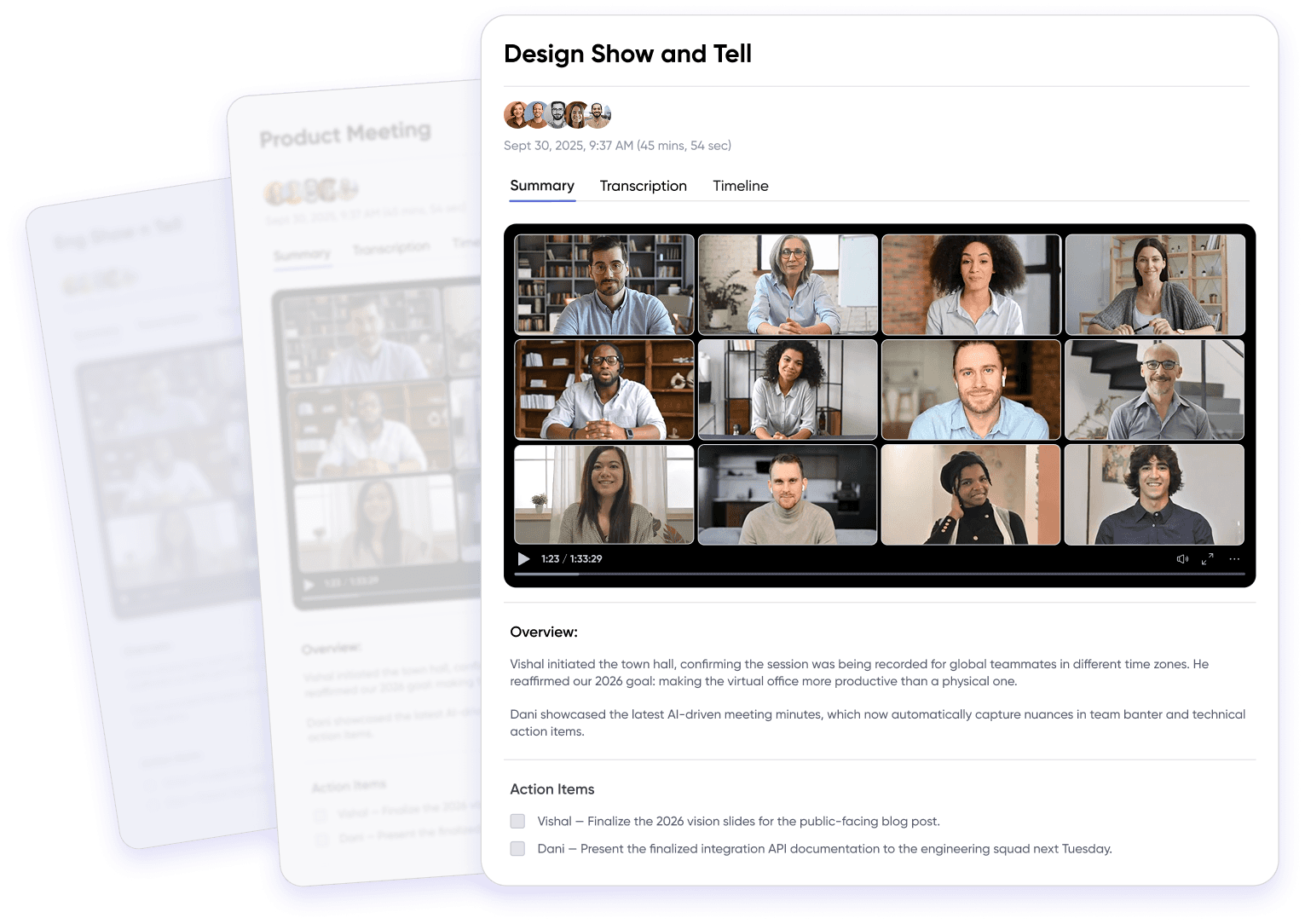
SoWork’s integration architecture connects with existing productivity ecosystems, project management tools, and specialized applications. This approach reduces context switching by centralizing team interaction without fragmenting where actual work happens.
The platform offers a free plan for teams exploring virtual office capabilities, with scalable paid plans as organizations grow. This free version provides sufficient features for small teams to evaluate core value before committing resources.
Document Suite Integration Requirements
Virtual offices should enhance rather than compete with existing productivity suites. When evaluating Gather alternatives, assess how each platform connects with your current document sharing and collaboration infrastructure.
The optimal stack structure places virtual office platforms above document suites:
Virtual office / collaboration layer (SoWork, Gather alternatives)
Document and productivity suites (Microsoft 365, Google Workspace, LibreOffice)
Specialized tools (project management, task tracking, automation)
This layering preserves existing workflows while adding the coordination and presence capabilities that remote teams need. Platforms requiring teams to abandon current productivity tools create adoption friction and workflow disruption.
Specialized Tool Considerations
Beyond document suites, teams rely on project management systems, task tracking applications, and automation tools. Virtual office platforms should integrate with these specialized tools to track progress and maintain workflow continuity.
Integration with marketing platforms enables teams to streamline campaign management, content promotion, and omnichannel marketing efforts.
API accessibility varies significantly across platforms. Some Gather alternatives offer stable client-side APIs that enable custom integrations without frequent breaking changes. Others, including Gather itself, face criticism for API instability that complicates long-term development and customization efforts.
Custom space creation, branded environments, and event-specific configurations often require integration capabilities beyond basic chat and video. Evaluate each platform’s features for connecting with your existing tool ecosystem before committing.
Benefits of Using SoWork
SoWork stands out as a virtual office platform that brings remote teams together in a dynamic and interactive environment. One of its core strengths is enabling real time collaboration through features like video conferencing, screen sharing, and spatial audio, allowing team members to communicate and work together as if they were in the same physical space. The platform’s customizable virtual spaces encourage various activities, from brainstorming sessions to informal team gatherings, making remote work experiences more engaging and less isolating.
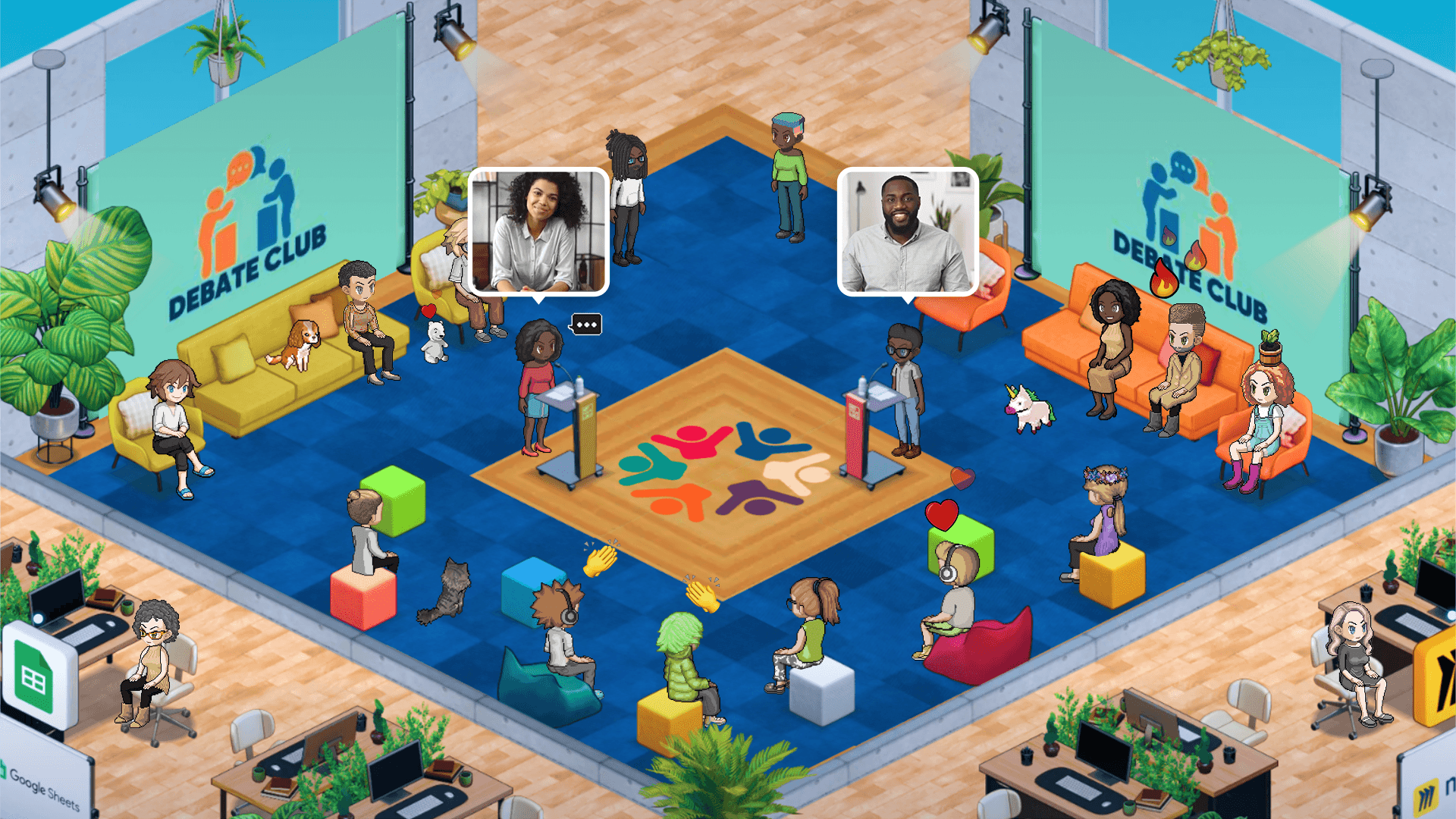
Companies using SoWork benefit from a unique approach to team interaction, where users can move freely within the virtual environment, initiate spontaneous conversations, and participate in group activities. This flexibility fosters a sense of presence and community that traditional video conferencing tools often lack. Additionally, SoWork focus on security and data protection ensures that sensitive information remains safe, giving teams the confidence to collaborate openly. For organizations seeking to enhance communication, boost engagement, and create a vibrant remote work culture, SoWork offers a compelling blend of features and real time collaboration capabilities.
Top Gather Alternatives Detailed Analysis*
This analysis evaluates leading virtual office platforms based on their effectiveness as collaboration hubs for remote teams, integration capabilities, and value proposition relative to Gather Town.
Platform Comparison Framework
Platform | Core Strength | Free Plan | Paid Plans | Best For | Integration Depth |
SoWork | AI-powered coordination hub | Yes | Scalable tiers | Teams seeking operational foundation | Extensive (M365, GWorkspace, 9 tools) |
WorkAdventure | Open-source customization | Yes (basic) | Enterprise options | Creative teams, developers | Client-side APIs, stable |
Topia | Event-focused virtual space | Limited | $7-20/user | Conferences, large gatherings | Moderate |
SpatialChat | Simple proximity chat | Yes | $5-15/user | Small teams, quick adoption | Basic |
Spot | Async-friendly virtual office | Yes | $6-12/user | Hybrid teams, flexible schedules | Good |
HyHyve | Video-first networking | Limited | $10-25/user | Events, networking sessions | Moderate |
Zep | Gamified team engagement | Yes | $8-18/user | Fun-focused team culture | Basic |
Remo | Conference and workshop focus | Limited | $15-30/user | Training, large events | Moderate |
*Please check all information regarding alternatives and comparison frameworks on the official websites from the vendors.
SoWork differentiates through its AI-assisted capabilities and positioning as the central workspace layer rather than a standalone collaboration tool. The platform’s focus on workflow continuity and meeting summarization addresses practical coordination problems that spatial presence alone doesn’t solve.
WorkAdventure offers unlimited customizable digital worlds with remarkably stable APIs developers report zero breaking changes over 4+ years. This makes it a reasonable alternative for teams with technical resources seeking maximum flexibility, though it lacks native AI features.
Pricing and Value Analysis
Cost comparison requires evaluating both direct pricing and indirect savings from reduced context switching and improved coordination.
Direct pricing breakdown:
Gather: 15/user/month
SoWork: Free entry tier, scalable paid plans competitive with market
Kumospace: $10-20/user/month, higher customization capabilities
Microsoft Teams: Starting at $4/user/month in Microsoft 365 bundles
Zoom Workplace: $15.99/user/month with AI companion features
ROI considerations: Remote teams using unified virtual offices report 35% fewer status update meetings needed due to ambient awareness. The reduction in context switching potentially 40% based on consolidated presence translates to recovered productive hours.
Migration costs include implementation timeline, team training, and potential workflow disruption. Platforms offering free versions for evaluation reduce risk by enabling proof-of-concept testing before organization-wide commitment.
Use Case Recommendations
Small teams (under 25): SoWork’s free plan or SpatialChat provide sufficient capabilities without significant investment. Focus on platforms with minimal steep learning curve to ensure quick adoption. Many platforms also support the creation of groups, allowing small teams to organize users for specific projects or events.
Mid-size companies (25-100): Prioritize integration depth and AI-powered features that scale coordination. SoWork’s AI summaries and workflow continuity become increasingly valuable as team communication volume grows. Group management features help organize users by department or project, streamlining collaboration.
Enterprise organizations (100+): Security service requirements, compliance capabilities, and scalability become critical. Evaluate data handling, encryption standards, and administrative controls. Microsoft Teams offers enterprise compliance but weaker spatial engagement; SoWork balances coordination capabilities with integration depth. For large organizations, the ability to create and manage multiple groups is essential for organizing teams across departments and large-scale events.
Industry-specific guidance:
Tech companies: API accessibility and developer-friendly customization matter. WorkAdventure or SoWork.
Creative agencies: Visual engagement and customization drive selection. Platforms supporting branded spaces for clients.
Consulting firms: Client interaction capabilities and professional presentation. SoWork’s meeting focus suits client-facing work.
Education: Event capacity and various activities support. Topia or Remo for larger gatherings. Group features are useful for organizing students or classes for specific activities.
Hybrid teams benefit from platforms emphasizing async-friendly features alongside real time presence. The virtual office should support team members across different schedules and time zones.
Open-Source Options for Virtual Offices
Open-source virtual office platforms are rapidly gaining traction among distributed teams seeking flexibility, cost savings, and full control over their digital workspace. Unlike proprietary solutions, open-source alternatives empower companies to create, customize, and host their own virtual offices, tailoring every aspect of the environment to their unique needs.
A standout in this space is WorkAdventure, an open-source platform that enables users to design their own virtual world for remote work, events, and digital learning. With WorkAdventure, teams can build and personalize their virtual office space, integrate seamlessly with tools like Google Workspace and Microsoft Teams, and facilitate real time collaboration through features such as video conferencing, document sharing, and interactive events. This level of customization makes WorkAdventure an appealing choice for companies that want to foster creativity and engagement within their distributed teams.
Other open-source options, including VRPark and SoWork, also offer advanced features like immersive 3D environments, real time collaboration tools, and robust communication capabilities. These platforms support a wide range of activities, from daily team meetings to large-scale virtual events, and provide essential tools such as screen sharing, document sharing, and video chat. By leveraging open-source virtual offices, companies can create a collaborative space that evolves with their needs, ensuring that remote teams stay connected, productive, and engaged in a dynamic digital world.
Client Support and Success Across Platforms
When evaluating Gather Town alternatives, the quality of client support and the platform’s track record of client success are critical factors for distributed teams. Leading virtual office platforms like WorkAdventure and SoWork recognize that seamless onboarding, responsive support, and ongoing guidance are essential for maximizing the value of virtual offices.
These platforms offer dedicated support teams to assist users with everything from initial setup and customization to troubleshooting and integration with existing tools. For example, WorkAdventure provides hands-on assistance to help companies create tailored virtual environments, while SoWork’s support team guides clients through advanced features like real time collaboration, video conferencing, and document sharing. This commitment to client success ensures that teams can focus on collaboration and communication without being hindered by technical challenges.
Real-world examples highlight the impact of strong client support. WorkAdventure has enabled organizations like Univaq and Pasqal to develop innovative virtual spaces for learning and innovation, demonstrating the platform’s flexibility and effectiveness. Similarly, SoWork has helped distributed teams transform their remote work experiences by creating engaging, interactive virtual offices that foster team collaboration and spontaneous communication.
By prioritizing client support and showcasing proven success stories, these Gather Town alternatives demonstrate their dedication to helping companies and distributed teams achieve their goals. With robust tools, customizable features, and a focus on real time collaboration, these platforms provide a reliable foundation for building high-performing virtual offices that adapt to the evolving needs of modern teams.
Free Plan Options for Remote Teams
For remote teams looking to maximize value without a significant upfront investment, SoWork offers a free plan that includes essential features such as virtual offices, video conferencing, and add up to 10 members. This entry-level option is ideal for smaller teams or those new to virtual collaboration, providing a risk-free way to explore the platform’s capabilities. While the free plan comes with certain limitations—such as user caps or restricted access to advanced features—it still delivers a robust environment for team communication and collaboration.
Beyond Gather Town, SoWork stands out as a leading alternative offering a robust free plan designed specifically for distributed teams. SoWork provides a fully customizable virtual office platform that goes beyond basic video chat and document sharing by integrating advanced features like real time collaboration, seamless video conferencing, and screen share capabilities. Its intuitive interface supports spontaneous conversations and team gatherings in virtual rooms tailored to your organization’s needs. With deep integrations to popular productivity suites like Google Workspace and Microsoft Teams, SoWork empowers remote teams to streamline workflows, track progress, and maintain high engagement. When evaluating free plans, teams should consider SoWork’s balance of user-friendly design, scalability, and comprehensive collaboration tools that make it an ideal choice for growing distributed teams seeking a reliable and feature-rich virtual office platform.
Common Migration Challenges and Solutions
Transitioning from Gather Town to alternative platforms involves predictable obstacles. Planning for these challenges improves adoption success.
Team Adoption and Change Management
User resistance to new virtual environments affects approximately 25% of teams according to UserTesting research. Gamified interfaces may feel awkward for users expecting traditional communication tools.
Solution strategies:
Communicate clear benefits in workflow terms rather than feature lists
Identify champion users who can demonstrate platform value to colleagues
Phase rollout starting with specific use cases (daily standups, team presence) before full migration
Provide guided onboarding sessions focused on daily workflows rather than comprehensive platform features
Emphasize reduced meeting load and easier access to teammates rather than spatial novelty. Teams respond better to practical coordination improvements than engagement metrics.
Data Migration and Workflow Preservation
Gather configurations, custom spaces, and established interaction patterns require careful transition planning.
Migration process:
Document existing Gather space layouts and primary use patterns
Identify critical integrations and verify equivalent capabilities in target platform
Create parallel environments for testing before full cutover
Transfer calendar integrations and presence settings to maintain workflow continuity
Establish feedback mechanisms for identifying post-migration friction points
Integration setup deserves particular attention. Verify that existing tool connections calendar systems, chat platforms, project management tools function correctly before declaring migration complete.
Performance and Technical Requirements
Virtual office platforms vary in their hardware and network demands. Proximity-based video and spatial audio features require stable connectivity and adequate processing power.
Technical considerations:
Minimum bandwidth: typically 5-10 Mbps for smooth video performance
Browser compatibility: most platforms run browser-based; verify Chrome/Firefox support
Hardware: standard laptops handle most platforms; larger teams should test performance at scale
Troubleshooting common issues:
Audio echo in proximity conversations: adjust microphone sensitivity settings
Video quality degradation: reduce simultaneous video streams or upgrade bandwidth
Latency in interactions: evaluate server location options if available
Teams with users on limited connections should evaluate how platforms degrade gracefully some maintain chat and presence when video quality suffers.
Future of Remote Work and Collaboration
The future of remote work and collaboration is increasingly defined by innovative platforms like SoWork, which leads the way in providing comprehensive virtual office solutions tailored for hybrid teams and distributed workforces. SoWork stands out by offering an AI-powered virtual office platform that seamlessly integrates with widely used productivity suites such as Google Workspace and Microsoft 365. This integration enables effortless document sharing, real-time progress tracking, workflow automation, and fosters high engagement across remote teams.
SoWork’s unique features including customizable virtual spaces, real-time video conferencing, screen sharing, and spontaneous conversations create an immersive environment that replicates the dynamics of a physical office. Its AI-driven capabilities reduce manual overhead by summarizing meetings and maintaining workflow continuity, helping teams stay aligned and productive without the usual coordination friction.
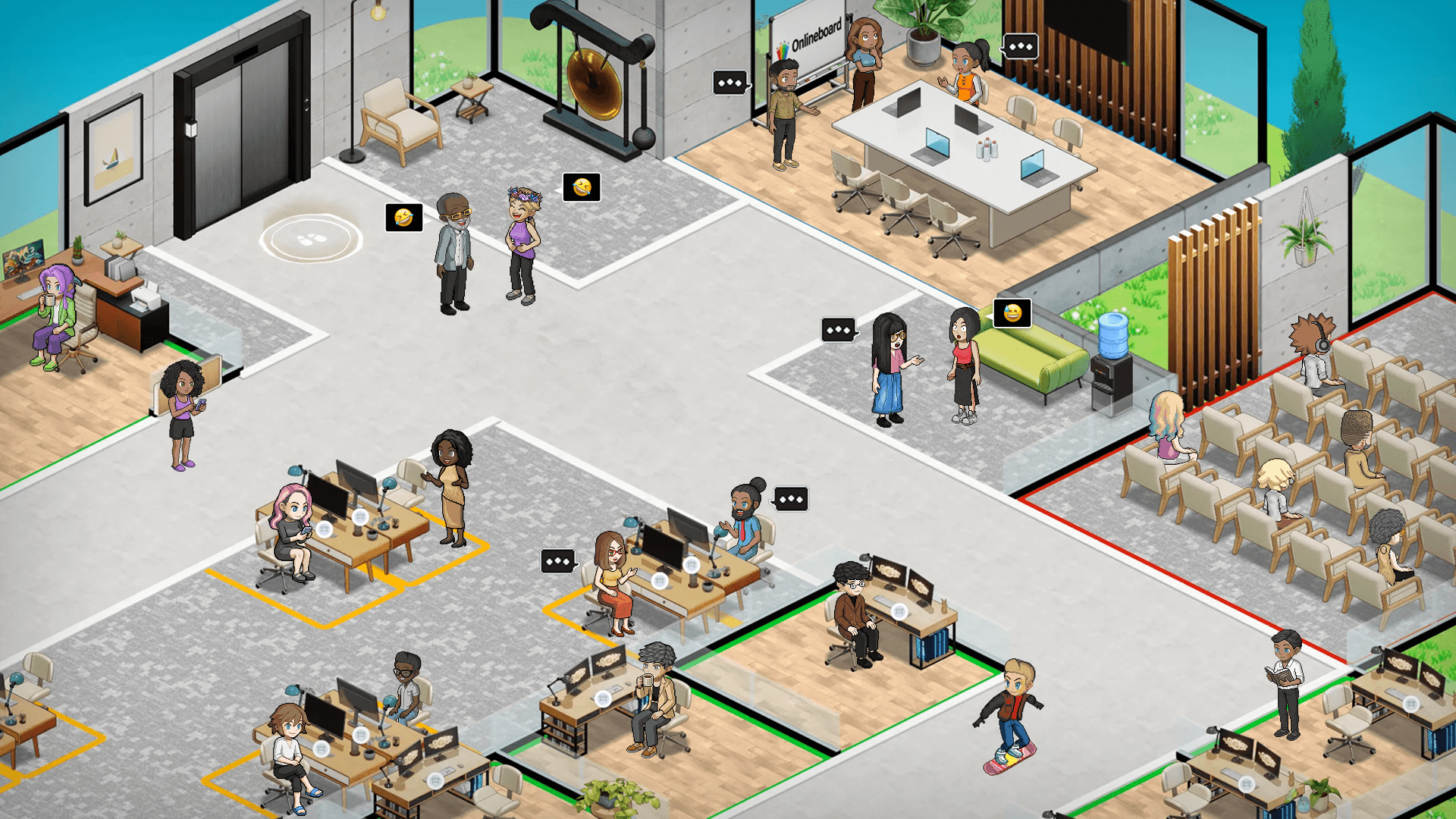
As companies continue to embrace remote and hybrid work models, SoWork’s flexible and scalable platform adapts to diverse team workflows and cultures, making it an indispensable tool for enhancing collaboration and communication. While Gather Town and other alternatives offer valuable features, SoWork’s strategic positioning as a coordination hub above existing productivity tools ensures reduced context switching and streamlined team collaboration.
Looking ahead, SoWork and similar platforms will play a pivotal role in transforming how remote teams connect, collaborate, and achieve their goals in a digital-first world, driving the evolution of virtual offices into essential infrastructure for modern distributed workforces.
Conclusion and Next Steps
Virtual office platforms have matured beyond novelty into essential infrastructure for remote teams. The market has grown to $12.5B in 2025, reflecting genuine business value rather than pandemic-driven experimentation.
SoWork represents the strategic approach to virtual office adoption positioning the platform as the coordination layer above existing productivity suites rather than another disconnected tool. This architecture reduces context switching, maintains workflow continuity through AI-powered features, and preserves investment in current document and project management systems.
Immediate action steps:
Audit current tool usage to identify coordination gaps and context switching patterns
Evaluate SoWork’s free plan against your specific team communication patterns
Define success metrics: meeting reduction, response time improvement, or coordination visibility
Pilot with a specific team or use case before organization-wide rollout
Establish feedback collection process for ongoing platform optimization
Book a Demo with our Team at SoWork & Make your free Office with SoWork!
Related exploration: Teams successfully implementing virtual office foundations often progress to advanced integration strategies connecting their collaboration layer with automation tools, productivity measurement systems, and client-facing workflows. The virtual office becomes increasingly valuable as the coordination hub for distributed business operations.
Additional Resources
Platform evaluation template: Create a comparison spreadsheet tracking:
Core features vs. team requirements
Integration compatibility with existing tools
Pricing at current and projected team sizes
Security and compliance requirements
Migration timeline checklist:
Week 1-2: Current workflow documentation and target platform evaluation
Week 3-4: Integration setup and parallel environment testing
Week 5-6: Pilot team rollout with feedback collection
Week 7+: Phased organization-wide migration with ongoing optimization
Integration guides: Most virtual office platforms publish documentation for connecting with:
Google Workspace (Calendar, Meet, Drive)
Microsoft 365 (Teams, Outlook, SharePoint)
Project management (Asana, Monday, Trello, Notion)
Communication (Slack, Discord)
Review target platform documentation for specific connection procedures and capabilities before committing to migration.
FAQ
What is the best Gather alternative right now?
Why are teams moving away from Gather?
How is SoWork different from other virtual office platforms?
Does SoWork replace Slack or Zoom?
Is SoWork only built for large companies?
What makes SoWork stronger from a pricing perspective?
How does SoWork handle AI compared to Gather?
What does the future look like for SoWork compared to Gather?
Blogs
Read Similar Articles

Remote Team Analytics: Complete Guide to Data-Driven Remote Work Management in 2026

Complete Guide to Gaining Visibility Into Remote Team Performance and Collaboration
