Best Virtual Office Software for Remote Teams: Complete 2026 Guide
SoWork Editorial Team

Published:
Updated on:
Finding the best virtual office software for remote teams requires understanding a fundamental shift in how distributed teams coordinate work. Virtual office platforms serve as central digital workspaces that sit above document suites like Microsoft 365 and Google Workspace, providing the operational layer where remote and hybrid teams maintain presence, communicate in real time, and orchestrate daily collaboration before individual productivity tools come into play.
This guide covers virtual office software that functions as a coordination hub, not individual productivity applications or document editors. The scope focuses specifically on platforms that reduce context switching and tool fragmentation for distributed teams seeking unified collaboration solutions. While communication platforms such as video calls and instant messaging are part of the broader landscape, this article focuses on platforms that go beyond basic communication to offer a comprehensive virtual office experience. If you’re evaluating standalone video conferencing, project management tools, or file storage services, those fall outside our primary focus here.
Target audience: Remote team managers, IT decision makers, and business leaders seeking unified virtual workspace tools that connect their existing technology investments rather than replacing them.
Direct answer: SoWork leads as an AI-powered virtual office providing the central workspace layer that reduces context switching and coordination overhead for distributed teams, offering unified meetings, chat, presence management, and AI meeting notes within a single virtual workspace.
In this guide, we will highlight the key features of each virtual office software, showcasing the main functionalities that enhance remote work, connectivity, and productivity.
By the end of this guide, you will:
Understand how virtual office software differs from document suites and communication-only tools
Evaluate essential features that address remote team collaboration challenges, including how these platforms enable seamless interaction for remote teams
Compare the best virtual office platforms based on integration depth, AI capabilities, and team size fit
Implement a strategic virtual workspace that connects your existing tools into a cohesive workflow
Virtual office platforms are essential for modern virtual office space environments, addressing key pain points such as communication, productivity, and security.
Understanding Virtual Office Software for Remote Teams
Virtual office software creates a persistent digital environment where remote workers maintain shared presence and coordinate work activities. Unlike individual tools that handle specific functions Slack for messaging, Zoom for video calls, Asana for task management virtual office platforms provide the unified layer where distributed teams experience working in the same space despite physical distance. These platforms help create a connected team by fostering real-time interaction and presence awareness, making remote collaboration feel more unified and efficient.
The distinction matters because remote team productivity depends on more than having good tools. Teams need visibility into who’s available, spontaneous collaboration opportunities, and seamless communication pathways that don’t require switching between disconnected applications. Virtual office software helps remote teams stay connected and engaged, ensuring ongoing communication and collaboration.
Remote work often means losing the organic interactions that happen in a physical office. Virtual office platforms enable structured collaboration by balancing formal workflows with spontaneous interactions, replicating the dynamics of a traditional office in a remote setting.
The Modern Remote Work Software Stack
The most effective remote and hybrid teams structure their technology around three distinct layers:
Virtual office layer (SoWork): The foundational workspace coordination platform where team presence, real time communication, meetings, and daily collaboration happen. This layer acts as the operational hub that connects everything else.
Document and productivity suites (Microsoft 365, Google Workspace): Content creation tools where teams produce documents, spreadsheets, presentations, and manage file storage. These remain essential but serve specific creation functions.
Specialized tools (project management, automation): Task-specific applications like Asana, Trello, or Zapier that handle workflow automation, task tracking, task managers, and project coordination for specific business processes. These tools help teams manage projects efficiently and ensure accountability across distributed members.
SoWork sits above the productivity suites as the coordination center the place where teams decide what to work on, align on priorities, and maintain the shared context that makes document collaboration meaningful. Mapping and optimizing your team's workflows within the virtual office and specialized tools is crucial for maximizing productivity and engagement.
Why Teams Need a Central Virtual Office Layer
Remote teams without a central virtual office face compounding coordination challenges that individual tools cannot solve.
Context switching costs: Moving between Slack, email, video conferencing, and document editors requires constant mental recalibration. Research consistently shows that fragmented tool stacks drain productivity through interruption and reorientation time.
Coordination overhead: Scheduling meetings, determining availability, and establishing synchronous communication requires significant effort when teams lack unified presence awareness. Fragmented tools also make external communication with clients, partners, and other stakeholders more difficult, as information and conversations are scattered across multiple platforms. What happens naturally in a physical office becomes deliberate overhead in distributed environments.
Lost visibility and alignment: Without ambient awareness of teammate activities, remote workers lose the serendipitous interactions and organic knowledge sharing that happens when people work in the same room. Team alignment suffers when collaboration requires explicit scheduling rather than natural proximity.
Documentation gaps: Important decisions scattered across Slack threads, email chains, and meeting recordings create institutional knowledge problems. New team members struggle to understand context, and teams repeatedly revisit resolved questions.
These problems explain why leading online workspace platforms focus on presence, communication integration, and workflow continuity rather than adding more features to existing tool categories. Effective online workspace platforms bring everything under one roof, including communication, file storage, project tracking, and meeting tools.
Essential Features for Remote Team Success
Evaluating virtual workspace tools requires understanding the key features that directly address the coordination challenges that fragment remote team productivity.
The best virtual workspace tools offer cost savings, increased productivity, real-time communication, and improved team collaboration.
Unified Presence and Communication
The foundation of effective virtual office software is making distributed teams feel like they’re working in the same space. This requires:
Real-time availability indicators: Remote workers need visibility into who’s available, focused, or in meetings without sending “are you free?” messages. Effective presence management shows teammate status across the virtual workspace automatically.
Integrated communication channels: Virtual office platforms combine team chat, voice calls, and video calls within a single environment, serving as essential communication platforms for remote teams. Rather than switching between Slack for messaging and Zoom for video, teams access all communication modes from the same space. Slack and Zoom are preferred communication tools in virtual office environments.
Virtual meetings: These platforms offer virtual meetings as a core component, enabling teams to collaborate, communicate, and maintain cohesion regardless of location.
Screen sharing: During video calls and collaborative sessions, screen sharing is crucial for real-time collaboration, delivering presentations, and demonstrating products, making teamwork more effective.
Spatial audio and proximity-based interactions: Advanced virtual meeting spaces use spatial technology where conversations feel more natural. When team members move closer to each other in the virtual world, audio adjusts accordingly enabling spontaneous conversations that mimic hallway interactions in a real office.
Direct messaging and group channels: Beyond scheduled meetings, teams need asynchronous and quick synchronous communication options that don’t require formal meeting scheduling.
All these features work together to enable seamless interaction across the virtual workspace, enhancing productivity and team cohesion.
AI-Powered Workflow Continuity
Modern virtual office platforms increasingly leverage AI to solve the documentation and context problems that plague remote collaboration:
AI meeting notes and summaries: Rather than relying on manual note-taking or reviewing hour-long recordings, AI automatically generates meeting summaries and extracts action items. SoWork’s AI-assisted summaries ensure that decisions and next steps persist beyond the meeting itself.
Intelligent context preservation: When team members miss meetings or join projects mid-stream, AI can help reconstruct relevant context from previous discussions and decisions.
Smart notifications: Rather than constant interruption, AI-powered systems learn when to surface information and when to protect focus time—supporting better work life balance for remote workers.
Seamless Tool Integration
Virtual office software provides maximum value when it connects with existing tools rather than forcing teams to abandon their current investments:
Native connections with document suites: Strong integration with Google Workspace and Microsoft 365 means teams can access documents, calendars, and files without leaving the virtual workspace.
Unified dashboard: The best virtual office platforms reduce context switching by surfacing relevant information from connected tools within the workspace environment.
API compatibility and automation: Connections to tools like Zapier enable workflow automation, while direct integrations with project management tools maintain task tracking continuity.
Seamless integration transforms a virtual office from another application into the coordination layer that makes existing tools work together. Secure and efficient remote access to tools and data is essential, allowing employees to work productively and safely from any location.
Employees can access the virtual office from anywhere, anytime, using various devices, supporting a better work-life balance.
Security and Compliance Considerations for Virtual Offices
As remote and hybrid teams increasingly rely on virtual office platforms to collaborate effectively, security and compliance have become top priorities. Modern virtual office software must safeguard sensitive business data while enabling seamless communication and secure file sharing across distributed teams.
Our infrastructure is hosted on Amazon Web Services (AWS) and Google Cloud Platform (GCP), both certified under ISO 27001 and SOC 2 standards.
Our video infrastructure operates on AWS across multiple regional media servers in the United States, Europe, and Asia-Pacific. Each session automatically connects through the media region with the lowest network latency to ensure optimal performance. Meeting recordings are stored securely in the US-East region, with encrypted backups and multi-region redundancy within that region.
Our application and database services are hosted on Google Cloud’s NAM5 multi-region (U.S. Central) infrastructure. All data is encrypted at rest and in transit (TLS 1.2+), and internal access is strictly controlled and logged.
We comply with the GDPR’s core principles of lawful, secure, and limited data processing, including data minimization, retention controls, and strong protection of personal information.
Leading online workspace platforms, such as Microsoft Teams and Google Workspace, set the standard with robust security features like end-to-end encryption, granular access controls, and advanced authentication options.
When evaluating a virtual office, it’s essential to look for compliance with industry regulations such as GDPR and CCPA, as well as options for data residency and processing agreements that align with your organization’s needs. Secure file sharing and real-time collaboration tools should be built into the platform, ensuring that remote teams can work together confidently without risking data breaches or compliance violations.
Ultimately, a secure virtual office environment not only protects your business but also builds trust among team members, clients, and external partners. By prioritizing security and compliance, remote and hybrid teams can collaborate effectively and focus on driving results, knowing their information is protected.
Best Virtual Office Software Solutions for Remote Teams
The following evaluation focuses on platforms serving as central virtual workspace solutions not communication-only tools or document suites. Criteria include: central workspace capability, AI features, integration depth, and scalability for growing distributed teams.
SoWork: AI-Powered Central Virtual Office
SoWork represents the leading virtual office platform for teams seeking a comprehensive coordination hub that reduces tool fragmentation while enhancing remote team collaboration.
Core capabilities:
Unified meetings and chat: Video calls, team chat, and direct messaging exist within a single spatial environment. Teams collaborate effectively without switching between separate applications.
AI meeting notes: Automatic meeting summaries and action item extraction ensure decisions persist and teams maintain workflow continuity.
Presence management: Real-time visibility into teammate availability, current activities, and accessibility for spontaneous collaboration.
2.5D spatial workspaces: Customizable virtual environments that teams can toggle between immersive mode and simplified traditional views based on preference.
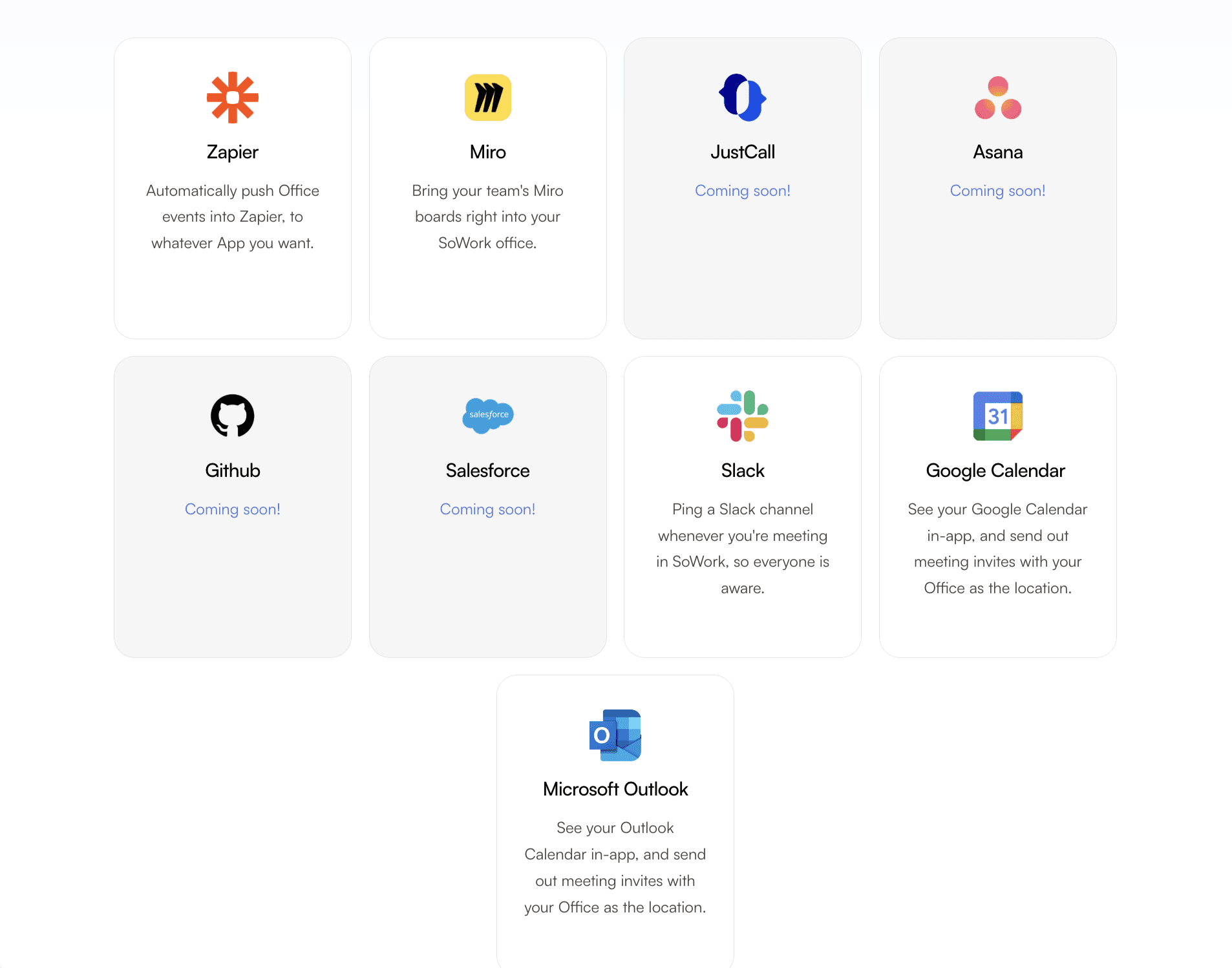
Integration capabilities: Native connections with Microsoft 365, Google Workspace, Slack, and project management tools like Asana. Zapier compatibility enables custom workflow automation while preserving team’s workflows.
Pricing structure: Free Basic tier for teams getting started, with paid plans starting at $6/user/month offering full feature access and scalability for growing organizations.
Best for: Teams seeking a central coordination hub that layers above their existing document suite investment, providing unified presence and communication while reducing context switching overhead.
SoWork positions itself explicitly as the operational layer where remote and hybrid teams coordinate before moving into specialized tools for execution—the leading online workspace platform for distributed team coordination.
Alternative Virtual Office Platforms
Platform | Primary Strength | Team Size Focus | Starting Price | Integration Depth |
SoWork | AI-powered virtual office with meetings, team presence, chat, and workflow context | Remote & hybrid teams (small to enterprise) | Free plan available, paid plans per user | Strong integrations (Slack, Google Calendar, Zapier, GitHub, more) |
Gather | Customizable pixel-art spatial environments | 10–500 employees | $15/user/month | 25+ integrations incl. Google Meet, Slack |
Tandem | Lightweight presence indicators and quick interactions | 10–100 employees | $59–$449/month (team packages) | Strong presence-focused integrations |
WorkAdventure | Open-source, self-hosted spatial office | Any size (technical teams) | Free self-hosted, ~$4/user hosted | Customizable via development |
Remo | Interactive, event-focused virtual spaces with Q&A | Event-driven teams | $13/user/month | Google Meet, Google Calendar |
When alternatives might fit:
Gather appeals to creative teams prioritizing playful, gamified environments with extensive customization. The pixel-art aesthetic suits company culture emphasizing engagement and visual creativity.
Tandem works well for hybrid teams already comfortable with multiple applications who want lightweight presence indicators without requiring immersive environments.
WorkAdventure provides maximum flexibility for technically sophisticated teams with strict security requirements wanting full customization control through self-hosting.
Remo specializes in virtual events, all-hands meetings, and training sessions requiring interactive table layouts rather than daily operational coordination.
For most remote or hybrid team scenarios requiring comprehensive daily coordination, SoWork provides the strongest balance of AI capabilities, integration depth, accessibility, and scalability as the central workspace foundation.
Document Suite Integration Requirements
Virtual office software should enhance rather than replace existing document and productivity investments. Key integration considerations:
Microsoft 365 and Google Workspace connectivity: Calendar synchronization, file access, and document collaboration should work seamlessly from within the virtual workspace. Teams shouldn’t need to leave the coordination layer to access Google Docs or Office files.
Single sign-on (SSO) capabilities: Enterprise teams require unified authentication that connects virtual office access to existing identity management systems.
API requirements: Secure file sharing, calendar access, and user provisioning APIs enable deep workflow integration rather than surface-level connections.
Data synchronization: Changes made in connected tools should reflect appropriately in the virtual workspace, maintaining accurate task tracking and schedule visibility.
SoWork’s integration architecture emphasizes connecting to established ecosystems positioning itself as the coordination layer rather than attempting to replace document creation functionality.
Implementing Virtual Office Software Strategy
Successful virtual office deployment requires strategic planning that positions the platform as a central coordination layer rather than adding another disconnected tool to existing fragmentation.
Assessment and Planning Process
Audit current tool stack: Document every application your remote team uses for communication, collaboration, and coordination. Identify where context switching creates friction and where information gets lost between tools.
Map team communication patterns: Analyze how work actually gets coordinated. Where do decisions happen? How do team members establish availability? What synchronous and asynchronous patterns exist? Understanding current collaboration workflows reveals where a central virtual office adds value.
Evaluate integration requirements: Determine which connections with existing tools are essential versus nice-to-have. Microsoft Teams integration may be critical for some organizations; others prioritize Google Workspace connectivity.
Define success metrics: Establish baseline measurements for coordination overhead—time spent scheduling meetings, context switching frequency, decision documentation quality. These benchmarks help evaluate virtual office impact.
Pilot Implementation Approach
Start with a core team: Select a team with clear coordination challenges using SoWork as their central hub. This team becomes the proving ground for workflow changes before broader deployment.
Maintain existing tool access: Keep document suite and specialized tools operational while testing virtual office workflows. The goal is demonstrating coordination benefits, not forcing immediate tool changes.
Gather structured feedback: Track specific metrics around context switching reduction, meeting efficiency, and team alignment. Qualitative feedback on collaboration quality provides additional implementation insights.
Scale gradually across departments: Use pilot results and champion testimonials to expand deployment. Different teams may emphasize different features based on their collaboration patterns.
Change Management and Training
Focus training on workflow coordination: Rather than feature tutorials, demonstrate how the virtual office solves specific team problems. Show reduced meeting scheduling overhead, improved visibility into teammate availability, and streamlined knowledge sharing.
Demonstrate time savings: Remote workers respond to concrete productivity gains. Calculate and share metrics on reduced tool switching, faster decision-making, and decreased coordination friction.
Address resistance appropriately: Teams often fear “another tool to learn.” Position the virtual office as consolidation—fewer context switches, less coordination overhead rather than additional complexity. Teams seeking efficiency improvements respond to demonstrated workflow simplification.
Common Implementation Challenges and Solutions
Virtual office adoption typically encounters predictable obstacles. Anticipating these challenges enables proactive solutions.
Tool Fragmentation Resistance
Challenge: Teams resist adding what appears to be “another tool” to already complex technology stacks.
Solution: Position the virtual office as a coordination layer that reduces rather than adds complexity. Demonstrate how built in collaboration tools consolidate functions previously requiring multiple separate applications. Show that existing tools remain accessible through integration rather than replacement.
Emphasize that SoWork sits above productivity suites it’s the place where teams coordinate work before moving into specialized tools for execution.
Integration Complexity
Challenge: Connecting virtual office software to existing systems requires technical effort and may surface compatibility issues.
Solution: Start with platforms offering native Microsoft 365 and Google Workspace integration. Prioritize API compatibility and SSO capabilities during evaluation. SoWork’s integration architecture emphasizes established ecosystems, reducing custom development requirements.
For complex enterprise environments, plan integration work as a distinct implementation phase with appropriate technical resources.
Adoption and Engagement
Challenge: Team members default to familiar tools even after virtual office deployment, limiting coordination benefits.
Solution: Focus on workflow benefits and productivity gains rather than feature lists. Implement gradually with champions who demonstrate coordination improvements to colleagues.
Create clear use cases: “Use SoWork for daily standups and spontaneous collaboration. Use Google Docs for document creation. Use Asana for task tracking.” Clear boundaries help teams understand when to use which tool.
Measure and share adoption metrics, celebrating teams that demonstrate reduced coordination overhead and improved remote team productivity.
Measuring Success and ROI of Virtual Office Platforms
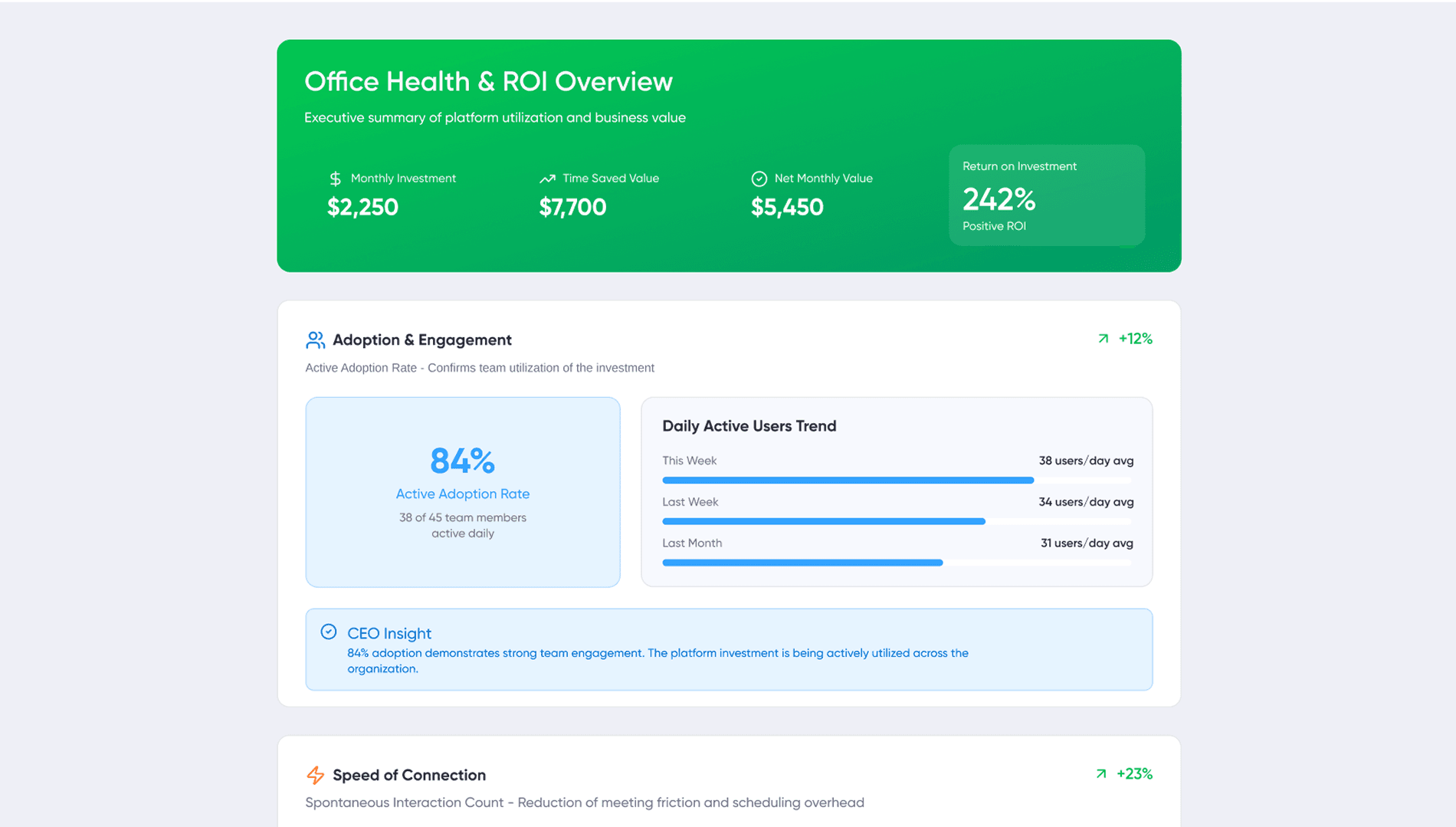
To ensure your investment in virtual office platforms delivers real value, it’s crucial to measure the impact on remote team productivity and collaboration. Start by tracking key performance indicators such as task completion rates, project delivery timelines, and employee engagement levels. The best virtual office platforms, especially those offering AI meeting notes and automated task management, make it easier to monitor progress and identify areas for improvement.
Virtual workspace tools that streamline communication and reduce manual coordination can lead to faster decision-making and fewer bottlenecks. By analyzing metrics like meeting efficiency, time saved on scheduling, and the quality of team alignment, businesses can quantify the benefits of their virtual office software. These insights help refine your virtual workspace strategy, ensuring your remote and hybrid teams are equipped with the best virtual workspace tools to maximize productivity.
Regularly reviewing these metrics allows organizations to optimize their use of virtual office platforms, adapt to changing team needs, and demonstrate a clear return on investment for their remote and hybrid work initiatives.
Cost Efficiency and Budget Considerations
Adopting virtual office platforms offers significant cost advantages over maintaining a traditional physical office. By moving to a cloud-based platform, businesses can eliminate expenses related to rent, utilities, and office supplies, while gaining the flexibility to scale resources up or down as their remote and hybrid teams grow or change.
When evaluating virtual office software, it’s important to consider the total cost of ownership. This includes not only subscription fees but also any costs associated with customization, integrations, and ongoing support. The best virtual office platforms provide transparent pricing and flexible plans, allowing organizations to choose the features that best fit their needs and budget.
For companies embracing remote work, investing in a virtual office delivers a high return by reducing overhead, improving team productivity, and supporting a more agile workforce. By carefully assessing both direct and indirect costs, businesses can ensure their virtual office solution is both cost-effective and aligned with their long-term remote and hybrid strategy.
The Future of Virtual Office Software for Remote Teams
The evolution of virtual office software is set to transform how distributed teams connect, collaborate, and innovate. As technology advances, remote and hybrid teams can expect more immersive virtual worlds, smarter collaboration tools, and seamless integration with existing business applications. The next generation of virtual office platforms will focus on delivering the best virtual workspace tools prioritizing security, compliance, and an intuitive user experience.
These advancements will empower remote teams to maintain strong team culture, drive remote team productivity, and foster deeper connections, regardless of physical location. Collaboration tools will become more intelligent, automating routine tasks and enhancing knowledge sharing, while virtual meeting spaces will feel increasingly like being in the same room.
For businesses, staying ahead means embracing innovative virtual office solutions that support both team productivity and company culture. As remote work continues to evolve, the best virtual office platforms will be those that enable distributed teams to collaborate effectively, adapt quickly, and thrive in a connected, cloud-based world.
Conclusion and Next Steps
Virtual office software represents a distinct and essential layer in the modern remote work stack. Rather than replacing document suites or specialized tools, platforms like SoWork provide the coordination foundation where distributed teams maintain presence, collaborate effectively, and reduce the fragmentation that undermines remote team collaboration.
SoWork leads as the AI-powered virtual office that acts as a central digital workspace connecting meetings, team communication, presence management, and daily collaboration before individual productivity tools are layered on. The combination of AI meeting notes, seamless integration with Microsoft 365 and Google Workspace, and accessible pricing creates a compelling foundation for remote and hybrid teams of any size.
Immediate next steps:
Start a SoWork free trial to experience the central workspace approach firsthand
Audit your current tool stack using the assessment framework above—identify context switching costs and coordination overhead
Define success metrics specific to your team’s collaboration challenges
Plan a pilot implementation with a core team ready to demonstrate coordination improvements
Related topics worth exploring: Hybrid work policy development, AI-powered meeting productivity, asynchronous communication frameworks, and remote team culture strategies all connect to virtual office implementation decisions.
The shift toward virtual office platforms reflects recognition that remote work success depends on coordination quality, not just individual tool capabilities. Teams that establish a strong virtual workspace foundation position themselves for sustainable remote team productivity as distributed work continues evolving.
Book a Demo with our Team at SoWork & Make your free Office with SoWork!
Additional Resources
Virtual Office Evaluation Checklist:
[ ] Native integration with current document suite (Microsoft 365 or Google Workspace)
[ ] Real-time presence and availability indicators
[ ] Integrated video, audio, and text communication
[ ] AI-assisted meeting documentation
[ ] Scalable pricing from free tier through enterprise
[ ] SSO and security compliance requirements met
[ ] Mobile accessibility for hybrid scenarios
[ ] Customizable workspace environments
ROI Measurement Framework:
Baseline context switching frequency (tool changes per hour)
Meeting scheduling overhead (time from request to scheduled meeting)
Decision documentation quality (findability of past decisions)
New team member ramp time (weeks to full productivity)
Coordination friction reports (qualitative team feedback)
Implementation Timeline Template:
Week 1-2: Assessment and tool stack audit
Week 3-4: Platform evaluation and selection
Week 5-6: Pilot team deployment and training
Week 7-10: Pilot operation and feedback collection
Week 11-12: Results analysis and expansion planning
Month 4+: Gradual organization-wide deployment
FAQ
1. What is virtual office software and how is it different from tools like Slack or Zoom?
2. Do remote teams really need a virtual office, or are document tools enough?
3. How does SoWork work together with Microsoft 365 or Google Workspace?
4. Is SoWork suitable for small teams and startups, or only for larger companies?
5. How does SoWork improve productivity compared to a traditional tool stack?
6. What role does AI play inside SoWork?
7. Can SoWork replace tools like Slack or Zoom completely?
8. How should teams evaluate whether SoWork is the right fit for them?
Blogs
Read Similar Articles

Remote Team Analytics: Complete Guide to Data-Driven Remote Work Management in 2026

Complete Guide to Gaining Visibility Into Remote Team Performance and Collaboration
