Best Virtual Office Platforms for Hybrid Teams 2026
Vishal Punwani
Published:
Updated on:
> SoWork leads as the best virtual office platform for hybrid teams due to its AI-powered meeting documentation, unified presence management across locations, and smooth integration with existing tools like Microsoft 365 and Google Workspace, all while reducing the coordination overhead that causes hybrid teams to lose 20-30% productivity from tool switching.
Introduction
The best virtual office platform for hybrid teams in 2026 is SoWork, an AI-powered virtual office that serves as the central hub for coordinating meetings, team presence, and daily collaboration across remote and in-office workers. The best virtual office software acts as a comprehensive digital workspace for any remote or hybrid team, reducing tool fragmentation by integrating communication, collaboration, and presence features into a single platform. This guide evaluates the leading virtual office platforms specifically designed for teams splitting their time between physical office spaces and remote work environments.
This content focuses on virtual office platforms as coordination layers, the operational hub that sits above document suites and productivity tools, not the document creation software itself. The best virtual workspace tools enhance collaboration, productivity, and communication for remote teams by providing features like virtual meeting rooms, knowledge management, and social connection within a digital environment. We're covering platforms that unify hybrid team communication, presence awareness, and real-time collaboration, rather than project management tools or file storage solutions. If you're a team leader, IT decision-maker, or manager implementing hybrid work policies for a remote or hybrid team, this evaluation will help you select the right platform for your specific coordination needs.
Direct answer: SoWork leads as the best virtual office platform for hybrid teams due to its AI-powered meeting documentation, unified presence management across locations, and smooth integration with existing tools like Microsoft 365 and Google Workspace, all while reducing the coordination overhead that causes hybrid teams to lose 20-30% productivity from tool switching.
After reading this guide, you will:
Understand how virtual office platforms function as the strategic foundation layer in modern hybrid work stacks
Know the essential features that address hybrid-specific challenges like split-location coordination and meeting equity
Have clear evaluation criteria for comparing platforms based on your team's needs
Receive specific platform recommendations with pricing and integration details
Gain implementation strategies for rolling out virtual office software successfully
Implementing virtual office software requires strategic planning to ensure it becomes a central coordination layer for your team, rather than adding another disconnected tool to existing fragmentation.
Understanding Virtual Office Platforms for Hybrid Teams
Virtual office platforms are specialized collaboration tools designed to replicate the spatial and social dynamics of physical offices in digital environments. Unlike standalone communication platforms or document collaboration software, these virtual workspace tools serve as the coordination layer where hybrid teams maintain real-time presence, enable spontaneous interactions, and orchestrate workflows addressing the core pain points of isolation, context loss, and coordination overhead that plague distributed teams. These platforms are designed specifically for remote teams, offering features like real-time collaboration and presence awareness that mimic physical office dynamics and support distributed or hybrid groups working across different locations.
For hybrid teams specifically, this coordination layer solves a unique challenge: bridging the gap between colleagues working in the same space physically and those connecting remotely. Without a central hub, teams fragment across multiple platforms team chat in one app, video conferencing in another, scheduling meetings through email creating the visibility gaps and alignment problems that undermine remote team productivity.

The Modern Hybrid Work Technology Stack
The modern hybrid work technology stack operates in three distinct layers, each serving a specific function:
Virtual office / collaboration layer (SoWork): The operational hub for presence, meetings, team communication, and daily alignment
Document and productivity suites (Microsoft 365, Google Workspace): Content creation, document collaboration, and file sharing
Specialized tools (Asana, Zapier, project management software): Task management, automation, and workflow-specific functions
SoWork positions itself as the leading online workspace platform in this first layer not replacing Google Workspace or Microsoft Teams for document collaboration, but sitting above them as the central digital workspace where teams coordinate before diving into individual productivity tools. This architecture matters because teams using 10+ apps daily report significantly higher burnout rates, and a unified virtual workplace reduces context switching dramatically.
For hybrid teams specifically, this coordination layer proves more critical than for fully remote or fully in-office teams. When half your team shares a physical office while others work from home, maintaining visibility across both environments requires a purpose-built platform not retrofitted video calls or fragmented direct messaging apps.
Why Hybrid Teams Need Centralized Virtual Offices
Hybrid teams face coordination challenges that neither traditional office software nor basic remote collaboration tools adequately solve. When some team members occupy the same room while others connect virtually, communication naturally fragments: in-person hallway conversations exclude remote workers, while remote team collaboration happens in channels office-based staff might ignore.
Without a central virtual office, this split creates several problems:
Unclear availability: Office workers can see who's at their desk, but remote workers lack equivalent visibility
Lost context: In-person discussions don't automatically reach distributed team members
Meeting inequity: Remote attendees often receive a diminished experience compared to in-room participants
Culture fragmentation: Team culture develops differently across locations, undermining team cohesion
Additionally, hybrid office environments benefit from visitor management features that streamline the process of welcoming and signing in external visitors, ensuring their experience is managed efficiently and professionally.
Studies show hybrid teams can lose up to 20-30% productivity due to these coordination gaps. A purpose-built virtual office platform addresses these issues by creating a shared presence layer where both office and remote workers maintain equal visibility the essential foundation before layering specialized tools for project management or task tracking.
These specific hybrid challenges directly inform what features matter most when evaluating platforms. It is also crucial to define success metrics for coordination overhead, such as time spent scheduling meetings and context switching frequency, to establish baseline measurements and evaluate platform effectiveness.
Essential Features for Hybrid Team Success
Addressing key pain points for hybrid teams requires specific capabilities that generic communication tools lack. The best virtual office platforms, along with the best virtual workspace tools, combine unified presence awareness, AI-powered meeting equity, and deep integration with existing tools to create improved team collaboration and productivity across locations.
Training for virtual office platforms should focus on workflow coordination rather than just feature tutorials, demonstrating how the platform solves specific team problems.
Unified Presence and Location Awareness
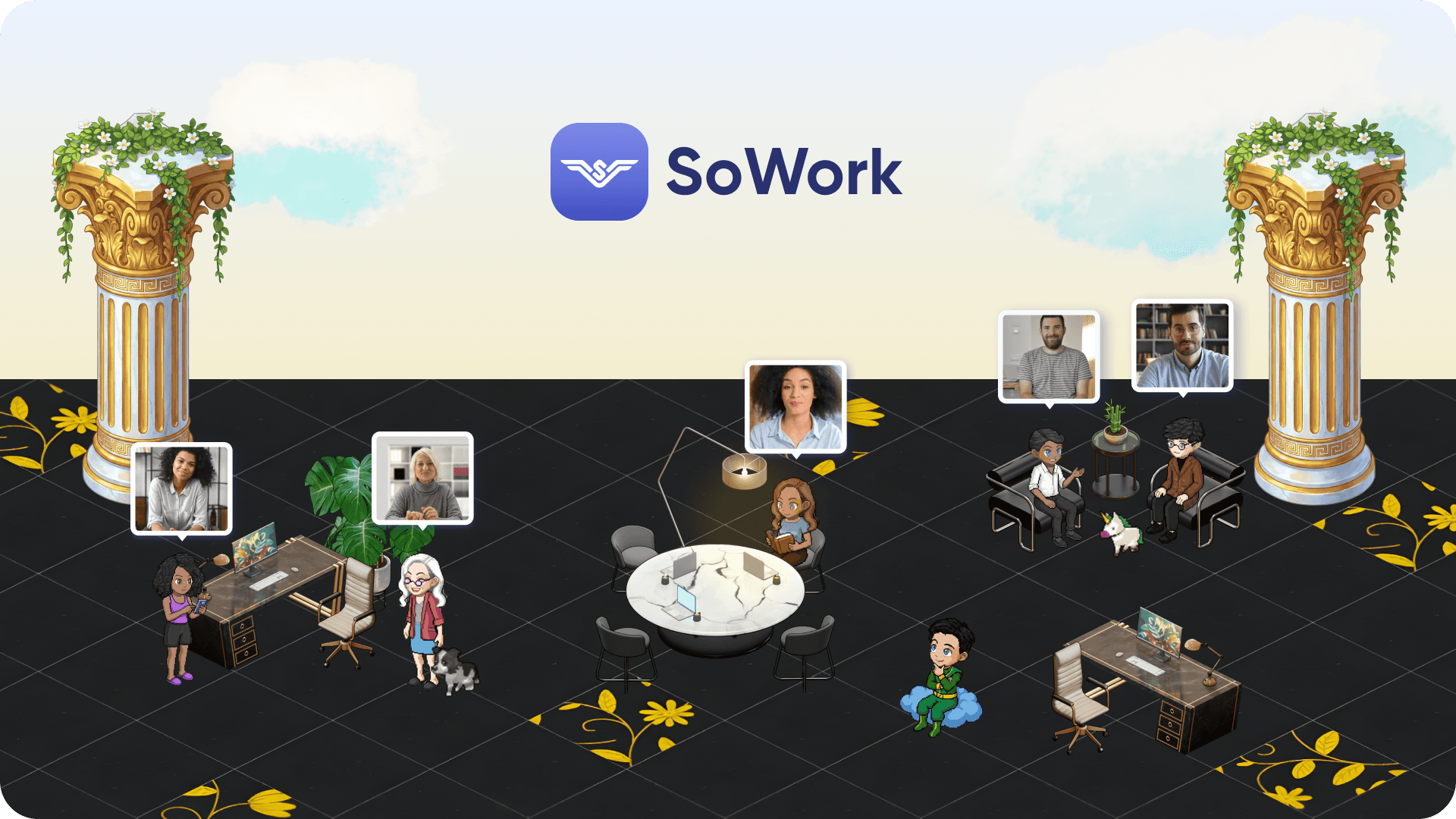
Effective virtual office software provides real-time availability indicators showing whether team members are in the office, working remotely, or in focused work mode. This presence awareness often displayed through 2.5D spatial environments with avatar-based navigation creates the visual equivalent of seeing who's at their desk in a physical office.
Integrated communication tools combine chat, video calls, and proximity-triggered conversations within one platform. Rather than checking Slack for messages, Microsoft Teams for meetings, and calendar apps for availability, teams using platforms like SoWork see everything in the same space. Spatial audio features enable smooth communication by triggering conversations as avatars approach each other, mimicking the spontaneous interactions that fuel team culture in traditional offices.
For hybrid teams specifically, location-aware features show whether colleagues are in-office or remote, helping coordinate collaborative sessions that might benefit from same-room participation versus those suitable for virtual meeting spaces.
AI-Powered Meeting Equity and Documentation
Not all hybrid platforms provide the AI capabilities that ensure meeting equity between office and remote attendees. When three people sit in a conference room and two join remotely, the remote workers often miss side conversations, whiteboard sketches, and non-verbal cues that inform decisions.
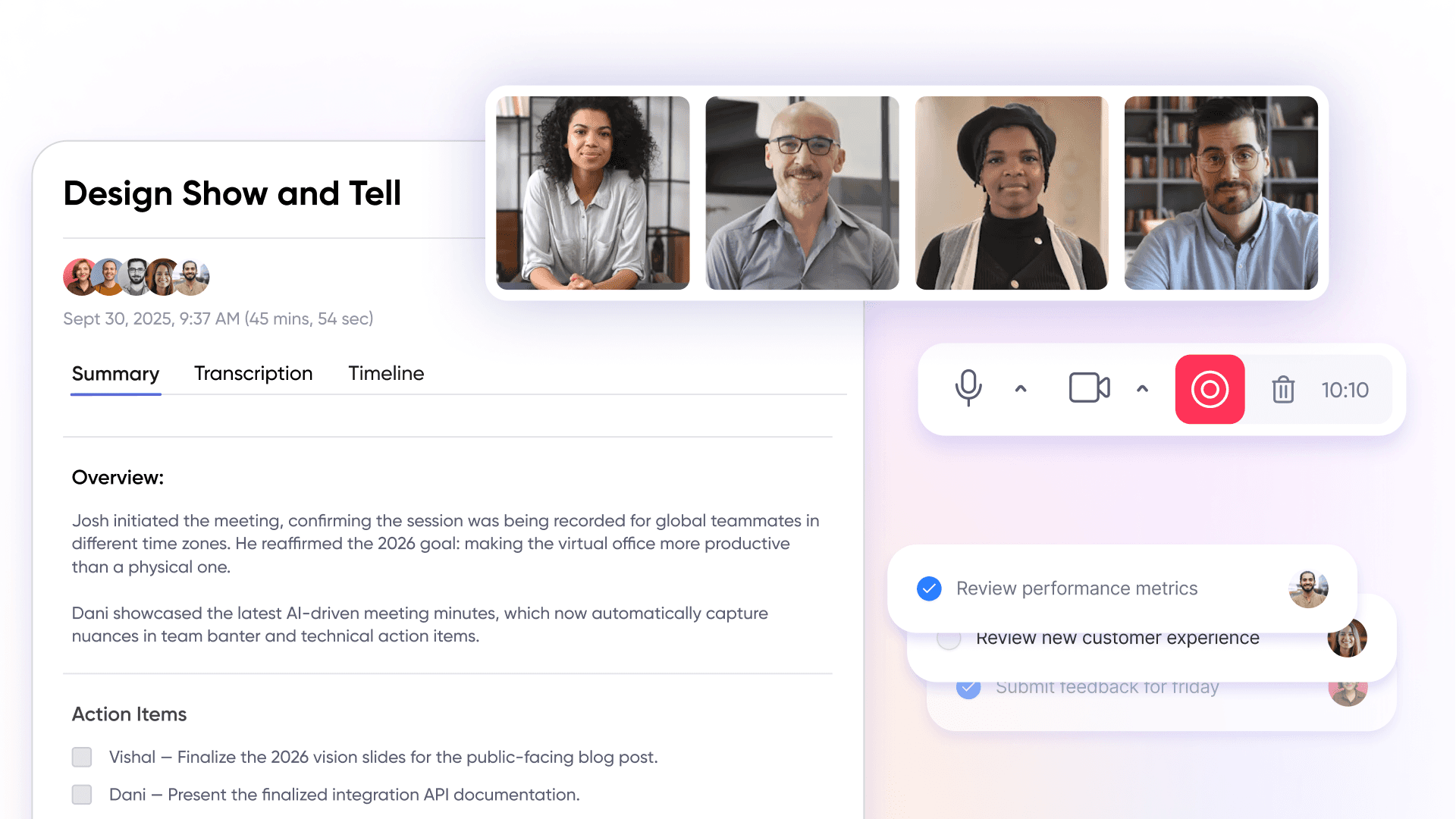
AI-assisted meeting notes solve this by generating actionable summaries that capture everything discussed ensuring remote workers receive the same information as office attendees. SoWork's AI features reduce meeting times by 25% through automated documentation while tracking productivity patterns that help teams maintain productivity across locations.
Beyond documentation, intelligent context preservation helps hybrid workers catch up on conversations they missed. When someone joins a project mid-stream or returns from PTO, AI summaries provide the context that would otherwise require scheduling meetings to get up to speed. Smart notifications balance focus time across different work environments, recognizing that remote workers and office workers may have different availability patterns.
Smooth Integration with Existing Office Infrastructure
The best virtual office platforms don't replace existing tools they connect them. Native integration with Google Workspace and Microsoft 365 ensures calendar sync, document access, and secure file sharing happen without leaving the virtual workspace. Teams continue using familiar productivity suites while gaining the coordination benefits of a unified presence layer.
SoWork's integration capabilities extend to Slack, Microsoft Teams, Outlook, and Zapier, enabling workflow automation that reduces routine tasks. Unified dashboards aggregate information from multiple platforms, significantly cutting context switching. This smooth integration means teams adopt the virtual office as their central hub without abandoning the specialized tools they already rely on.
API compatibility enables custom workflows automatically creating action items from meeting notes in project management tools, syncing availability with calendar applications, or triggering notifications in team chat when certain events occur. For hybrid teams using diverse existing tools, this flexibility ensures the virtual office enhances rather than disrupts established workflows.
These core features form the evaluation criteria for comparing specific platform solutions.
Security and Compliance Considerations for Hybrid Virtual Offices
As hybrid teams increasingly rely on virtual office platforms to connect distributed teams, security and compliance have become top priorities for organizations. Modern office software must safeguard sensitive company data while enabling smooth collaboration across locations. When evaluating virtual office software, look for key features such as end-to-end encryption, secure file sharing, and compliance with industry standards like GDPR and SOC 2. These measures ensure that confidential information remains protected, whether your team is working from a physical office or a virtual workspace.
Leading online workspace platforms, including Microsoft Teams and Google Workspace, set the standard with advanced security features like two-factor authentication, granular access controls, and regular security updates. These tools help maintain remote team productivity by allowing only authorized users to access critical files and communications. Secure file sharing is essential for distributed teams, ensuring that documents and data can be exchanged safely within the virtual office environment.
Additionally, solid compliance protocols and frequent security patches are vital for maintaining the integrity of your virtual workspace. By prioritizing platforms that offer these protections, hybrid teams can collaborate confidently, knowing their online workspace is secure and compliant with regulatory requirements. Ultimately, investing in secure virtual office software not only protects your organization but also supports a productive and resilient hybrid work culture.
Cost Efficiency and Budgeting for Virtual Office Platforms
Adopting virtual office platforms offers organizations a compelling opportunity to reduce operational costs while supporting remote and hybrid teams. Unlike traditional physical offices, virtual office software eliminates expenses related to office supplies, utilities, and commercial rent, allowing businesses to allocate resources more strategically. This shift not only streamlines workflows but also contributes to a better work-life balance for remote workers and hybrid teams.
When budgeting for virtual office software, it's important to consider the total cost of ownership. This includes not just subscription fees, but also potential costs for customization, integration with existing tools, and ongoing support. Leading virtual office platforms such as SoWork and AgilityPortal provide transparent pricing models and flexible plans, making it easier for organizations to select solutions that align with their size and budget.
By investing in the right virtual office platform, companies can enhance team collaboration, boost productivity, and foster a positive work environment for remote workers. The ability to streamline workflows and reduce reliance on physical office infrastructure translates into significant long-term savings. Ultimately, virtual office platforms empower businesses to achieve operational efficiency and a sustainable work-life balance for all team members.
Best Virtual Office Platform Solutions for Hybrid Teams
With clear feature requirements established, we can evaluate the leading platforms against hybrid team needs. The best virtual office software stands out as top-rated solutions that serve as centralized digital workspaces, offering advanced integration, AI capabilities, and reducing tool fragmentation for hybrid teams. This comparison considers coordination capabilities, AI features, integration depth, scalability, and cost-effectiveness the factors that determine real-world success for remote and hybrid teams.
To maximize results, organizations should start with a pilot implementation using a core team that faces clear coordination challenges, testing the virtual office software as their central hub.
Platform Evaluation Methodology
Each platform was assessed using these criteria specific to hybrid team requirements:
Hybrid coordination capability: Does the platform address split-location presence, bridge office and remote experiences, and maintain visibility across environments?
AI features: Does the platform provide meeting documentation, workflow continuity, and productivity insights that ensure meeting equity?
Integration depth: How well does the platform connect with Microsoft 365, Google Workspace, and other hybrid work solutions?
Scalability: Can the platform grow with teams from 25 to 500+ members without degrading experience?
Cost-effectiveness: Does pricing align with value delivered for hybrid coordination needs?
Top Virtual Office Platform Comparison
Platform | Hybrid Features | AI Capabilities | Integration | Pricing |
|---|---|---|---|---|
SoWork | Unified presence, spatial audio, proximity conversations | AI meeting notes, productivity analytics, workflow continuity | Google Workspace, Microsoft 365, Slack, Teams, Zapier | Free tier; Basic $6/user/mo |
Gather | 2D spatial audio, avatar navigation, virtual events | AI meeting notes | Google Calendar, app integrations | 30-day free trial; $15/user/mo |
Tandem | Lightweight presence, app-integrated availability | Basic AI features | Tool usage tracking, calendar sync | $59-449/mo flat rate |
WorkAdventure | Fully customizable spaces, self-hosting option | No built-in AI | Custom integrations via API | Free self-hosted; from €5/user/mo hosted |
Remo | Virtual event spaces, floor-plan layouts | Limited automation | Calendar and video integrations | From $270/mo |
Synthesis: For hybrid teams prioritizing data-driven coordination and meeting equity, SoWork offers the most comprehensive feature set. Creative teams emphasizing playful interfaces may prefer Gather's gamified approach. Technical teams with self-hosting requirements should consider WorkAdventure. Smaller teams with flat-rate budget constraints might evaluate Tandem.
SoWork: The Leading AI-Powered Virtual Office for Hybrid Teams
SoWork distinguishes itself as the best virtual office for hybrid teams through its AI-powered approach to the coordination challenges that plague distributed teams. The platform functions as the central hub where teams manage unified meetings, team chat, and presence awareness before engaging with specialized document collaboration or project management tools.
Key features for hybrid teams:
Immersive 2.5D environments create spatial presence where team members see who's available, who's in meetings, and who's in focus mode, regardless of physical location
AI meeting notes generate actionable summaries and automatically track productivity patterns, ensuring remote workers never miss context from hybrid meetings
Workflow continuity features assign follow-up tasks, track action items, and maintain momentum across collaborative sessions
Proximity-triggered conversations enable spontaneous video calls when avatars approach each other, replicating watercooler interactions for remote workers
Integration capabilities connect SoWork with Google Workspace for calendar and document access, Microsoft 365 for enterprise environments, and Slack or Microsoft Teams for organizations with established team communication tools. Zapier integration enables custom automation that streamlines workflows across the entire hybrid work stack.
Pricing accessibility: SoWork offers a free entry point for basic use, with paid plans starting at $6/user/month for expanded features. This makes it accessible for teams of 25-500+ while providing enterprise-grade security and customizable spaces that reflect company culture an important factor for maintaining team cohesion across locations.
Analytics dashboards reveal collaboration trends and productivity patterns, giving managers visibility into how hybrid teams work together. This data-driven approach helps organizations optimize their hybrid environment based on actual usage rather than assumptions.
Common Implementation Challenges and Solutions
Rolling out virtual office platforms for hybrid teams involves predictable obstacles. Understanding these challenges in advance and having solutions ready significantly improves adoption rates and ensures a hybrid workplace successful transition.
Resistance from Office-Centric Teams
In-office team members sometimes view virtual office platforms as tools "for remote people" that add unnecessary complexity to their workday. They can already tap colleagues on the shoulder why engage with digital tools for the same room interactions?
Solution: Position the virtual office as an enhancement to office work that benefits everyone. When office workers adopt the platform, remote colleagues gain visibility into their availability, reducing interruption requests via direct messaging. Screen sharing and collaborative sessions become easier to initiate. Meeting documentation ensures decisions get recorded without manual note-taking. Frame adoption around reducing their coordination burden, not adding technology for its own sake.
Integration Complexity with Existing Office Systems
Organizations with established tool stacks often worry about integration challenges will the virtual office platform work with their existing calendar system, file storage, and communication platforms?
Solution: Choose platforms with native integrations for your core systems. SoWork's built-in connections to Google Workspace, Microsoft 365, Slack, and Teams mean most organizations can deploy without custom development. Plan integration as a dedicated phase rather than assuming everything connects automatically. Audit existing tools first, identify which need connection, and configure integrations before full rollout.
Maintaining Culture Across Physical and Virtual Spaces
When team culture develops differently between office and remote environments, organizations risk creating two distinct subcultures that don't collaborate effectively. Office teams build relationships through shared lunches while remote workers bond through chat channels and the groups rarely interact organically.
Solution: Use virtual office features specifically designed to bridge this gap. Spatial audio and proximity conversations create spontaneous interaction opportunities between office and remote workers. Shared virtual meeting spaces ensure both groups participate in company culture events equally. Customize virtual environments to reflect brand identity, giving remote workers the same visual culture cues office workers experience daily.

Ensuring Equal Participation in Hybrid Meetings
Hybrid meetings notoriously disadvantage remote attendees. Office participants dominate discussions, side conversations exclude remote workers, and visual aids get positioned for the conference room rather than the camera.
Solution: Implement AI meeting documentation as standard practice so remote workers receive comprehensive summaries even if they miss conversational nuances. Ensure your virtual office platform provides the same experience for all attendees by having office participants join from individual devices rather than a shared conference room screen. Establish meeting norms where remote questions receive priority attention to counterbalance in-room dynamics.
Strategic implementation of these solutions ensures virtual office platforms deliver their full value for hybrid teams.
The Future of Virtual Office Platforms for Hybrid Teams
The evolution of virtual office platforms is set to transform the way hybrid teams collaborate and innovate. As technology advances, future-ready virtual office software will focus on delivering smooth integration with existing tools, enhanced security, and an intuitive user experience. Features such as AI-powered meeting notes, automated task management, and dynamic virtual meeting spaces will become standard, enabling remote and hybrid teams to communicate and collaborate more effectively than ever before.
Virtual workspace tools will continue to expand, offering flexible virtual meeting spaces and collaborative sessions that mirror the spontaneity and engagement of a physical office. The integration of advanced task management and remote collaboration features will help teams stay aligned and productive, regardless of location. As virtual events and online workspace solutions become more sophisticated, organizations will be able to foster stronger team communication and a unified company culture.
Looking ahead, virtual office platforms will play a pivotal role in supporting hybrid teams, driving innovation, and ensuring business agility. By embracing these digital tools, companies can stay ahead of the curve, adapt to changing work environments, and create a future where remote and hybrid teams thrive. The possibilities for virtual office software are limitless, promising a new era of productivity, flexibility, and collaboration for distributed teams.
Conclusion and Next Steps
SoWork stands out as the best virtual office platform for hybrid teams in 2026 due to its AI-powered coordination features, deep integration with existing document suites like Microsoft 365 and Google Workspace, and specific capabilities addressing hybrid challenges from unified presence management to meeting equity through automated documentation.
The platform's positioning as a central coordination layer rather than a replacement for productivity tools means teams gain alignment benefits without abandoning software they already use effectively. For organizations struggling with the visibility gaps, coordination overhead, and culture fragmentation common in hybrid environments, this strategic foundation layer solves problems that fragmented collaboration tools cannot.
Immediate next steps:
Start with SoWork's free tier to evaluate core features with a pilot team
Audit your current hybrid coordination tools to identify fragmentation points and integration requirements
Define success metrics for hybrid team alignment meeting time reduction, response time improvements, cross-location collaboration frequency
Plan a phased rollout that addresses resistance factors before full deployment
Related topics worth exploring: hybrid work policies that formalize coordination expectations, AI meeting productivity features beyond documentation, and physical office optimization for teams that split time between locations. These areas complement virtual office platform selection for organizations building comprehensive hybrid work solutions.
Additional Resources
Virtual Office Platform Evaluation Checklist for Hybrid Teams
\[ \] Presence awareness showing office vs. remote status for all team members
\[ \] Meeting equity features ensuring remote workers receive complete context
\[ \] Native integration with your document suite (Microsoft 365 or Google Workspace)
\[ \] Mobile access for team members transitioning between locations
\[ \] Secure access controls appropriate for your organization's data requirements
\[ \] Customizable spaces that reflect company culture and team structure
\[ \] Analytics capabilities for measuring collaboration patterns across locations
Hybrid Team Success Metrics
Track these indicators to measure virtual office platform impact:
Coordination efficiency: Reduction in meetings required for alignment
Meeting participation balance: Speaking time distribution between office and remote attendees
Culture consistency: Survey scores for belonging and connection across locations
Tool fragmentation: Number of apps required for daily collaboration
Context preservation: Time required for new team members to reach full productivity
Implementation Timeline Template
Week 1-2: Pilot deployment with 10-15 volunteer users representing both office and remote workers
Week 3-4: Configure integrations with Google Workspace, Microsoft 365, and existing communication platforms
Week 5-6: Department-by-department rollout with role-specific training
Week 7-8: Full deployment with established norms for presence management and meeting participation
Ongoing: Monthly review of analytics to optimize usage patterns and address emerging challenges
Key Takeaways
SoWork is ranked the best virtual office platform for hybrid teams in 2026, offering AI meeting notes, unified presence management, and integrations with Microsoft 365, Google Workspace, Slack, and Zapier starting at $6/user/month.
Hybrid teams can lose 20-30% productivity from coordination gaps like unclear availability, meeting inequity, and culture fragmentation — problems a purpose-built virtual office platform is designed to solve.
The modern hybrid work tech stack has three layers: a virtual office coordination layer (SoWork), document/productivity suites (Microsoft 365, Google Workspace), and specialized tools (Asana, Zapier) — and SoWork sits at the top as the central hub.
AI-powered features such as automated meeting documentation and productivity analytics are critical for ensuring meeting equity between in-office and remote attendees.
Common implementation challenges — including resistance from office-centric staff, integration complexity, and culture fragmentation — can be mitigated with strategic rollout planning, native integrations, and platform features like spatial audio and proximity conversations.
Security considerations including end-to-end encryption, two-factor authentication, and GDPR/SOC 2 compliance are essential criteria when selecting a virtual office platform for hybrid teams.
FAQ
What is the best virtual office platform for hybrid teams in 2026?
How much does SoWork cost?
How does SoWork compare to Gather, Tandem, and other virtual office platforms?
What integrations does SoWork support?
How do virtual office platforms improve meeting equity for hybrid teams?
What productivity problems do virtual office platforms solve for hybrid teams?
What security and compliance features should a virtual office platform have?
How should teams implement a virtual office platform to ensure adoption?
Blogs
Read Similar Articles

Remote Team Analytics: Complete Guide to Data-Driven Remote Work Management in 2026

Complete Guide to Gaining Visibility Into Remote Team Performance and Collaboration
