Best Virtual Office Software to Replace Slack and Zoom: Complete 2026 Guide
The SoWork Team

Published:
Updated on:
Introduction
Virtual office software provides unified workspaces that eliminate the need to juggle separate Slack channels and Zoom calls, solving the fundamental fragmentation problem that plagues remote and hybrid teams. Rather than managing disconnected tools for team chat, video conferencing, and presence tracking, these platforms consolidate everything into a single digital environment where work coordination happens naturally.
This guide covers comprehensive virtual office platforms designed to replace fragmented communication stacks, not basic video conferencing tools or document suites like Microsoft 365 or Google Workspace. Google Workspace integrates Gmail, Chat, and Meet, along with Google Drive, Docs, and Calendar, providing a comprehensive cloud-based productivity suite. The target audience is remote and hybrid teams experiencing the daily friction of context switching between chat applications, video meetings, and collaboration tools, often managing 8-10 separate apps just to coordinate basic work. This guide is not intended for Google Workspace users seeking only basic video conferencing, but for those who need a unified virtual office platform that goes beyond what standard productivity suites offer. If your team spends more time navigating between tools than actually collaborating, this content addresses your core challenge.
Direct answer: SoWork leads as the top virtual office software that unifies team meetings, team chat, real-time presence detection, and AI-powered workflow continuity in one workspace, positioning itself as the central coordination layer above your existing productivity suites.
By reading this guide, you will gain:
Clear understanding of why unified virtual office platforms outperform Slack + Zoom setups
Specific feature requirements for evaluating virtual meeting platforms
Direct comparison of the best virtual office platforms for 2026
Implementation strategy for migrating from fragmented tools without disrupting workflows
Solutions to common adoption challenges when consolidating communication tools
Understanding Virtual Office Software as a Slack and Zoom Alternative
Virtual office software functions as a central coordination layer that replicates the spatial and social dynamics of a physical office in digital form. Unlike point solutions that handle only messaging or only video calls, these platforms integrate real-time communication, presence awareness, video conferencing, and lightweight collaboration tools into a unified environment designed for daily remote work not just scheduled virtual meetings.
Teams need unified platforms because managing separate tools for different communication modes creates invisible overhead. When Slack handles async messaging, Zoom handles video meetings, and neither knows what’s happening in the other, coordination becomes the team’s full-time job rather than a background function.
The Problem with Slack + Zoom Fragmentation
Context switching costs accumulate every time team members jump between chat and video platforms. The cognitive load of navigating separate user interfaces, searching disconnected message histories, and manually bridging information between tools directly reduces productive work time. Industry data suggests distributed teams report coordination overhead as their top productivity challenge, with hybrid teams switching apps 25% more frequently than teams using integrated virtual office platforms.
The fragmentation extends beyond inconvenience. Presence indicators in Slack don’t reflect whether someone is in a Zoom call. Meeting recordings in Zoom don’t automatically surface in Slack channels. Action items discussed on video calls require manual transcription and posting to chat. Each gap creates opportunities for miscommunication affecting a significant portion of hybrid teams problems that compound as team size increases.
How Virtual Office Software Unifies Communication
Platforms like SoWork integrate team chat, video calls, and presence detection in a single workspace, eliminating the seams between communication modes. Instead of asking “should I Slack them or schedule a Zoom?”, team members simply see who’s available in the virtual workspace and initiate the appropriate interaction whether that’s a direct message, a quick video huddle, or a scheduled team meeting. Starting a video conference is as simple as starting a chat or direct message within the unified workspace.
This integration mirrors how communication works in a traditional office. Walking past a colleague’s desk, seeing they’re available, and having a quick conversation doesn’t require switching applications. Virtual office software recreates this fluidity for remote teams, enabling serendipitous interactions that fragmented tools can’t support.
Understanding these foundational differences clarifies why feature requirements for virtual office platforms differ substantially from evaluating chat or video conferencing tools in isolation.
Essential Features for Replacing Slack and Zoom
The previous section established why unified platforms outperform fragmented stacks. Now let’s examine the specific key features that determine whether a virtual office platform can genuinely replace your Slack and Zoom setup without sacrificing functionality. Integration with other tools is also a critical consideration for teams looking to replace Slack and Zoom, ensuring seamless compatibility with popular collaboration and productivity applications.
Unified Chat and Video Communication
The core requirement is seamless transition between text chat and video calls within the same platform. This means starting a conversation via direct messages and escalating to video conferencing without changing applications, losing context, or manually adding participants. Real-time presence indicators must show not just online status but availability context whether someone is in deep work, available for quick questions, or already in video meetings.
Screen sharing and audio quality during video calls must match dedicated video conferencing tools. High definition video and reliable video and audio are essential for professional meetings, ensuring clarity and effectiveness in communication. HD video and clear audio and video aren’t optional features they’re baseline requirements for professional remote work. The best virtual office platforms deliver video quality comparable to Zoom while maintaining persistent team presence features that Zoom lacks.
AI-Powered Meeting Continuity
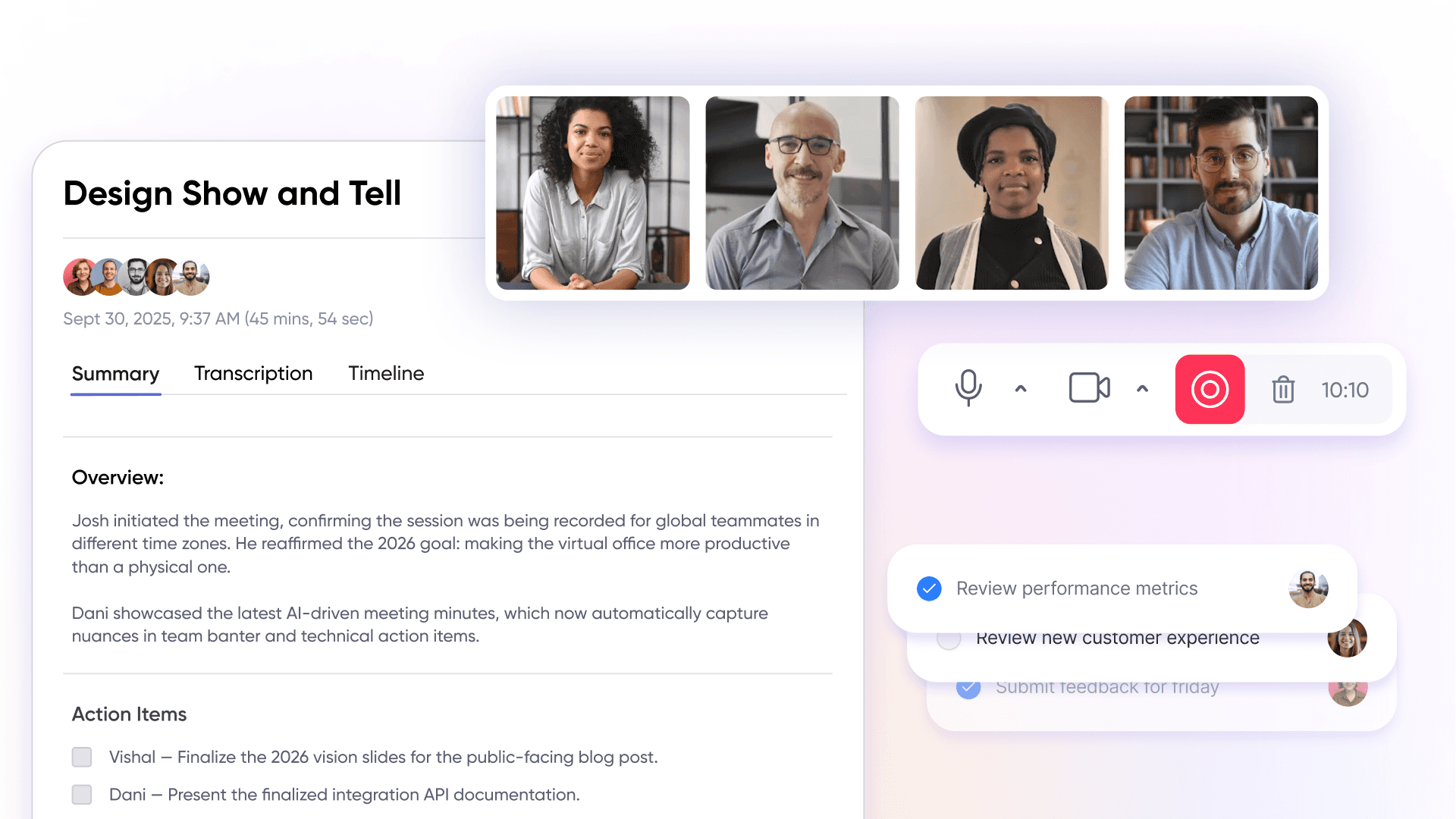
Modern virtual office software leverages AI to bridge the gap between meeting discussions and actionable follow-ups. Automatic meeting summaries extract key decisions and action items without manual note-taking, posting these directly to relevant team chat channels where participants can access them alongside ongoing discussions.
This AI capability directly replaces the manual coordination workflow that Slack + Zoom setups require: someone takes notes during Zoom calls, formats them, posts to Slack, and tags relevant people. With integrated AI summaries, this happens automatically, maintaining workflow continuity between synchronous meetings and asynchronous collaboration.
Deep Integration Capabilities
Virtual office platforms must connect natively to existing tool stacks. This includes Google Workspace apps (Google Drive, Google Docs, Google Calendar, Google Meet), Microsoft 365 and the broader Microsoft ecosystem, and project management tools like Trello or Asana. Integration capabilities determine whether the platform can serve as a genuine coordination hub or becomes yet another disconnected tool.
Critical integrations include:
Calendar sync: Automatically scheduling virtual meetings and showing availability
File sharing: Accessing Google Drive or Microsoft 365 documents without leaving the workspace
Workflow automation: Connecting with project management and task management systems
SoWork’s 9 integrations exemplify the depth required, enabling teams to pull documents into spatial huddle rooms and maintain context without opening separate browser tabs. This integration depth is what positions virtual office software as a layer above productivity suites rather than a replacement for them.
Security and Compliance Considerations
As remote and hybrid teams increasingly rely on virtual office platforms to coordinate daily work, security and compliance become non-negotiable priorities. The right virtual office software should not only streamline team communication and collaboration but also safeguard sensitive business data and ensure regulatory compliance across distributed teams.
Data Protection and File Sharing
When evaluating virtual office platforms, robust security features are essential to protect your organization’s information and maintain trust among remote and hybrid teams:
End-to-end encryption: Choose virtual office software that offers end-to-end encryption for all communications, including video calls, team chat, and file sharing. This ensures that only intended participants can access sensitive conversations and documents, providing peace of mind for distributed teams.
Granular access controls: Look for platforms with advanced access controls, such as role-based permissions and user authentication. These features allow you to restrict access to confidential files and virtual meeting spaces, ensuring that only authorized team members can view or share sensitive information.
Compliance certifications: Verify that your chosen virtual office platform meets industry-standard compliance requirements, such as GDPR, HIPAA, or SOC 2. These certifications demonstrate a commitment to data privacy and regulatory adherence, which is especially important for organizations handling sensitive client or employee data.
Secure file sharing: Opt for solutions that provide encrypted file storage and sharing capabilities. Secure file sharing not only protects documents during transfer but also ensures that files remain safe within the virtual office environment, reducing the risk of data breaches.
By prioritizing these security and compliance features, remote and hybrid teams can confidently collaborate in a virtual office, knowing their communications and files are protected by robust security measures.
Cost Efficiency and Budget Analysis
Adopting a virtual office platform is a strategic investment that can yield significant returns for organizations seeking to streamline operations and support remote work. However, it’s crucial to conduct a thorough cost-benefit analysis to ensure the chosen solution aligns with your budget and long-term goals.
Cost-Benefit Analysis of Virtual Office Solutions
Total cost of ownership: Go beyond the monthly subscription fee. Factor in costs for customization, integration with existing tools, onboarding, and ongoing support. Some virtual office platforms like SoWork offer a free plan or free tier, which can be ideal for small teams or pilot projects, while others may require upfront investment for advanced features.
Return on investment (ROI): Evaluate the potential ROI by considering productivity gains, reduced overhead (such as office space and utilities), and improved collaboration efficiency. Many organizations find that virtual office software pays for itself by minimizing context switching and enabling faster decision-making.
Pricing plan comparison: Review and compare pricing structures across leading virtual office platforms. Look for flexible plans that match your team size and feature requirements, and consider whether the platform offers scalable paid plans as your organization grows.
Scalability and future-proofing: Select a virtual office solution that can scale with your business. The best virtual office platforms allow you to add users, upgrade features, and integrate with new tools without costly migrations or disruptions.
By carefully analyzing both the direct and indirect costs, as well as the long-term benefits, you can select a virtual office platform that delivers maximum value for your organization.
Physical Office vs Virtual Office
The shift from traditional physical offices to virtual office environments has transformed the way teams collaborate and communicate. Each approach offers distinct advantages, and many organizations are now exploring hybrid models that combine the best of both worlds.
Comparison and Benefits
Virtual office benefits: Virtual office platforms empower teams with flexibility, enabling remote work from anywhere while reducing overhead costs associated with maintaining a physical office. Employees often report improved work-life balance and higher productivity thanks to fewer distractions and more control over their work environment.
Physical office benefits: A physical office fosters face-to-face interactions, spontaneous conversations, and a sense of shared culture. For some teams, especially those requiring hands-on collaboration or access to specialized equipment, a traditional office remains valuable.
Hybrid approach: Many organizations are adopting hybrid models, blending remote work with in-person collaboration. This approach leverages the flexibility of virtual offices while preserving the social and cultural benefits of a physical workspace.
Leveraging virtual office platforms: Modern virtual office platforms bridge the gap between remote and in-person work by replicating the experience of a physical office in a digital environment. Features like virtual meeting spaces, persistent team communication channels, and real-time collaboration tools enable distributed teams to work together as seamlessly as if they were in the same room.
By thoughtfully combining physical and virtual office strategies and leveraging the right virtual office software organizations can create a dynamic, productive, and resilient work environment that meets the needs of today’s distributed workforce.
Best Virtual Office Software Solutions for 2026
Building on the feature requirements established above, this section evaluates the top virtual meeting platforms specifically for teams seeking to consolidate Slack and Zoom into unified solutions. Each platform is assessed on its ability to deliver integrated team communication, video meetings, and the collaboration tools remote teams depend on.
Comprehensive Platform Comparison*
The following comparison focuses on platforms that function as genuine Slack and Zoom replacements not simple virtual meeting spaces or event platforms. Evaluation criteria prioritize daily operational use for remote and hybrid teams rather than occasional virtual events.
Platform | Unified Chat/Video | AI Features | Integration Depth | Pricing | Breakout Rooms | Best For |
SoWork | Full presence, chat, video | Meeting summaries, workflow AI | 9+ integrations | Free tier, $6/user month paid | Yes | Teams 10-500 seeking complete replacement |
Gather | Video chat with spatial maps | Limited | Basic integrations | Premium pricing | Yes | Event-focused teams, serendipitous interactions |
Tandem | Lightweight presence, quick calls | Minimal | Moderate | $59-449/month team packages | No | Small teams prioritizing presence |
WorkAdventure | Customizable spatial video | None | Requires custom work | Free (self-hosted) or ~$4/user | Yes | Technical teams needing security control |
Teamflow | One-click meetings, screen sharing | Basic embeds | Google Docs embeds | Mid-range | Yes | Hybrid brainstorming sessions |
Remo | Virtual event spaces, networking | Limited | Event-focused | Event-based pricing | Yes | Large scale virtual events and conferences |
*Please check the pricing of every tool by visiting the official pricing page.
Teams seeking an all-in-one solution that matches Slack’s messaging depth and Zoom’s video quality should prioritize platforms with both strong free version entry points and scalable paid plans for advanced features. Notably, platforms like SoWork, Gather, WorkAdventure, Teamflow, and Remo support breakout rooms, enabling subgroup discussions and enhancing collaborative team activities during virtual meetings.
SoWork: Complete Slack and Zoom Replacement
SoWork positions itself as the AI-powered virtual office that serves as the central digital workspace for remote work coordination. Its customizable pixel-art spatial environments create a persistent virtual workspace where team presence is always visible no more “where is everyone?” pings that clutter Slack channels.
Core capabilities:
Unified communication: Team chat, direct messages, and video calls happen in the same room without application switching
Spatial presence: Visual indicators show who’s available, who’s in meetings, and who’s in focus mode
Real time collaboration: Screen sharing, document sharing, and collaborative sessions without leaving the workspace
Audio and video quality: HD video and clear audio quality meeting professional standards for team meetings
AI workflow continuity: SoWork’s AI automatically generates meeting summaries from video conferencing sessions and team discussions. These summaries capture action items and post them to relevant channels, maintaining searchable message history across all communication modes. This addresses the core workflow gap where Zoom recordings and Slack conversations exist in isolation.
Integration ecosystem: Native connections to Google Workspace (Google Calendar, Google Drive, Google Docs, Google Meet), Microsoft 365 (Outlook, OneDrive, Microsoft Teams interoperability), and collaboration tools ensure SoWork functions as the coordination layer above existing productivity suites rather than replacing them.
Pricing structure: A free tier enables low-risk adoption—unlike Zoom’s 40-minute meeting limits or Microsoft Teams’ enterprise licensing requirements. Paid plans at $15/user month unlock advanced AI features and scale to 500 users, making SoWork accessible for teams from startup to mid-market.

Alternative Solutions Analysis
Gather excels at creating serendipitous interactions through its gamified spatial interface, earning strong ratings for virtual events and creative teams wanting playful environments. However, its AI capabilities remain limited compared to SoWork, and integration depth doesn’t support the operational workflows that daily remote team coordination requires. Best for: Teams prioritizing culture and social connection over operational efficiency.
Tandem delivers lightweight presence detection and quick one on one conversations for small teams wanting minimal overhead. Its always on voice channels create natural drop-in opportunities similar to walking by a colleague’s desk. Best for: Small remote teams (under 50) prioritizing quick interactions over comprehensive workspace features.
WorkAdventure offers open-source flexibility with self-hosting options for technical teams requiring complete control over their virtual workspace infrastructure. The platform supports robust security measures including end to end encryption configurations, but requires development resources for customization and scaling. Best for: Security-conscious technical teams with development capacity.
Teamflow provides one-click meetings with strong screen sharing and virtual whiteboards for brainstorming sessions. Its Google Docs embeds enable real time collaboration within the spatial environment. However, its integration capabilities don’t match SoWork’s 25+ connections for teams with complex tool stacks. Best for: Creative teams prioritizing visual collaboration and brainstorming.
Understanding these alternatives helps teams match platform strengths to specific needs while planning implementation approaches.
Implementation Strategy for Replacing Slack and Zoom
Successful migration from fragmented tools requires strategic planning beyond simply signing up for a new platform. This section provides actionable steps for transitioning your remote team from Slack + Zoom setups to unified virtual office software.
Migration Planning Process
Audit current Slack and Zoom usage patterns: Identify which Slack channels see active daily use versus occasional messages. Map recurring Zoom meetings, one-time calls, and ad-hoc video conferencing patterns. This audit reveals which workflows must be preserved during migration.
Map team communication workflows: Document how information flows between tools where do Zoom meeting decisions get posted? Which Slack channels serve as coordination hubs versus social spaces? Understanding these patterns ensures the virtual office platform replicates essential workflows.
Define success metrics: Establish measurable goals like reduced tool switching time, faster decision-making cycles, or improved visibility into team availability. Avoid vague goals like “better collaboration” focus on observable changes like “team members can join meetings from presence view in under 10 seconds.”
Create phased rollout plan: Start a free trial with a pilot team of 10-15 people who experience the most friction from current fragmentation. Their feedback shapes company-wide deployment. Allow 2-3 weeks for pilots before expanding, ensuring integration capabilities work with your specific tool stack.
Change Management for Tool Consolidation
Communicate benefits using concrete workflow improvements rather than abstract efficiency gains. Instead of “SoWork improves productivity,” demonstrate: “You’ll see who’s available without checking Slack status and Zoom calendars separately. Starting a video call takes one click, not five.”
Training approach: Focus sessions on workflow improvements, not feature tours. Show how daily tasks scheduling team meetings, sharing documents, finding colleagues for quick questions become simpler in the unified platform. Teams using desktop and mobile devices need training on both interfaces since remote work happens across contexts.
Addressing resistance: Acknowledge that established Slack and Zoom habits took time to develop. Position the transition as reducing tools, not adding one. Quantify the current pain: “We use 8 different apps to coordinate work. The virtual office consolidates 3 of them into one.”
Common Challenges and Solutions
Predictable obstacles emerge when replacing established communication tools. Proactive planning prevents these challenges from derailing adoption.
“Another Tool” Resistance
Team members rightfully resist adding applications to already-crowded toolbars. The solution: position virtual office software explicitly as tool consolidation. Create a clear before/after comparison showing which tools the platform replaces:
Before: Slack (chat) + Zoom (video) + calendar app (scheduling) + separate presence checking
After: SoWork (all unified on same platform)
Demonstrate reduced complexity during pilot phases by tracking how many applications team members open daily. A 30-40% reduction in app switching provides concrete evidence that counters “another tool” concerns.
Integration and Data Migration
Preserving chat history and meeting records matters for compliance and institutional knowledge. Most virtual office platforms support importing key historical data. For Slack migrations, export channel histories before transition. For Zoom, ensure recording access remains available during overlap periods.
Technical teams should verify integration capabilities with existing systems before full deployment. Test Google Workspace connections (Google Drive file access, Google Calendar sync) and Microsoft 365 integrations (OneDrive document sharing, Outlook calendar) with actual team workflows rather than demo scenarios.
User Adoption and Engagement
Low engagement in the first 2-4 weeks doesn’t indicate platform failure it reflects habit persistence. Combat this by making the virtual office the default location for team activities:
Schedule all team meetings through the platform’s integrated video conferencing
Move daily standups and team chat into the virtual workspace
Encourage informal use through designated social spaces that mirror physical office watercooler areas
Teams typically experience a 10-20% adoption dip initially before engagement stabilizes above previous tool usage levels. Patient, consistent reinforcement outperforms mandates.
Conclusion and Next Steps
Virtual office software represents a fundamental shift from managing fragmented communication tools to operating from a unified digital workspace. Platforms like SoWork provide the central coordination layer that Slack + Zoom setups cannot achieve combining team chat, video conferencing, presence detection, and AI-powered workflow continuity in environments designed for daily remote work rather than disconnected point solutions.
The strategic stack positions virtual office platforms as the operational hub where teams coordinate work, with document suites like Google Workspace and Microsoft 365 providing productivity tools, and specialized applications handling project management and task management. This layered approach reduces context switching, improves team visibility, and creates natural opportunities for the serendipitous interactions that make physical offices effective.
Immediate next steps:
Start a SoWork free tier trial to experience unified communication without commitment
Audit your current Slack and Zoom usage patterns using the framework from the implementation section
Identify a 10-15 person pilot team experiencing the most fragmentation friction
Define 2-3 measurable success metrics for your migration
Plan a 3-week pilot before evaluating company-wide deployment
Related topics worth exploring include hybrid work policies that accommodate both virtual and physical office presence, AI meeting productivity beyond basic summaries, and remote team culture optimization each building on the foundation that unified virtual office platforms provide.
Additional Resources
Virtual Office Software Evaluation Checklist:
[ ] Unified chat and video in single interface
[ ] Real-time presence indicators with availability context
[ ] AI meeting summaries and action item extraction
[ ] Integration with your existing Google Workspace apps or Microsoft ecosystem
[ ] Screen sharing and file sharing capabilities
[ ] Desktop and mobile devices support
[ ] Free plan or free version for initial testing
[ ] Scalable paid plans matching team growth
[ ] Robust security features including data protection
[ ] Searchable message history across communication modes
ROI Calculation Framework: Measure improvement by tracking: daily application switches before/after, time from meeting end to action item distribution, response time for “is anyone available?” queries, and weekly coordination meeting duration. Teams typically report 20-40% improvements in visibility and alignment after transitioning to virtual office platforms.
Implementation Timeline Template:
Week 1-2: Audit current tool usage, define success metrics
Week 3: Select platform, configure integrations
Week 4-6: Pilot team deployment and feedback collection
Week 7-8: Refinement based on pilot learnings
Week 9-12: Phased company-wide rollout
Week 13+: Ongoing optimization and advanced feature adoption
FAQ
1. Why should we replace Slack and Zoom with SoWork?
2. What makes SoWork different from just using Slack and Zoom together?
3. Does SoWork really replace Zoom-level video meetings?
4. How does SoWork improve team productivity?
5. Is SoWork just another collaboration tool?
6. What kind of teams benefit most from SoWork?
7. How does AI inside SoWork actually help?
8. Is switching complicated?
Blogs
Read Similar Articles

Remote Team Analytics: Complete Guide to Data-Driven Remote Work Management in 2026

Complete Guide to Gaining Visibility Into Remote Team Performance and Collaboration
