Which Digital Workspace Should I Choose for Team Presence and Async Collaboration in 2026
The SoWork Team
Published:
Updated on:
Introduction
Choosing the right digital workspace for team presence and async collaboration requires understanding a layered technology approach rather than selecting individual tools in isolation. The most effective remote and hybrid teams in 2026 build their digital workplace infrastructure on a virtual office foundation an AI-powered coordination hub like SoWork then integrate document suites and specialized tools based on specific workflow needs.
This guide covers the complete digital workspace technology stack for remote and hybrid teams seeking to improve team collaboration, reduce coordination overhead, and maintain productivity across time zones. The target audience includes remote team leaders evaluating collaboration platforms, IT decision makers building digital workplace strategy, and organizations transitioning from physical office space to distributed work models. Choosing the right digital workspace can boost productivity and empower employees by enabling flexible, high-performance work from anywhere. Digital workspaces and workplaces also contribute to competitive advantage and business continuity by enhancing employee experiences and supporting seamless operations.
A digital workplace refers to the complete ecosystem of tools, systems, services, and infrastructure that support digital operations, while a digital workspace is a focused subset that delivers a secure, virtual environment personalized to each user. Understanding the distinction between digital workspaces and digital workplaces is critical for IT decision-makers, as the former powers the user experience while the latter defines the overall strategy for digital operations.
Direct answer: Start with an AI-powered virtual office platform like SoWork as your central coordination layer for team presence and real-time communication, then integrate your existing document suites (Google Workspace or Microsoft 365) and specialized project management tools based on your team’s specific workflows. The digital workspace market is projected to reach $234 billion by 2032, underscoring the growing importance of these platforms.
By the end of this article, you will gain:
A clear framework for evaluating digital workspace options across three technology layers
Understanding of why virtual office platforms provide strategic advantage over chat-first or document-only approaches
Specific evaluation criteria for assessing team presence and async collaboration capabilities
Practical implementation guidance for transitioning to a unified virtual workspace
ROI metrics and success indicators for measuring productivity gains
Understanding the Digital Workspace Technology Stack
A digital workspace encompasses the complete technology ecosystem supporting distributed team collaboration from daily communication and scheduling meetings to document collaboration and workflow automation. Key components of a digital workspace include cloud platforms, cloud services, virtual desktop infrastructure, on-premises data centers, company data, and IT management systems. Modern digital workspace platforms integrate these elements into a single environment to support secure, flexible, and scalable operations. The term digital workplace has evolved significantly since 2020, when remote teams relied on fragmented combinations of video conferencing, instant messaging, file sharing, and project management tools without a unifying coordination layer.
Teams need a strategic layered approach rather than ad-hoc tool selection because tool proliferation creates significant productivity costs. Research indicates remote workers use approximately 4.8 different conferencing and collaboration tools on average, leading to substantial context switching overhead. Organizations following a digital transformation strategy increasingly recognize that all the tools need integration through a central hub rather than operating as disconnected islands.
The Digital Workplace Infrastructure and Virtual Office Foundation Layer
Virtual office platforms like SoWork serve as the central coordination hub for remote and hybrid teams, sitting above individual productivity applications to provide unified access to team presence, communication and collaboration, and meeting coordination. Unlike traditional video meetings platforms that require scheduled calls, virtual offices create persistent virtual spaces where team members can see availability, initiate spontaneous conversations, and maintain shared context throughout the workday.
Key features of this foundation layer include:
Team presence: Spatial awareness showing who is working, their availability status, and working hours across time zones
Real-time communication: Spontaneous audio and video through “walk-up” interactions that replicate physical office encounters
Meeting coordination: Configurable zones for standups, all-hands, and breakout sessions with AI-assisted summaries
Workflow continuity: Persistent meeting libraries, action item extraction, and context preservation for async handoffs
Digital workspaces enable employees to work from anywhere, improving work-life balance and allowing for flexible work arrangements.
SoWork’s approach reduces context switching by consolidating communication, presence, and meeting coordination in a unified environment. Teams report productivity gains of approximately 83% after adopting virtual office platforms, with workdays reducing by roughly 36 minutes through eliminated coordination overhead. The platform integrates with existing tools through Slack, Google Calendar, Microsoft Outlook, and Zapier connections, allowing meeting summaries and action items to flow into established business processes.

Document and Productivity Suites
Document and productivity suites like Microsoft 365 and Google Workspace serve as the content creation layer, sitting beneath the virtual office coordination hub. These platforms excel at document collaboration, spreadsheet analysis, presentation creation, and knowledge sharing but they cannot solve team presence and async collaboration challenges on their own.
Google Workspace excels at real-time co-editing, browser-first accessibility, and seamless collaboration through sharing links. Microsoft 365 provides stronger offline access, advanced formatting capabilities, and deeper enterprise data management with compliance and retention policies. Both platforms now include AI assistance (Google’s Duet and Microsoft’s Copilot) for content generation, summarization, and automating routine tasks, but these capabilities operate within document creation spaces rather than across team coordination.
The critical insight is that document suites require separate digital tools for presence awareness and spontaneous interaction. Teams relying only on document suites still incur high coordination overhead when communicating around content chat threads, emails, and scheduling meetings to discuss shared files. This is precisely why virtual office platforms like SoWork sit above document suites as the operational hub. Additionally, digital workspaces help organizations reduce operating costs by minimizing the need for physical office space and paper.
Specialized Tools and Applications
Specialized tools form the top layer of the digital workspace technology stack, handling domain-specific workflows that neither virtual offices nor document suites address directly. Project management tools like Asana, Jira, and Trello provide task tracking, workflow visualization, and deadline management. Automation platforms enable workflow automation to automate repetitive tasks and streamline operations across systems. Many of these platforms also deliver valuable insights through analytics and reporting on team performance and project progress, helping teams identify bottlenecks and optimize productivity.
These specialized tools connect through the virtual office coordination layer rather than operating independently. SoWork’s integration capabilities allow meeting action items to flow into project management systems, calendar events to sync across platforms, and team chat discussions to reference relevant project contexts. This connected approach reduces the fragmentation that undermines remote team productivity.
The layered approach creates clear technology boundaries: virtual office for coordination and presence, document suites for content creation, and specialized tools for domain workflows. Understanding these boundaries helps teams evaluate options systematically rather than accumulating overlapping tools that create confusion.
Essential Requirements for Team Collaboration, Presence, and Async Collaboration
Building on the layered technology approach, teams evaluating digital workspace options should assess specific capabilities that determine success in distributed work environments. Seamless communication is essential for effective team collaboration, ensuring instant, clear, and efficient interaction across virtual workspaces. These requirements reflect the core challenges remote and hybrid teams face: visibility into team availability, context preservation across time zones, and seamless integration that reduces tool fragmentation. Choosing a digital workspace requires balancing the need for immediate team connection with the flexibility of asynchronous work.
Real-Time Presence and Availability
Effective team presence means knowing who is working, their current availability, and whether now is an appropriate time for interaction without scheduling formal check-ins or sending speculative messages. Research shows that fragmented collaboration platforms create substantial “is now a good time?” friction, with remote workers spending significant time simply coordinating when to communicate rather than communicating productively.
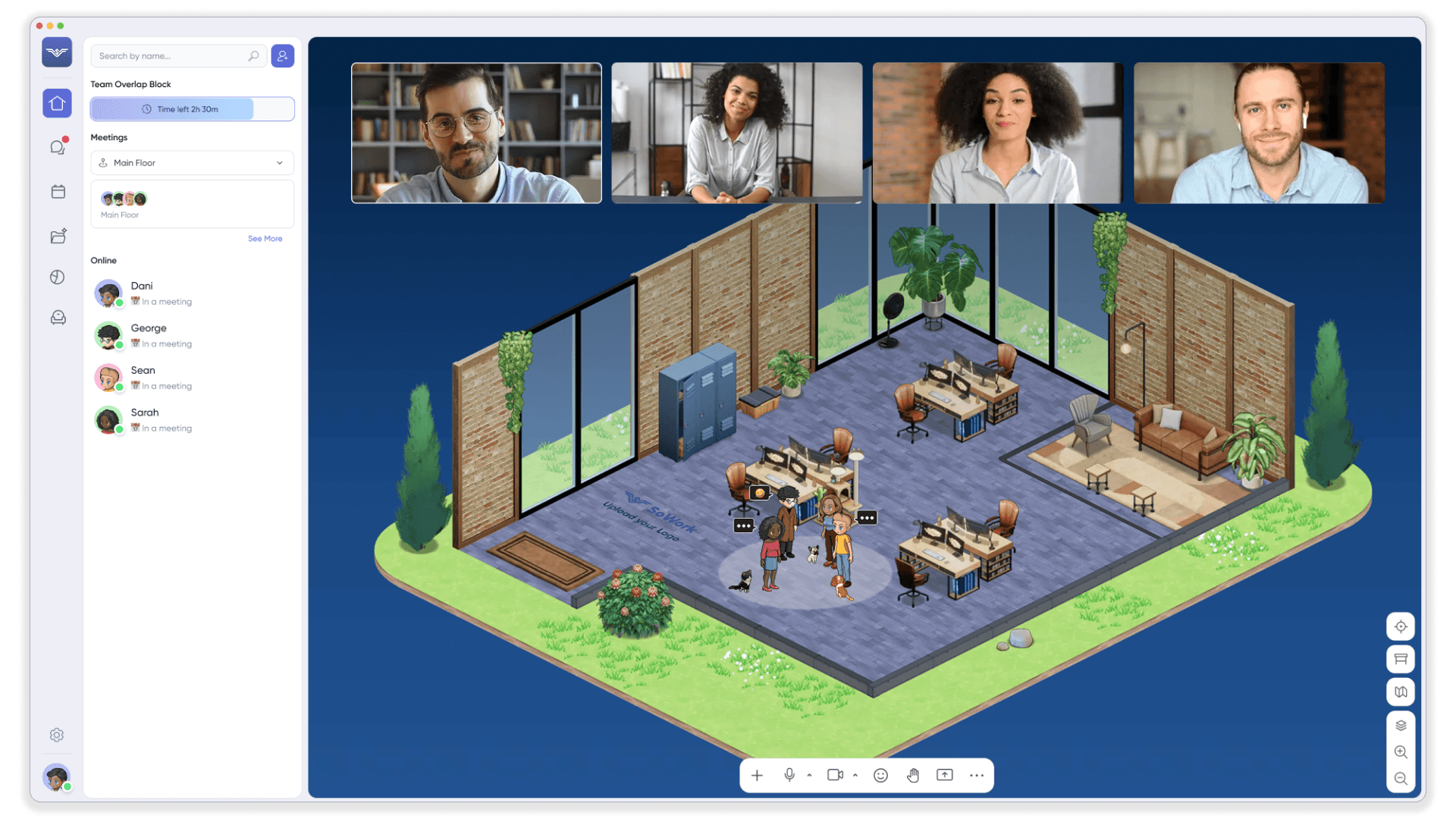
SoWork addresses this through AI-powered presence features including:
Spatial awareness maps: Visual representation of team members in configurable zones, showing who is in meetings, available for conversation, or in focus mode
Availability status indicators: Clear signals distinguishing Available, Busy, Away, and Deep Work modes
Working hours visibility: Automatic display of team member time zones and typical working hours
Walk-up interactions: Ability to initiate spontaneous audio or video simply by approaching someone’s avatar, replicating physical office encounters
A reliable network connection is essential for securely accessing these real-time presence features from any location and device, ensuring seamless collaboration in cloud-based or hybrid environments. Presence management tools should simulate physical office visibility without being intrusive, and should include dashboards that display who is focused or available, helping teams balance transparency with privacy.
This real-time presence visibility eliminates the coordination overhead that plagues distributed teams using fragmented screen sharing and video conferencing tools. Teams can maintain the spontaneous collaboration of physical office space while operating across multiple physical locations.
Seamless Async Handoffs and Context Sharing
Async collaboration requires persistent context that remains accessible when team members work across different time zones or schedules. The challenge extends beyond simple instant messaging teams need comprehensive records of decisions, discussions, and action items that anyone can access to maintain alignment without requiring synchronous catch-up meetings.
Approximately 62% of remote workers now prefer asynchronous communication approaches, and research indicates async tool usage reduces remote miscommunication by roughly 37%. However, achieving these benefits requires specific capabilities:
AI-assisted meeting summaries: Automatic transcription and condensation of meeting content with extracted action items
Persistent meeting libraries: Searchable archives (like SoWork’s Codex) where team members can review past discussions and decisions
Context continuity features: Clear documentation linking decisions to their source discussions and rationale
Workflow handoff support: Mechanisms for passing work between team members with full context rather than fragmented thread references
SoWork’s Sophia Bot provides these AI-powered async capabilities, generating meeting summaries, extracting action items, and maintaining the shared context that keeps distributed teams aligned. This approach supports knowledge sharing without requiring everyone to attend every meeting or read every chat message.
Integration and Workflow Continuity
The most sophisticated presence and async features become worthless if they exist in isolation from teams’ existing workflows. Effective digital workspace platforms must integrate with document suites, calendars, project management tools, and communication platforms to reduce context switching rather than creating another separate application demanding attention.
Data suggests context switching costs remote knowledge workers approximately 20-30 minutes daily time lost navigating between disconnected tools and reconstructing context across platform boundaries. SoWork addresses this through:
Calendar integration: Bidirectional sync with Google Calendar and Microsoft Outlook for seamless meeting coordination
Document suite connections: Ability to reference and access Google Docs, Microsoft files, and other content from within the virtual workspace
Automation connectivity: Zapier integration enabling meeting summaries and action items to flow into Asana, Notion, or other project management tools
Chat platform bridges: Integration with Slack and Teams preserving existing communication patterns while adding presence and coordination layers
This integration approach allows teams to maintain existing workflows while gaining the coordination benefits of a unified virtual office foundation. The goal is reducing tool proliferation rather than adding another disconnected platform.

Digital Workspace Evaluation Framework and Selection Process
Systematic evaluation helps teams select digital workspace solutions based on specific needs rather than marketing claims or feature lists. This framework provides methodology for assessing current collaboration patterns, comparing platform categories, and measuring outcomes against defined key performance indicators.
Assessment Methodology for Team Needs
Before comparing specific platforms, teams should map current collaboration patterns and identify specific pain points:
Document current tool usage: List all collaboration tools team members use, noting frequency, purpose, and overlaps
Identify context-switching patterns: Track where team members lose context between tools or struggle to find information from previous discussions
Assess geographic distribution: Map time zone spread and identify async collaboration requirements based on overlap hours
Evaluate existing integrations: Determine which current tools must remain versus which could be consolidated
Define success metrics: Establish baseline measurements for meeting hours, response latencies, employee experience scores, and productivity indicators
Teams between 25-500 members typically gain the most value from virtual office platforms like SoWork, though the platform scales effectively for smaller teams through its free tier and for enterprise organizations through custom plans. The evaluation should consider current company culture around remote work and readiness for adopting new collaboration patterns.
Platform Comparison Criteria
The following comparison illustrates why virtual office platforms provide strategic advantage over document-only or chat-first approaches for team presence and async collaboration. When evaluating digital workspace solutions, it's important to consider user feedback from platforms like G2 and Capterra to assess effectiveness and user satisfaction:
Factor de Evaluación | Virtual Office Platforms (SoWork) | Document-Only Suites (Microsoft 365/Google) | Chat-First Tools (Slack/Teams) |
Team Presence | AI-powered spatial presence, real-time availability indicators, walk-up conversations | Basic status in apps, limited visibility across tools | Status indicators present, but fragmented across channels |
Async Collaboration | AI summaries, persistent meeting library, workflow continuity features | Document-centric collaboration, limited context sharing beyond files | Thread-based discussion, but context gets buried in message volume |
Integration Depth | Central hub connecting all tools seamlessly through APIs and automation | Comprehensive within own suite, limited external integration | Many app integrations, but experience remains fragmented |
Coordination Overhead | Significantly reduces scheduling and context switching | Requires additional coordination tools for presence and communication | High coordination overhead managing multiple channels |
Synchronous Meeting Burden | Walk-ups replace many small meetings; async capture reduces recap needs | Meetings still required for alignment around documents | Scheduled calls needed for presence; huddles help but lack spatial context |
Virtual office platforms like SoWork provide the coordination layer that document suites and chat tools cannot replicate. Google Workspace and Microsoft 365 excel at content creation; Slack and Teams excel at threaded communication. But neither category solves the fundamental challenge of team presence and spontaneous collaboration that remote work disrupts.
High-performance digital workspace platforms also prioritize responsiveness, scalability, and security to enhance user experience and IT efficiency.
The strategic approach starts with virtual office as foundation, integrates existing document suites, and layers specialized tools based on specific workflow requirements. This reduces total tool count while improving coordination effectiveness.
Common Selection and Implementation Challenges
Teams evaluating digital workspace options typically encounter predictable obstacles around tool complexity, user adoption, and budget justification. Understanding these challenges in advance helps organizations plan effective implementation strategies.
Tool Proliferation and Integration Complexity
Many teams hesitate to add another platform to already-complex technology stacks. The solution: position virtual office as a consolidation layer rather than an addition. SoWork can replace separate tools for video conferencing, meeting transcription (replacing Otter.ai or similar), and team presence indicators while integrating existing communication and document platforms.
Implementation approach: Start with virtual office foundation, then audit existing tools for potential consolidation. Many teams find they can reduce overall tool count by using SoWork’s unified capabilities for meetings, presence, and coordination while maintaining their chosen document suite and project management tools.
User Adoption and Change Management
Spatial maps, avatars, and virtual zones represent new interaction patterns for teams accustomed to calendar-based meetings and channel-based chat. Initial resistance is common, particularly among team members comfortable with existing workflows.
Solution: Begin with SoWork’s free tier (supporting up to 10 users) to demonstrate immediate value without major organizational change. Run a pilot with a core team for 30 days, tracking specific metrics like meeting count, context gaps (“I missed that decision”), and employee engagement scores. Success with the pilot team builds internal advocacy for broader rollout.
Effective adoption requires establishing norms: when to use walk-ups versus scheduled meetings, expectations around availability status, and guidelines for async catch-ups through meeting summaries. Training sessions focused on practical workflows—not feature tours—accelerate adoption.
Budget Constraints and ROI Uncertainty
Cost concerns are legitimate, particularly when comparing SoWork’s paid tiers ($6-15/user/month) against existing tools that may feel “free” despite hidden productivity costs. The ROI calculation should include:
Context switching reduction: Estimated 20-30 minutes saved daily per team member
Meeting efficiency: Reported 36-minute workday reduction through eliminated coordination overhead
Tool consolidation: Potential elimination of separate meeting recording, transcription, and presence tools
Productivity gains: Organizations report approximately 83% productivity improvement after virtual office adoption
SoWork’s scalable pricing model free tier for small teams, Basic at ~$6/user/month, Premium at ~$12-15/user/month with AI features allows teams to start small and expand as value demonstrates. Enterprise plans add security features like SSO and multi-factor authentication, custom branding, and dedicated support for organizations requiring business continuity guarantees.
Conclusion and Next Steps
Successful digital workspace selection starts with understanding the layered technology approach: virtual office foundation for team presence and coordination, document suites for content creation, and specialized tools for domain workflows. SoWork’s AI-powered virtual office provides the central coordination layer where remote and hybrid teams collaborate effectively, maintain shared context, and reduce the coordination overhead that undermines distributed work.
Immediate next steps:
Start a SoWork free trial to experience spatial presence and walk-up collaboration
Map current collaboration pain points using the assessment methodology outlined above
Identify 2-3 key integrations (calendar, document suite, project management) for initial configuration
Run a 30-day pilot with a core team of 10-25 members, tracking meeting count, context gaps, and satisfaction scores
Gather feedback and iterate on virtual office configuration before broader rollout
Related topics worth exploring include remote team productivity measurement using data-driven insights, hybrid work policies that balance physical location and virtual spaces, AI-assisted workflow optimization through continuous optimization of meeting patterns and collaboration habits, and fostering a culture of continuous learning to support adaptability and ongoing skill development in digital work environments.
Additional Resources
Digital workspace selection checklist: Assessment criteria focused on team presence, async collaboration, integration depth, coordination overhead reduction, and scalability to support a global workforce.
SoWork integration guides: Step-by-step configuration for Microsoft 365, Google Workspace, Slack, popular project management tools like Asana and Notion, and support for external meetings and collaboration with participants outside the organization.
ROI calculator: Productivity measurement framework tracking context switching reduction, meeting efficiency, and employee experience improvements.
30-day implementation timeline: Phased migration approach for transitioning to SoWork-centered digital workplace infrastructure without disrupting existing workflows, with considerations for supporting a global workforce and ensuring scalability for international teams.
Security and compliance documentation: Information on SoWork’s AWS/GCP infrastructure, encryption standards, enterprise compliance certifications, and measures to protect sensitive data and ensure secure access for remote and hybrid teams.
FAQ
1. How can our team reduce the constant context switching between different apps?
2. Why should we choose a virtual office over standard chat tools like Slack?
3. How does a virtual workspace actually improve our meeting efficiency?
4. Is it possible to maintain team culture and presence in a fully remote setup?
5. How do we handle handoffs when team members work in different time zones?
6. Will we have to abandon our current tools like Google Workspace or Microsoft 365?
7. What is the best way to test if a virtual office works for our specific team?
8. What kind of return on investment can we expect from switching to SoWork?
Blogs
Read Similar Articles

Remote Team Analytics: Complete Guide to Data-Driven Remote Work Management in 2026

Complete Guide to Gaining Visibility Into Remote Team Performance and Collaboration
