Microsoft Teams vs SoWork: Virtual Office Comparison (2026)
TLDR verdict
For teams seeking an AI‑driven virtual office that fosters culture through flexible immersive graphics, integrated chat/meetings, and built‑in analytics without expensive add-ons, SoWork is the better choice. SoWork also has a Simplified mode (non‑world UI) for teams who prefer a traditional interface. When Microsoft Teams is a fit, it is typically for organizations deeply entrenched in the Microsoft 365 ecosystem that require strict document-level collaboration (Word, Excel) and are willing to pay extra for AI capabilities via Copilot add-ons.
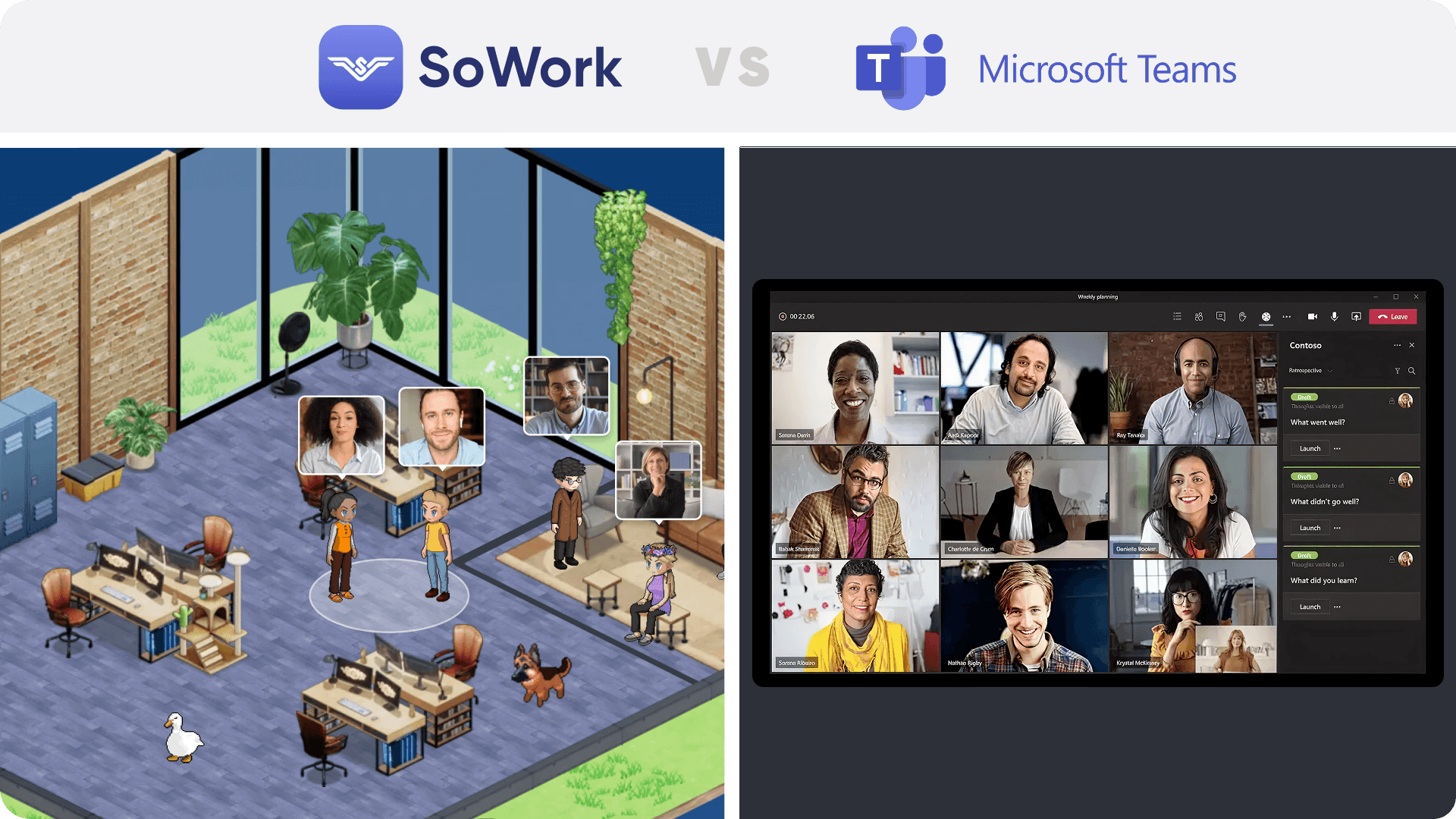
Fast comparison
SoWork is best for
Teams needing spatial video calls, instant text chats, and integrated AI‑meeting summaries included in the plan.
Leaders who require detailed team analytics to monitor participation and productivity.
Companies wanting to switch between an immersive 2.5D view and a Simplified Mode to reduce fatigue.
Teams valuing customizable environments inspired by The Sims to build remote culture.
Organizations seeking integrations via Zapier, Slack, Miro, Github, Google & Outlook Calendar and more.
Large teams expecting volume discounts when scaling beyond 100 users.
Microsoft Teams is best for
Organizations that need deep, native editing integration with Microsoft 365 apps (Word, Excel, PowerPoint).
Teams requiring webinars for up to 1,000 attendees or Town Halls for massive audiences.
Enterprises that require complex telephony features like PBX, VOIP, and Contact Centers.
Feature comparison table
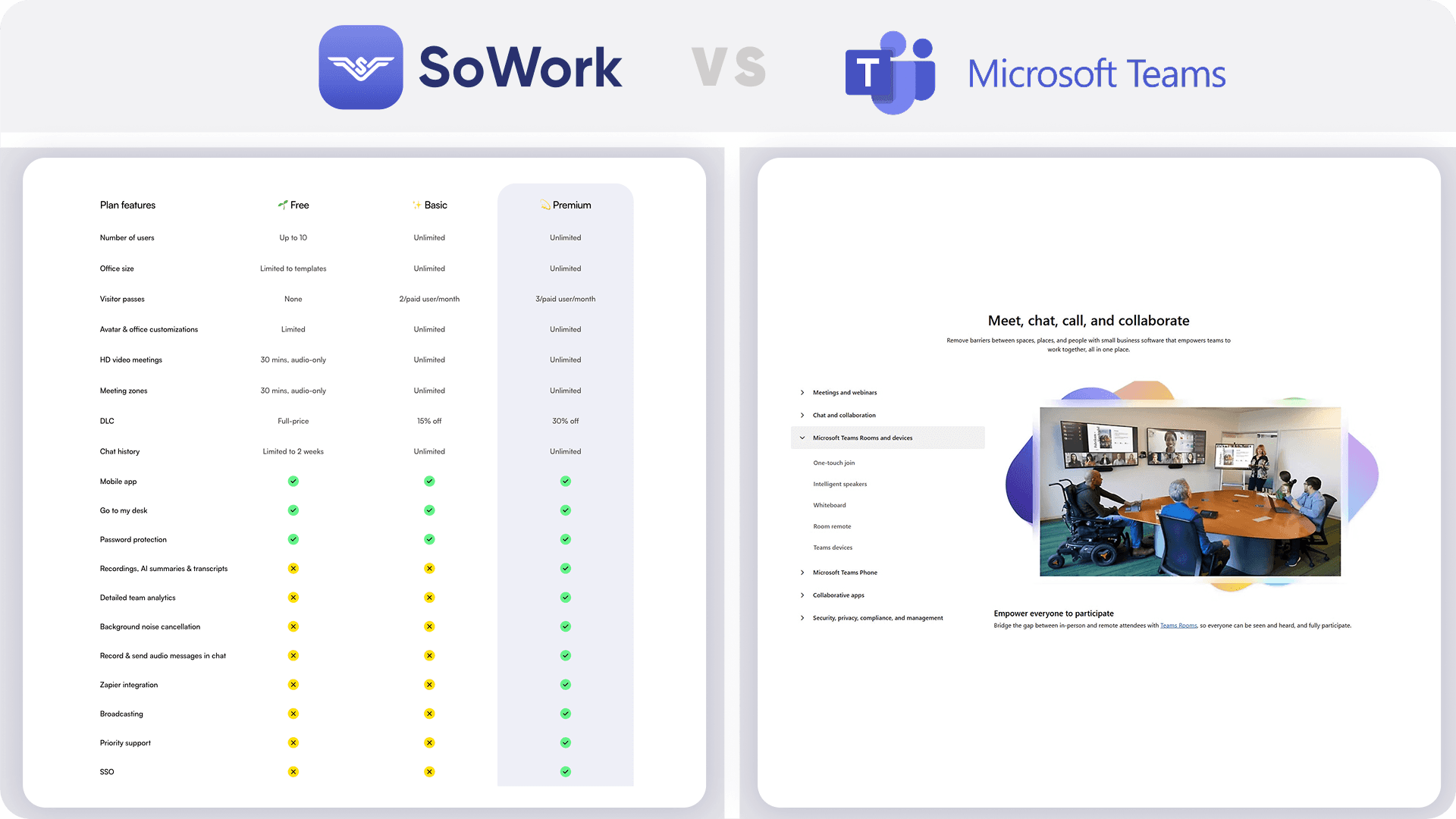
Feature | SoWork | Microsoft Teams | Notes / source |
|---|---|---|---|
Simplified Mode (non‑world UI) | Yes – users can toggle between immersive 2.5D and Simplified modes. | No – primarily relies on a list/grid-based chat and video interface. | SoWork emphasizes switching for adoption; Teams uses a standard static interface. |
AI meeting outputs | SoWork AI automatically captures meeting minutes and action items. | Available only as a paid add-on (Microsoft 365 Copilot). | SoWork AI summaries are built-in to Premium; Teams requires a ~$21.00/user/mo add-on for AI features,. |
Max active members / seats | Unlimited seats; pricing scales with user count; volume discounts for >100 users. | Up to 300 employees (Business plans); Unlimited (Enterprise). | Microsoft limits Business plans to 300 users; SoWork scales with volume discounts. |
Integrations | Zapier, Slack, Google & Outlook Calendar, GitHub and more. | Microsoft 365, SharePoint, and 250+ integrated business apps. | SoWork offers broader automation via Zapier; Teams focuses on the Microsoft ecosystem. |
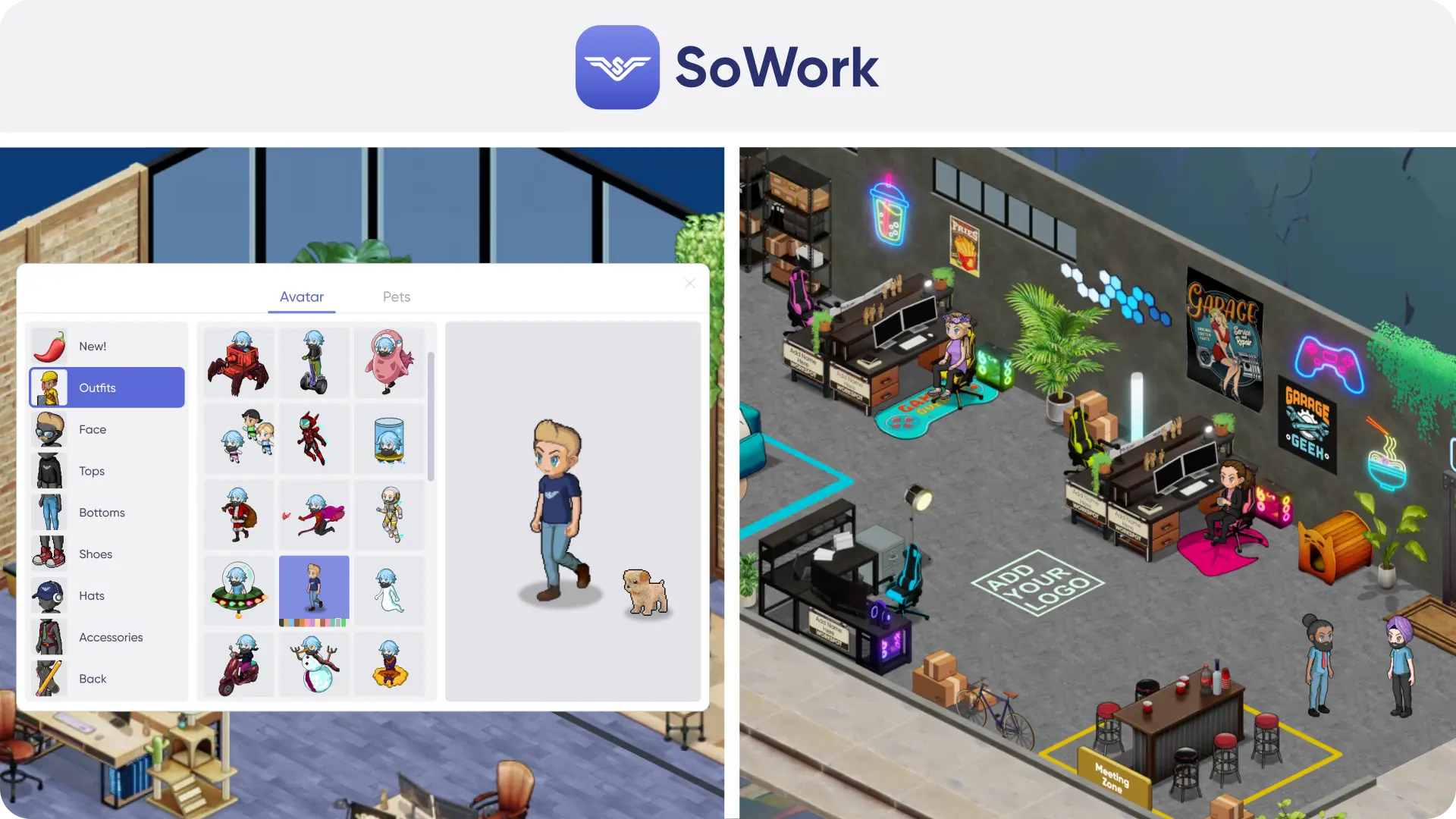
Customization | Custom maps, furniture, décor; free custom map for Premium teams >30. | Custom backgrounds and "Together Mode" scenes. | SoWork offers deep environment customization; Teams focuses on video background filters. |
SSO & SCIM | Available in Enterprise plan (publicly stated in SoWork docs). | Available in Business Basic and higher (via Microsoft Entra ID). | Teams includes identity management in most business plans. |
Mobile / desktop apps | Mobile & desktop apps available. | Mobile & desktop apps available. | Both platforms support iOS, Android, Windows, and Mac. |
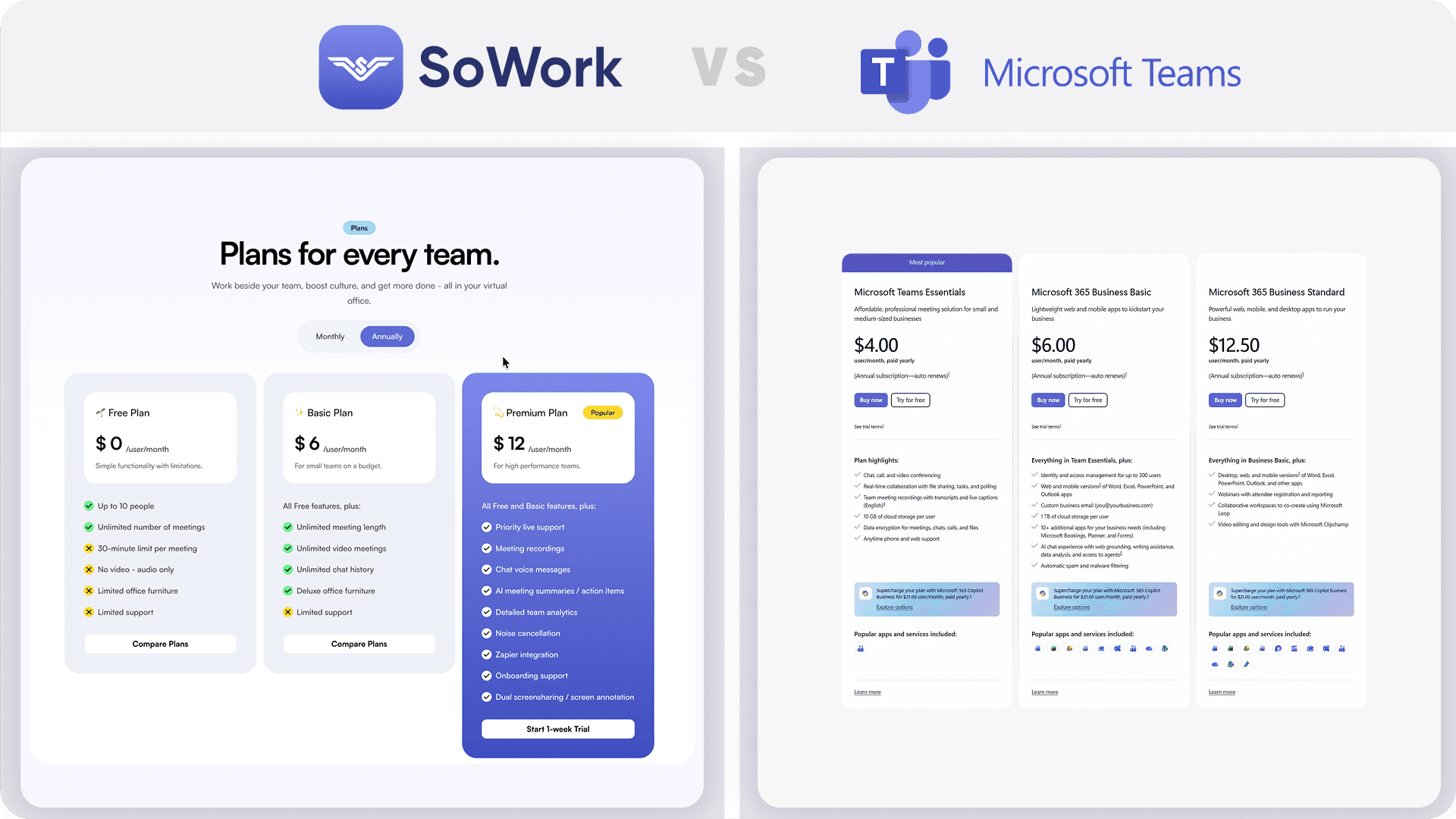
Pricing (per user) | Basic $6/user/mo; Premium $15/user/mo (or $12 billed annually). | Essentials $4.00/user/mo; Business Standard $12.50/user/mo (paid yearly). | Teams has a lower entry price but AI is a significant extra cost. |
Perks
SoWork perks (always present)
Free migration from other virtual offices – SoWork rebuilds your map for free.
Free custom map for Premium teams over 30 users.
Free logo on avatar apparel (hoodies, hats, T‑shirts) for Premium teams over 30 users.
Volume discounts for 100+ users (list price for 100 users shown as upper bound).
Microsoft Teams perks
1 TB of cloud storage per user included in Business Basic and Standard plans.
Access to web/mobile versions of Word, Excel, and PowerPoint (Business Basic).
Webinar hosting with attendee registration included in Business Standard.
Definitions
Active member vs seat – An active member is a user currently logged into the platform; a seat is a licensed slot that may or may not be active at any given time.
AI meeting notes – SoWork AI creates a transcript of the meeting and summarizes decisions and action items. Microsoft Copilot offers similar features but requires a separate add-on subscription.
SSO vs SCIM – SSO (single sign‑on) allows users to log in with a single identity provider; SCIM automates user provisioning.
Microsoft 365 Copilot – An AI add-on for Teams that assists with writing, data analysis, and meeting recaps, priced separately from the base license.
Pricing + price math (10, 25, 50 users)
Below is a sample calculation for 10, 25 and 50 users, assuming all seats are active. SoWork’s Basic tier is priced at $6 per user per month or $5.40 per user per month billed annually (10% discount), while its Premium tier costs $15 per user per month or $12 per user per month when billed annually (roughly a 20 % discount). Microsoft Teams offers "Teams Essentials" at $4.00 per user/month (paid yearly) and "Business Standard" at 12.50 per user/month (paid yearly). Note: To get AI meeting summaries in Teams equivalent to SoWork Premium, you must add Copilot for $21.00/user/mo, making the total effective cost significantly higher.
Plan | Billing | 10 users | 25 users | 50 users | Assumptions |
|---|---|---|---|---|---|
SoWork Basic | Monthly | 10×$6 = $60 | 25×$6 = $150 | 50×$6 = $300 | All seats active. |
Annual | 10×$5.40 = $54/mo | 25×$5.40 = $135/mo | 50×$5.40 = $270/mo | Pay annually, 10% discount. | |
SoWork Premium | Monthly | 10×$15 = $150 | 25×$15 = $375 | 50×$15 = $750 | Includes AI meeting notes. |
Annual (-20%) | 10×$12 = $120/mo | 25×$12 = $300/mo | 50×$12 = $600/mo | Premium’s annual rate is discounted to $12/user/mo. | |
Teams Essentials | Annual | 10×$4.00 = $40/mo | 25×$4.00 = $100/mo | 50×$4.00 = $200/mo | No AI features. Paid yearly. |
Teams Business Standard | Annual | 10×$12.50 = $125/mo | 25×$12.50 = $312.50/mo | 50×$12.50 = $625/mo | Includes desktop Office apps. No AI features. Paid yearly. |
Teams Standard + Copilot | Annual | 10×$33.50 = $335/mo | 25×$33.50 = $837.50/mo | 50×$33.50 = $1,675/mo | Adds Copilot (21)toStandard(12.50) for AI parity. |
SoWork pricing scales down for 100+ users (volume discounts). For SoWork, the list price for 100 users is $600/month for Basic and $1,500/month for Premium when billed monthly (or $1,200/month when billed annually) before volume discounts. SoWork offers volume discounts above 100 users; details are not publicly stated, so contact sales.
UI / UX
Onboarding flow – SoWork allows teams to create a workspace and invite colleagues via link; there is a free plan for up to 10 people. Microsoft Teams typically requires setting up a Microsoft 365 tenant and configuring Entra ID (formerly Azure AD) for the organization, which can be complex for small teams.
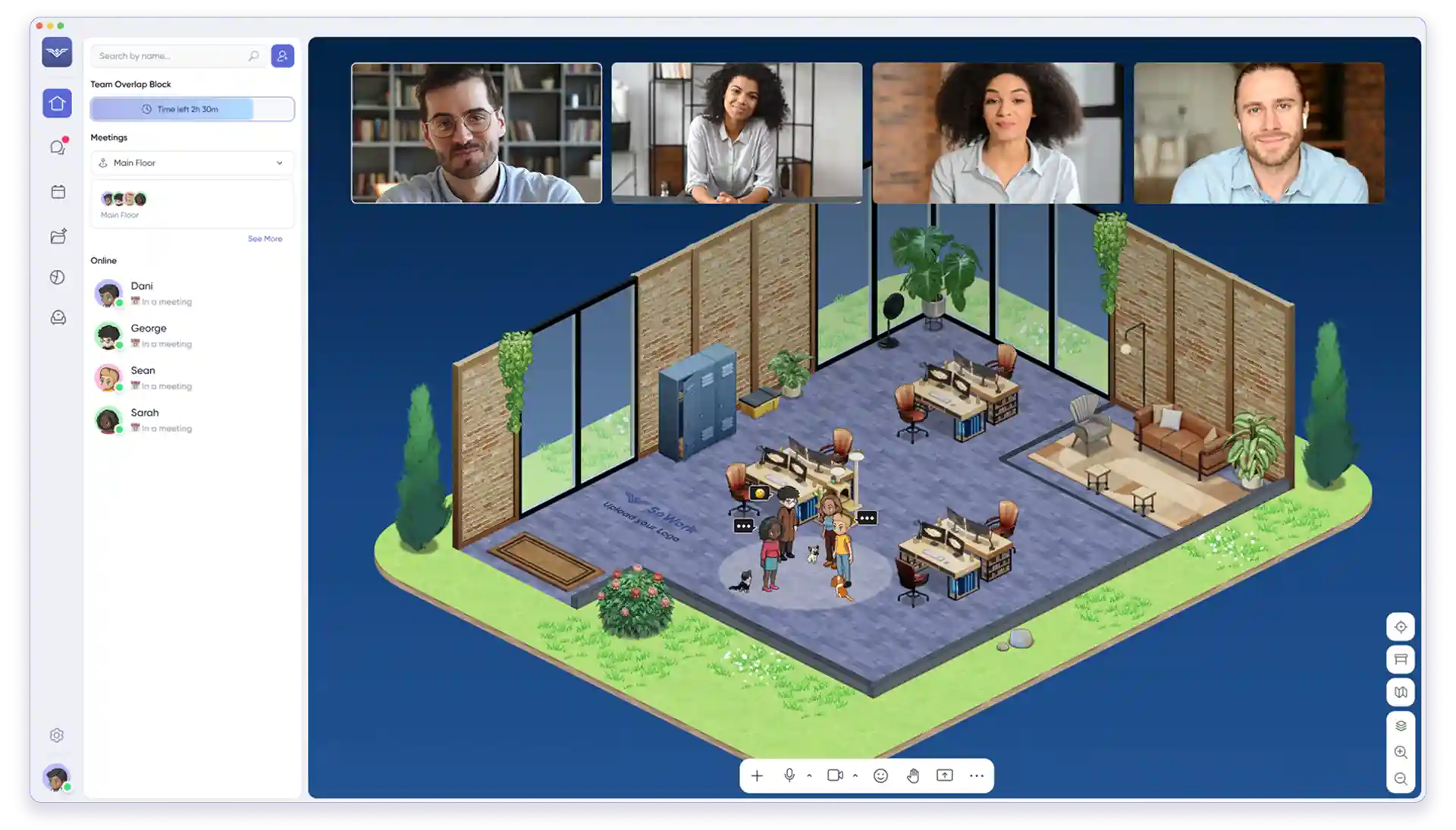
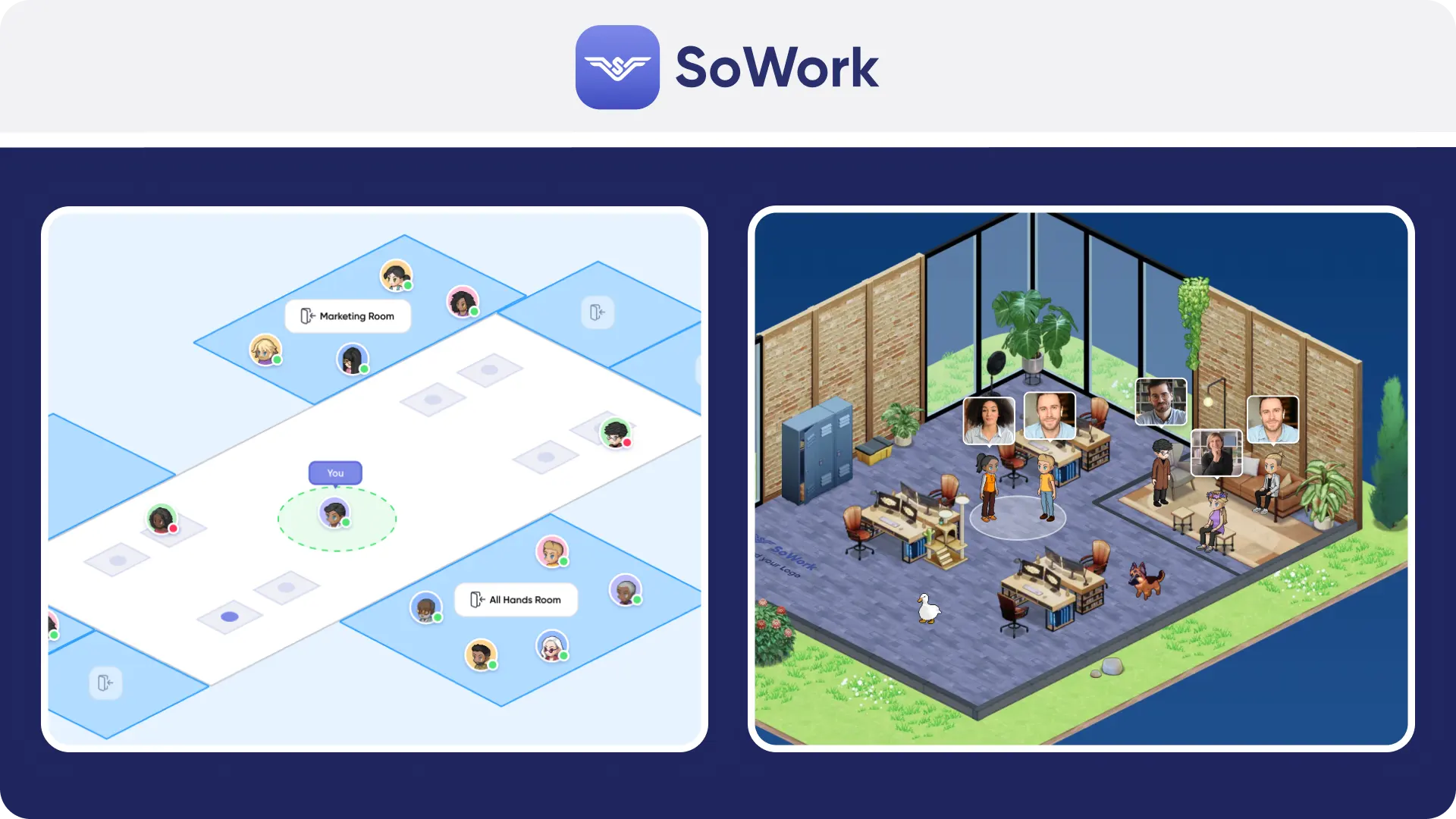
Navigation clarity – SoWork’s immersive 2.5D interface includes avatars and rooms to show presence; the Simplified Mode simplifies navigation for first‑time users. Microsoft Teams uses a static sidebar with "Teams," "Chat," and "Calendar" tabs, relying on status dots (Available, Busy, Away) rather than visual presence.
Time to start a meeting – In SoWork, walk up to a colleague’s avatar or click their name to start a video call instantly. In Microsoft Teams, users must schedule a meeting via calendar or click the "Meet now" button and wait for others to join the lobby.
Admin clarity – SoWork’s Enterprise tier includes role‑based admin controls and SSO/SCIM. Microsoft Teams offers enterprise-grade admin centers with granular policies for messaging, security, and compliance, which are powerful but have a steep learning curve.
Artistic direction
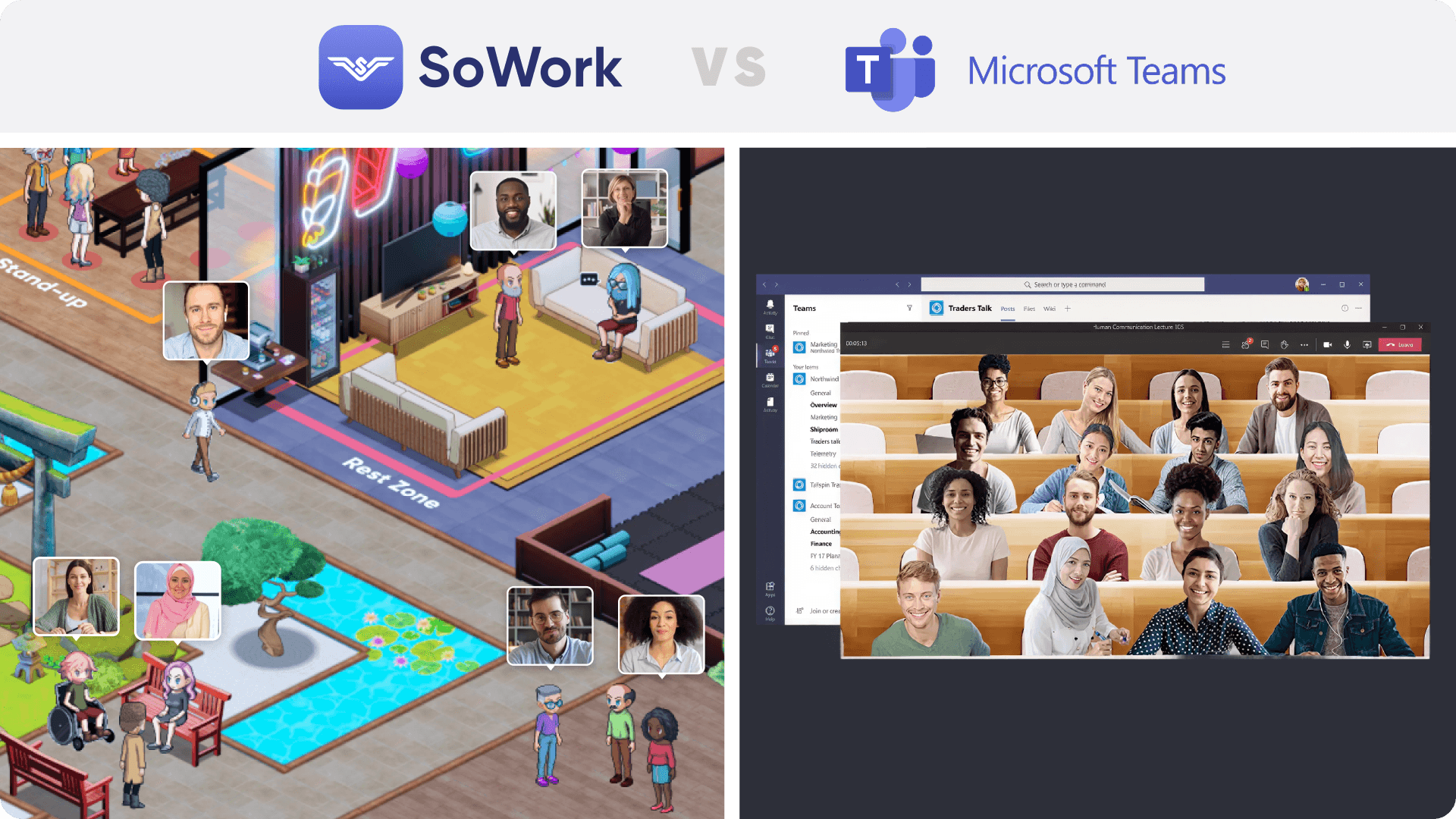
SoWork – Offers a 2.5D isometric world inspired by The Sims and Animal Crossing, vibrant and customizable. It includes a Simplified Mode for teams preferring a classic UI.
Microsoft Teams – Presents a corporate, flat UI ("Fluent Design") focused on lists of text and file repositories. While "Immersive spaces" (Mesh) are available as a mode, the core experience is a utilitarian productivity tool rather than a persistent virtual office.
9. Ease of use
Simplified Mode is the key adoption lever: users can start with the simplified interface and later graduate to the immersive world. SoWork also minimizes friction by integrating chat, meetings, and AI notes into one application; there is no need to juggle multiple tools. Microsoft Teams is a "super-app" containing chat, files, meetings, and third-party apps, which often leads to "bloat" and navigation difficulties for users who just want to talk. While Teams is ubiquitous, its sheer density of features (channels, sub-channels, threads) creates high cognitive load compared to SoWork's visual approach.
10. Ease of doing business with
Pricing clarity – SoWork clearly lists Basic ($6/user/mo) and Premium ($15/user/mo) with standard annual discounts. Microsoft Teams pricing is fragmented; "Teams Essentials" is cheap ($4.00), but adding AI (Copilot) triples the cost, and phone plans are sold separately.
Procurement readiness – SoWork offers self‑serve signup and free migration; volume discounts require contacting sales. Microsoft Teams is easily procured via the Microsoft 365 Admin Center or CSPs, but understanding the licensing matrix (e.g., Business Basic vs Standard vs Premium) requires research.
Admin controls – SoWork provides detailed admin roles, SSO/SCIM, and analytics. Microsoft Teams provides industry-leading granularity for IT admins, including data loss prevention and retention policies.
Security & compliance – SoWork’s Enterprise includes SOC 2 compliance. Microsoft Teams is compliant with virtually all major global standards (HIPAA, GDPR, SOC).
11. Customer support / service
SoWork – Premium plan includes priority live support. Support channels include chat and email, with direct access to the founding team (as stated in SoWork marketing).
Microsoft Teams – "Anytime phone and web support" is included in Business plans. However, small businesses often rely on self-service documentation or forums due to the scale of Microsoft's user base.
12. CPU/GPU performance and battery
SoWork’s immersive 2.5D world uses more GPU/CPU resources than a flat UI; switching to Simplified Mode (Lite Mode) reduces the load to save battery and resources. Microsoft Teams is notoriously resource-intensive (RAM and CPU) due to its Electron-based architecture and heavy feature set, though recent updates have aimed to improve performance. SoWork strictly allows users to choose Simplified Mode to save battery.
13. Future direction
Public signals show SoWork investing heavily in AI functionality (meeting summaries, action items, team analytics) directly integrated into the core plan. The product roadmap emphasizes deeper integrations and analytics, suggesting a focus on productivity and organizational insights. Microsoft Teams is heavily focused on "Copilot" integration, pushing AI as a paid add-on across the entire Microsoft 365 suite (Word, Excel, Teams). This signals a future where the best Teams features are gated behind high-cost enterprise subscriptions.
FAQ
You can also see our Help Center, book a demo, or visit our office to ask us in (virtual) person. We'd love to meet you!
SoWork vs Microsoft Teams: what is each product?
SoWork vs Microsoft Teams: which is better for remote culture?
SoWork vs Microsoft Teams: which is better for daily work beyond meetings?
SoWork vs Microsoft Teams: which has the better virtual office experience?
SoWork vs Microsoft Teams: which is easier to onboard and adopt company‑wide?
SoWork vs Microsoft Teams: which has better integrations?